Product and option stock alerts
Customers can subscribe for back-in-stock notifications at product level or for specific option combinations such as size, color or other variations.
Product Stock Notification Alert for OpenCart helps store owners recover lost sales by allowing customers to subscribe for notifications when out-of-stock products become available again. When a product is unavailable, the default Add to Cart button is replaced with a Notify Me option. Customers can submit their email and receive automatic notifications once the product is restocked.
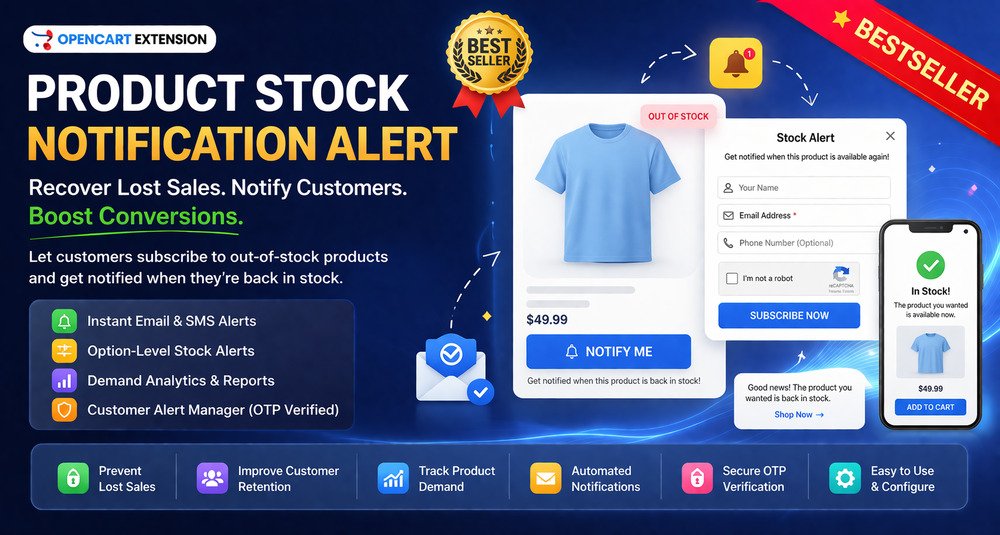
Product Stock Notification Alert for OpenCart helps store owners recover lost sales by allowing customers to subscribe for notifications when out-of-stock products become available again.
When a product is unavailable, the default Add to Cart button is replaced with a Notify Me option.
Customers can submit their email and receive automatic notifications once the product is restocked.
Customers often leave an OpenCart store when they see a product is out of stock.
Without a notification system, these potential buyers may never return, resulting in lost sales and missed revenue opportunities.
Store owners also lack visibility into which products customers are actively waiting for, making it difficult to plan inventory effectively.
Customers can subscribe for back-in-stock notifications at product level or for specific option combinations such as size, color or other variations.
Use a popup or embedded form with configurable fields, duplicate prevention, captcha support and automatic details for logged-in customers.
Send back-in-stock emails automatically, confirm subscriptions and optionally notify selected customers manually.
Create reusable, branded and multi-language notification templates with dynamic product placeholders and preview support.
Trigger notifications using quantity, stock status, manual product selection or option-level stock rules.
Review top requested products, demand by category or brand, pending versus notified alerts and export alert records to CSV.
Search and manage alerts by product, email, SKU or customer, run bulk actions and review notification status and operational logs.
Use cron-based processing for scheduled notifications and reports, with optional SMS notification support where configured.
Bring customers back when previously unavailable products return to stock.
Give interested shoppers a reason to revisit the store.
Turn stock-interest signals into potential purchases.
See which products or option combinations attract the most stock-alert interest.
Use demand signals to support restocking decisions.
Reduce manual work by notifying subscribed customers automatically.
Give shoppers a clear way to follow unavailable products.
Use alert activity to spot products with strong customer interest.
Suitable for OpenCart stores, developers and agencies working with scenarios such as:
The purpose of this OpenCart extension is to help store owners capture customer interest even when products are unavailable.
Instead of losing potential buyers, customers can subscribe for stock alerts and receive notifications when products are restocked.
The extension also provides valuable insights into customer demand, helping store owners make informed inventory decisions and improve product availability strategy.
Frequently out-of-stock products
Collect demand and notify interested customers when inventory returns.
Configurable products
Let shoppers follow size, color or other option combinations.
Limited inventory
Track demand where stock levels change frequently.
Dropshipping stores
Respond to supplier-driven availability changes.
Demand planning
Measure customer interest before deciding what to restock.
New product demand
Collect early interest before or around a product launch.
Automated restock communication
Replace manual stock-availability follow-ups with scheduled notifications.
The purpose of this OpenCart extension is to help store owners capture customer interest even when products are unavailable. Instead of losing potential buyers, customers can subscribe for stock alerts and receive notifications when products are restocked.
This catalog includes the extension for OpenCart 3.x & 4.x. Check the official HuntBee product page for the exact supported minor versions before installation.
Purchases, downloads, licensing, updates and support are handled through the official HuntBee product page linked from this catalog.
OpenCart store Email functionality enabled on server Cron job access recommended for automation SMS gateway API required for SMS notifications (optional)
Product details, purchases, downloads, licensing and support are handled through the official HuntBee website.