How does the Low Stock Alert extension help prevent revenue loss in OpenCart stores?
The Low Stock Alert extension for OpenCart ensures you never miss a sale due to stockouts. By automating real-time email alerts for low and out-of-stock items, it enables timely restocking, keeping your inventory levels optimized and preventing potential revenue loss.
Can the Low Stock Alert extension automate stock level monitoring in my OpenCart store?
Yes, the Low Stock Alert extension automates stock level monitoring in OpenCart stores by sending email notifications when products reach low or zero stock levels. This reduces manual efforts and helps maintain optimal stock availability.
What features does the Low Stock Alert extension offer to manage inventory in OpenCart?
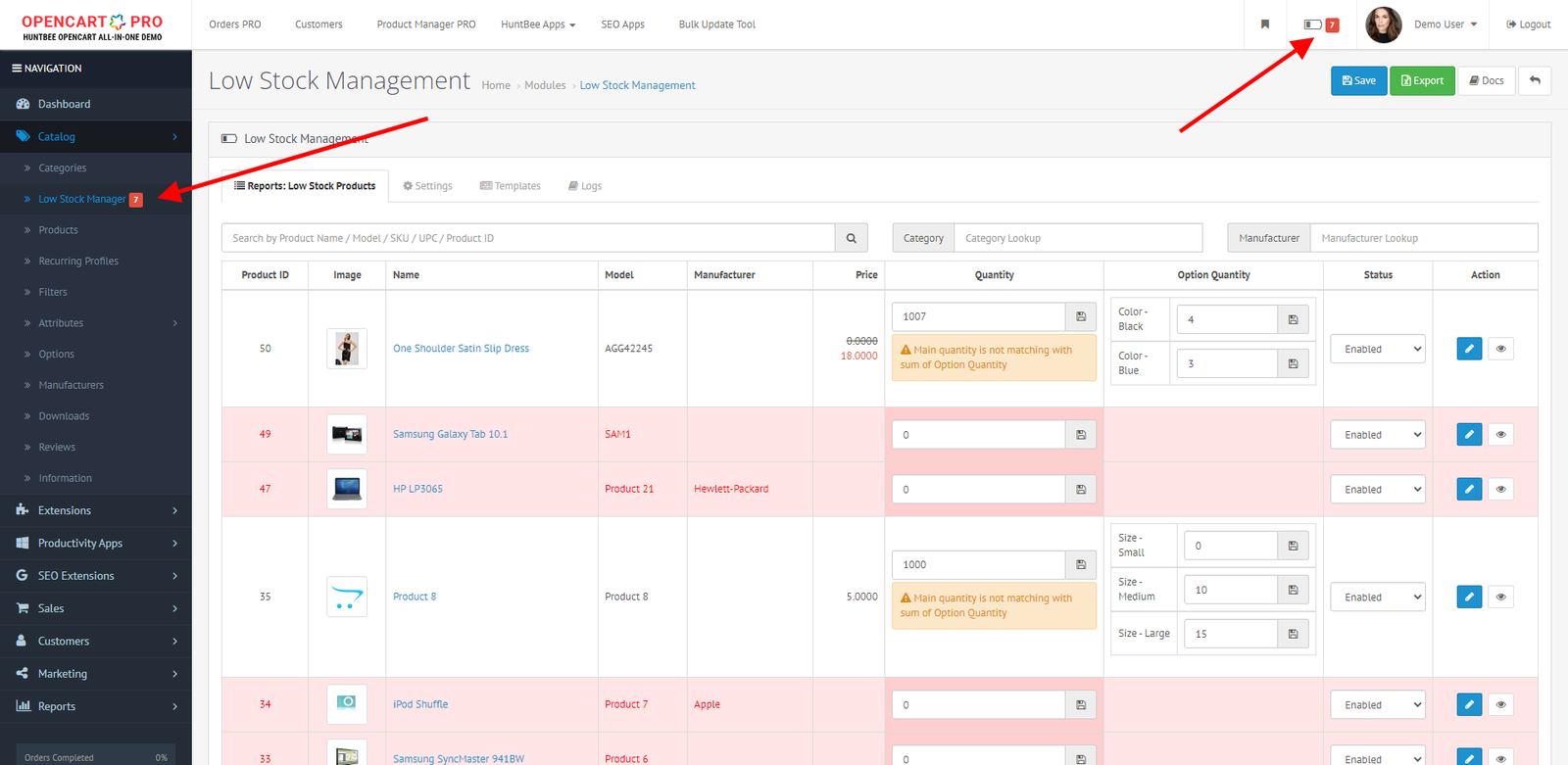
The Low Stock Alert extension offers features like email alerts, a centralized dashboard with AJAX filtering, quick stock updates, and color-coded alerts to efficiently manage and track inventory in OpenCart stores.
How can I customize stock alerts in OpenCart using the Low Stock Alert extension?
With the Low Stock Alert extension, you can create unlimited custom email templates and preview them before use. This allows OpenCart store owners to tailor how they receive notifications based on their specific needs and preferences.
Does the Low Stock Alert extension support quick updates for product options in OpenCart?
Yes, the Low Stock Alert extension allows OpenCart store owners to quickly update quantities for product options without needing to open each product page, streamlining the inventory management process.
Is there a way to automatically disable out-of-stock products in OpenCart?
Absolutely, the Low Stock Alert extension includes a feature that automatically disables out-of-stock products in OpenCart stores. This ensures that customers see only available items, enhancing their shopping experience.
Can I track stock updates and changes in my OpenCart store using the Low Stock Alert extension?
Yes, the Low Stock Alert extension includes work logs that document all stock updates and changes, providing OpenCart store owners with detailed oversight of inventory adjustments.
How does the Low Stock Alert extension aid in rapid product search and filtering in OpenCart?
The Low Stock Alert extension enhances product search and filtering in OpenCart with AJAX filtering and quick search capabilities, allowing you to efficiently locate and manage low-stock items across categories and manufacturers.
What advantages does the Low Stock Alert extension offer over manual inventory tracking in OpenCart?
The Low Stock Alert extension offers significant advantages over manual tracking by automating alerts, providing a centralized management dashboard, and enabling quick updates. This reduces errors and saves time, improving overall efficiency in OpenCart inventory management.
How do I ensure my OpenCart store's stock levels are accurate using the Low Stock Alert extension?
The Low Stock Alert extension includes a stock validation feature to ensure that the main product quantity aligns with the total option quantity, helping maintain accurate stock levels in your OpenCart store.
Can I export low-stock data for external analysis from my OpenCart store using the Low Stock Alert extension?
Yes, the Low Stock Alert extension provides an option to export low-stock data to CSV. This feature enables OpenCart store owners to perform external data analysis or share inventory information easily.
How can the Low Stock Alert extension improve customer satisfaction in OpenCart stores?
By using the Low Stock Alert extension, OpenCart stores can maintain adequate stock levels, ensuring that customers don't face disappointment from unavailable products. Timely restocking based on automated alerts helps keep customers satisfied and potentially increases loyalty.
What role does the HuntBee Email Template Designer play with the Low Stock Alert extension in OpenCart?
The Low Stock Alert extension is compatible with the HuntBee Email Template Designer, allowing OpenCart store owners to create visually appealing and customized email alerts for stock updates, enhancing the professional look of communications.
How do event-based triggers in the Low Stock Alert extension enhance inventory management in OpenCart?
Event-based triggers in the Low Stock Alert extension enable alerts to be sent immediately after stock updates, ensuring that OpenCart store owners receive timely notifications to manage their inventory effectively.
Does the Low Stock Alert extension offer any visibility features for low-stock items on the OpenCart admin dashboard?
Yes, the Low Stock Alert extension includes a top menu indicator that displays the total number of low-stock products directly on the OpenCart admin dashboard, providing immediate visibility and access to critical inventory status.