Automate Customer Emails, Recover Sales and Improve Engagement
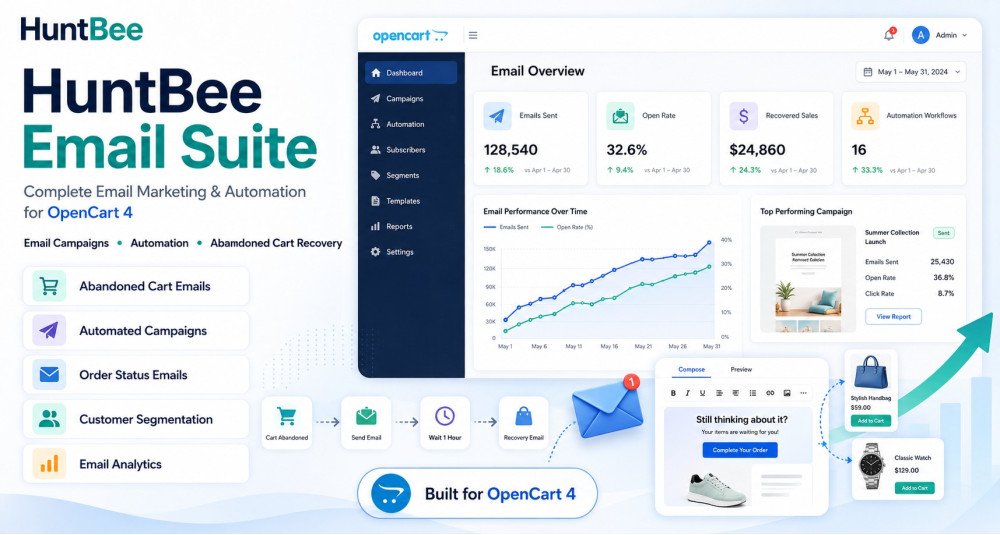
Huntbee Email Suite is a complete customer email communication and automation solution for OpenCart stores.
It brings essential ecommerce email tools together in one organised suite, helping store owners recover lost sales, notify customers at the right time, request feedback after purchase, create better email content, and manage customer communication more efficiently.
Instead of installing multiple separate email extensions, the suite provides a central system designed specifically for modern OpenCart stores.
Problem Statement
Email remains one of the most important communication channels for ecommerce stores, but many OpenCart businesses do not use it effectively.
Customers may:
- Leave products in their cart without completing checkout.
- Wait for an out-of-stock product to become available.
- Complete an order but never receive a follow-up.
- Forget about the store after their first purchase.
- Need timely updates or reminders.
- Ignore poorly written or repetitive email content.
Managing these situations manually is difficult and time-consuming.
Using several unrelated extensions can also make configuration, maintenance, email templates, and automation harder to manage.
Huntbee Email Suite provides a structured solution for managing important customer email workflows from one OpenCart suite.
Who Is This Extension For?
Huntbee Email Suite is suitable for:
- OpenCart store owners who want to improve customer communication.
- Stores with abandoned carts and incomplete purchases.
- Stores that regularly have out-of-stock products.
- Businesses that want to request customer reviews and feedback.
- Stores looking to increase repeat purchases.
- Ecommerce businesses wanting automated customer follow-ups.
- Multi-product stores with frequent customer communication.
- OpenCart administrators who want centralised email tools.
- Businesses looking to reduce manual email work.
- Store owners who want to use AI to create better email content.
Key Benefits
- Recover Potentially Lost Sales
Follow up with customers who leave products in their cart without completing an order. - Bring Customers Back to Your Store
Notify interested customers when products return to stock. - Improve Post-Purchase Engagement
Automatically contact customers after their order and request useful feedback. - Create Better Email Content Faster
Use AI-assisted tools to help prepare professional email content. - Reduce Manual Follow-Up Work
Automate repetitive customer communication. - Improve Customer Experience
Send useful emails based on real customer activity rather than unnecessary messages. - Centralise Email Tools
Manage several email-related functions from one Huntbee suite. - Increase Repeat Visits
Keep customers connected to your OpenCart store after their first interaction. - Improve Conversion Opportunities
Reach customers when they are more likely to return and complete a purchase. - Save Administrative Time
Reduce the need to manually identify customers and send individual follow-up emails.
Purpose of the Extension
The purpose of Huntbee Email Suite is to help OpenCart stores communicate with customers at important moments in the shopping journey.
It is designed around practical ecommerce situations such as:
- A customer abandoning a cart.
- A customer waiting for a product to return to stock.
- A customer completing an order.
- A store owner needing to create customer email content.
- A business wanting feedback after delivery.
- A customer needing a useful follow-up.
The goal is not simply to send more emails.
The goal is to send more relevant emails at the right time, while reducing the amount of manual work required from the store administrator.
Complete Feature List
Abandoned Cart Email Automation
Customers frequently add products to their cart but leave the store before completing checkout.
The Abandoned Cart Email component helps identify these opportunities and allows automated follow-up emails to encourage customers to return.
Key capabilities include:
- Abandoned Cart Detection
- Automated Cart Follow-Up
- Customer Cart Information
- Scheduled Email Sending
- Customisable Email Content
- Cart Recovery Links
- Follow-Up Timing Controls
- Email Activity Management
- Automated Processing Through Cron
This helps stores recover sales that might otherwise be lost.
Back in Stock Notifications
Customers may leave a store when the product they want is unavailable.
The Back in Stock Notification component allows interested customers to request a notification and automatically receive an email when the product becomes available again.
Features include:
- Customer Stock Notification Requests
- Automatic Availability Detection
- Back in Stock Email Alerts
- Product-Specific Notifications
- Customer Subscription Management
- Automated Notification Processing
- Email Template Management
- Notification History
This gives customers a reason to return instead of purchasing from another store.
Post-Purchase Feedback Request
Customer feedback can help stores understand customer satisfaction while also encouraging reviews and repeat interaction.
The Post-Purchase Feedback Request component can automatically follow up with customers after an order.
Capabilities can include:
- Automated Post-Purchase Emails
- Configurable Follow-Up Delay
- Order-Based Email Triggers
- Customer Feedback Requests
- Review Request Emails
- Customisable Email Content
- Automated Cron Processing
- Email History and Tracking
This helps create a structured post-purchase customer experience.
AI Email Content Generator
Writing effective email content repeatedly can take significant time.
The AI Email Content Generator helps store administrators create professional email content using configured AI services.
It can assist with:
- Email Subject Creation
- Email Body Generation
- Customer-Friendly Messaging
- Promotional Email Content
- Follow-Up Email Content
- Product-Based Email Copy
- Tone and Message Assistance
- Email Content Improvement
AI-generated content can be reviewed and adjusted before use.
This allows store owners to create better email communication without needing to write every message from the beginning.
Email Tools
The suite includes supporting email utilities designed to improve day-to-day OpenCart email management.
Depending on the available components and configuration, tools may assist with:
- Email Template Management
- Email Content Preparation
- Email Testing
- Customer Email Operations
- Automated Email Processing
- Email Logs
- Delivery Workflow Management
- Email History
- Administrative Email Utilities
These tools help keep customer email operations organised within OpenCart.
Email Template Management
Different customer scenarios require different messages.
The suite provides structured email templates that can be customised for individual workflows.
Templates may be used for:
- Abandoned cart recovery.
- Back in stock notifications.
- Post-purchase follow-ups.
- Feedback requests.
- Review requests.
- Customer reminders.
- Other supported email automation workflows.
Store owners can customise messaging to match their brand and customer communication style.
Automated Email Scheduling
Some emails should not be sent immediately.
The suite can use scheduled processing to send emails based on configured timing and customer activity.
Examples include:
- Sending an abandoned cart reminder after a defined delay.
- Sending a feedback request several days after an order.
- Processing queued customer notifications.
- Sending stock availability notifications automatically.
This makes email automation more reliable and reduces manual administration.
Cron-Based Processing
Background email operations can be processed using cron.
Cron allows OpenCart to perform automated tasks without requiring the administrator to manually open the extension.
Cron-based processing may handle:
- Abandoned cart reminders.
- Post-purchase emails.
- Notification queues.
- Back in stock alerts.
- Scheduled email jobs.
- Automated email maintenance.
Email Logs and History
Understanding what has already been sent is important when running automated email campaigns.
Where supported by the individual component, the suite can maintain useful information such as:
- Email Sent Status
- Customer Information
- Email Type
- Date and Time
- Automation Status
- Processing Result
- Error Information
This helps administrators understand and troubleshoot email workflows.
Configurable Automation Rules
Different OpenCart stores require different communication strategies.
The suite allows administrators to configure relevant automation behaviour based on the individual component.
This may include:
- Delay before sending.
- Email frequency.
- Automation enable or disable controls.
- Order status conditions.
- Product availability conditions.
- Customer eligibility.
- Email template selection.
Central Huntbee Suite Interface
All email tools are integrated into the Huntbee Suite architecture.
This provides:
- Centralised Navigation
- Consistent Administration Interface
- Shared Suite Architecture
- Organised Component Management
- Simpler Updates
- Cleaner OpenCart Administration
Instead of managing many unrelated extensions, important email functions are grouped within one solution.
Modular Architecture
Huntbee Email Suite is designed as a modular system.
Different email components can operate independently while using the same suite architecture.
This allows the suite to expand over time with additional customer communication and email automation features.
How to Use
Step 1 – Install Huntbee Suite Manager
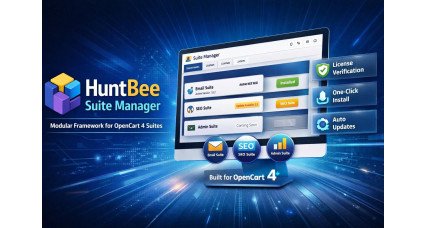
Install the required Huntbee Suite Manager / Framework if it is not already installed.
The framework provides the shared architecture required by Huntbee suites.
Step 2 – Install Huntbee Email Suite
Upload and install the Email Suite package through the OpenCart administration.
Step 3 – Activate the Extension
Activate the suite using your Huntbee license information where required.
Step 4 – Open Huntbee Suites
Navigate to the Huntbee Suites section inside the OpenCart administration.
Step 5 – Choose the Required Email Component
Select the email feature you want to configure, such as:
- Abandoned Cart Emails
- Back in Stock Notifications
- Post-Purchase Feedback
- AI Email Tools
- Email Utilities
Step 6 – Configure Email Settings
Configure the relevant settings for the selected component.
This may include:
- Email timing.
- Email templates.
- Order status rules.
- Product conditions.
- Automation settings.
- AI provider configuration.
Step 7 – Configure Cron
If the selected feature requires automated background processing, configure the provided cron command on your server.
Step 8 – Test Your Emails
Send or preview test emails where available to ensure your email layout, content, and configuration are correct.
Step 9 – Enable Automation
Once testing is complete, enable the required automation.
The suite can then process customer email workflows according to your configured rules.
Use Cases
Recovering an Abandoned Cart
A customer adds several products to the cart but leaves without completing checkout.
The suite can send an automated follow-up email reminding the customer about the products left behind.
This creates another opportunity to complete the sale.
Notifying a Customer When a Product Returns
A popular product is temporarily out of stock.
A customer requests a notification.
When stock becomes available again, the customer automatically receives an email and can return to purchase the product.
Requesting Feedback After an Order
A customer successfully completes an order.
After a configured number of days, the suite sends a follow-up email asking about their experience.
This can help collect useful customer feedback and reviews.
Creating an Email With AI
A store administrator wants to create a professional email but does not know what to write.
Using the AI email tool, the administrator can generate a suitable starting point and then review or customise the content.
Reducing Manual Customer Follow-Ups
A store receives hundreds of orders every month.
Manually sending cart reminders, feedback requests, and stock notifications would require significant administrative time.
The suite automates these repetitive workflows.
Encouraging Repeat Customers
A customer has already purchased from the store.
A relevant post-purchase communication keeps the relationship active and creates another opportunity for future purchases.
Improving Customer Service
Instead of requiring customers to repeatedly check whether a product is available, the store automatically contacts them when stock returns.
This creates a more convenient shopping experience.
Expected Results
After properly configuring Huntbee Email Suite, OpenCart store owners can expect:
- More opportunities to recover abandoned carts
- More returning customers for restocked products
- Improved post-purchase communication
- More customer feedback and review opportunities
- Reduced manual email administration
- Faster creation of email content
- More consistent customer communication
- Better customer engagement
- Improved customer retention opportunities
- More organised email automation
- Reduced repetitive administrative work
- Better use of customer activity data
Actual results depend on store traffic, products, customer behaviour, email deliverability, email content, and configuration.
The suite provides the tools and automation required to create better customer communication workflows inside OpenCart.
Requirements
- OpenCart: Designed for supported modern OpenCart 4 releases.
- Huntbee Suite Manager / Framework: Required.
- Extension License: A valid Huntbee license may be required for licensed functionality and updates.
- PHP: Compatible PHP version required by the supported OpenCart release.
- Database: Standard OpenCart-supported MySQL / MariaDB environment.
- Email Configuration: A correctly configured OpenCart email system or SMTP service is recommended.
- Cron: Required for certain automated email workflows.
- AI Features: A supported AI provider API key may be required for AI-assisted email functionality.
- Server Access: Cron configuration may require access to the hosting control panel or server.
- Email Deliverability: Correct DNS, SMTP, SPF, DKIM, and DMARC configuration is strongly recommended for reliable email delivery.
OpenCart Version Policy
Development and future improvements are primarily focused on newer OpenCart releases.
Customers are encouraged to keep OpenCart updated so they can benefit from the latest Huntbee improvements, OpenCart changes, performance optimisations, and new email automation functionality.
Compatibility with older OpenCart 4 generations may not always be guaranteed when OpenCart introduces significant architectural changes.
Why Choose Huntbee Email Suite?
A customer email should have a clear purpose.
It may remind a customer about an unfinished purchase, inform them that a product is available again, request feedback after an order, or help maintain the relationship after a sale.
Huntbee Email Suite gives OpenCart store owners a structured way to automate these important customer communication workflows.
By combining practical email automation, AI-assisted content creation, customer follow-ups, stock notifications, and post-purchase engagement within one suite, it helps stores communicate more effectively while reducing everyday administrative work.
| OPENCART | |
| Compatibility | 4.1.0.4 |
| VERSION : 1.0.3 | DATE RELEASED: 13 Feb 2026 |
| |
| VERSION : 1.0.0 | DATE RELEASED: 12 Feb 2026 |
| |
Customer feedback
Reviews (0)
0 / 5
0 reviews
Related Products