• Search
  • Huntbee Email Suite for OpenCart 4

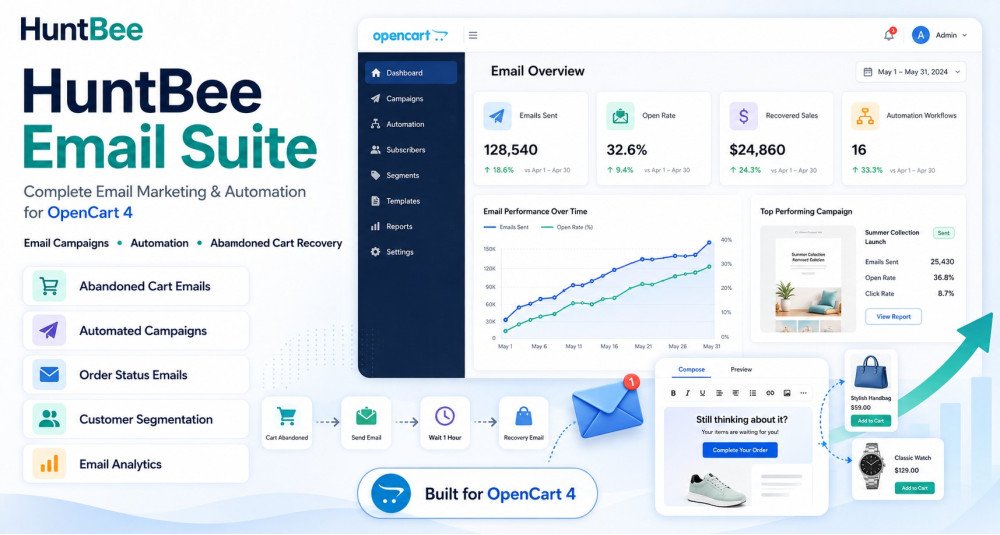
Huntbee Email Suite is a complete customer email communication and automation solution for OpenCart stores.

It brings essential ecommerce email tools together in one organised suite, helping store owners recover lost sales, notify customers at the right time, request feedback after purchase, create better email content, and manage customer communication more efficiently.

Instead of installing multiple separate email extensions, the suite provides a central system designed specifically for modern OpenCart stores.


Problem Statement

Email remains one of the most important communication channels for ecommerce stores, but many OpenCart businesses do not use it effectively.

Customers may:

  • Leave products in their cart without completing checkout.
  • Wait for an out-of-stock product to become available.
  • Complete an order but never receive a follow-up.
  • Forget about the store after their first purchase.
  • Need timely updates or reminders.
  • Ignore poorly written or repetitive email content.

Managing these situations manually is difficult and time-consuming.

Using several unrelated extensions can also make configuration, maintenance, email templates, and automation harder to manage.

Huntbee Email Suite provides a structured solution for managing important customer email workflows from one OpenCart suite.


Who Is This Extension For?

Huntbee Email Suite is suitable for:

  • OpenCart store owners who want to improve customer communication.
  • Stores with abandoned carts and incomplete purchases.
  • Stores that regularly have out-of-stock products.
  • Businesses that want to request customer reviews and feedback.
  • Stores looking to increase repeat purchases.
  • Ecommerce businesses wanting automated customer follow-ups.
  • Multi-product stores with frequent customer communication.
  • OpenCart administrators who want centralised email tools.
  • Businesses looking to reduce manual email work.
  • Store owners who want to use AI to create better email content.

Key Benefits

  • Recover Potentially Lost Sales
    Follow up with customers who leave products in their cart without completing an order.
  • Bring Customers Back to Your Store
    Notify interested customers when products return to stock.
  • Improve Post-Purchase Engagement
    Automatically contact customers after their order and request useful feedback.
  • Create Better Email Content Faster
    Use AI-assisted tools to help prepare professional email content.
  • Reduce Manual Follow-Up Work
    Automate repetitive customer communication.
  • Improve Customer Experience
    Send useful emails based on real customer activity rather than unnecessary messages.
  • Centralise Email Tools
    Manage several email-related functions from one Huntbee suite.
  • Increase Repeat Visits
    Keep customers connected to your OpenCart store after their first interaction.
  • Improve Conversion Opportunities
    Reach customers when they are more likely to return and complete a purchase.
  • Save Administrative Time
    Reduce the need to manually identify customers and send individual follow-up emails.

Purpose of the Extension

The purpose of Huntbee Email Suite is to help OpenCart stores communicate with customers at important moments in the shopping journey.

It is designed around practical ecommerce situations such as:

  • A customer abandoning a cart.
  • A customer waiting for a product to return to stock.
  • A customer completing an order.
  • A store owner needing to create customer email content.
  • A business wanting feedback after delivery.
  • A customer needing a useful follow-up.

The goal is not simply to send more emails.

The goal is to send more relevant emails at the right time, while reducing the amount of manual work required from the store administrator.


Complete Feature List

Abandoned Cart Email Automation

Customers frequently add products to their cart but leave the store before completing checkout.

The Abandoned Cart Email component helps identify these opportunities and allows automated follow-up emails to encourage customers to return.

Key capabilities include:

  • Abandoned Cart Detection
  • Automated Cart Follow-Up
  • Customer Cart Information
  • Scheduled Email Sending
  • Customisable Email Content
  • Cart Recovery Links
  • Follow-Up Timing Controls
  • Email Activity Management
  • Automated Processing Through Cron

This helps stores recover sales that might otherwise be lost.


Back in Stock Notifications

Customers may leave a store when the product they want is unavailable.

The Back in Stock Notification component allows interested customers to request a notification and automatically receive an email when the product becomes available again.

Features include:

  • Customer Stock Notification Requests
  • Automatic Availability Detection
  • Back in Stock Email Alerts
  • Product-Specific Notifications
  • Customer Subscription Management
  • Automated Notification Processing
  • Email Template Management
  • Notification History

This gives customers a reason to return instead of purchasing from another store.


Post-Purchase Feedback Request

Customer feedback can help stores understand customer satisfaction while also encouraging reviews and repeat interaction.

The Post-Purchase Feedback Request component can automatically follow up with customers after an order.

Capabilities can include:

  • Automated Post-Purchase Emails
  • Configurable Follow-Up Delay
  • Order-Based Email Triggers
  • Customer Feedback Requests
  • Review Request Emails
  • Customisable Email Content
  • Automated Cron Processing
  • Email History and Tracking

This helps create a structured post-purchase customer experience.


AI Email Content Generator

Writing effective email content repeatedly can take significant time.

The AI Email Content Generator helps store administrators create professional email content using configured AI services.

It can assist with:

  • Email Subject Creation
  • Email Body Generation
  • Customer-Friendly Messaging
  • Promotional Email Content
  • Follow-Up Email Content
  • Product-Based Email Copy
  • Tone and Message Assistance
  • Email Content Improvement

AI-generated content can be reviewed and adjusted before use.

This allows store owners to create better email communication without needing to write every message from the beginning.


Email Tools

The suite includes supporting email utilities designed to improve day-to-day OpenCart email management.

Depending on the available components and configuration, tools may assist with:

  • Email Template Management
  • Email Content Preparation
  • Email Testing
  • Customer Email Operations
  • Automated Email Processing
  • Email Logs
  • Delivery Workflow Management
  • Email History
  • Administrative Email Utilities

These tools help keep customer email operations organised within OpenCart.


Email Template Management

Different customer scenarios require different messages.

The suite provides structured email templates that can be customised for individual workflows.

Templates may be used for:

  • Abandoned cart recovery.
  • Back in stock notifications.
  • Post-purchase follow-ups.
  • Feedback requests.
  • Review requests.
  • Customer reminders.
  • Other supported email automation workflows.

Store owners can customise messaging to match their brand and customer communication style.


Automated Email Scheduling

Some emails should not be sent immediately.

The suite can use scheduled processing to send emails based on configured timing and customer activity.

Examples include:

  • Sending an abandoned cart reminder after a defined delay.
  • Sending a feedback request several days after an order.
  • Processing queued customer notifications.
  • Sending stock availability notifications automatically.

This makes email automation more reliable and reduces manual administration.


Cron-Based Processing

Background email operations can be processed using cron.

Cron allows OpenCart to perform automated tasks without requiring the administrator to manually open the extension.

Cron-based processing may handle:

  • Abandoned cart reminders.
  • Post-purchase emails.
  • Notification queues.
  • Back in stock alerts.
  • Scheduled email jobs.
  • Automated email maintenance.

Email Logs and History

Understanding what has already been sent is important when running automated email campaigns.

Where supported by the individual component, the suite can maintain useful information such as:

  • Email Sent Status
  • Customer Information
  • Email Type
  • Date and Time
  • Automation Status
  • Processing Result
  • Error Information

This helps administrators understand and troubleshoot email workflows.


Configurable Automation Rules

Different OpenCart stores require different communication strategies.

The suite allows administrators to configure relevant automation behaviour based on the individual component.

This may include:

  • Delay before sending.
  • Email frequency.
  • Automation enable or disable controls.
  • Order status conditions.
  • Product availability conditions.
  • Customer eligibility.
  • Email template selection.

Central Huntbee Suite Interface

All email tools are integrated into the Huntbee Suite architecture.

This provides:

  • Centralised Navigation
  • Consistent Administration Interface
  • Shared Suite Architecture
  • Organised Component Management
  • Simpler Updates
  • Cleaner OpenCart Administration

Instead of managing many unrelated extensions, important email functions are grouped within one solution.


Modular Architecture

Huntbee Email Suite is designed as a modular system.

Different email components can operate independently while using the same suite architecture.

This allows the suite to expand over time with additional customer communication and email automation features.


How to Use

Step 1 – Install Huntbee Suite Manager

Install the required Huntbee Suite Manager / Framework if it is not already installed.

The framework provides the shared architecture required by Huntbee suites.

Step 2 – Install Huntbee Email Suite

Upload and install the Email Suite package through the OpenCart administration.

Step 3 – Activate the Extension

Activate the suite using your Huntbee license information where required.

Step 4 – Open Huntbee Suites

Navigate to the Huntbee Suites section inside the OpenCart administration.

Step 5 – Choose the Required Email Component

Select the email feature you want to configure, such as:

  • Abandoned Cart Emails
  • Back in Stock Notifications
  • Post-Purchase Feedback
  • AI Email Tools
  • Email Utilities

Step 6 – Configure Email Settings

Configure the relevant settings for the selected component.

This may include:

  • Email timing.
  • Email templates.
  • Order status rules.
  • Product conditions.
  • Automation settings.
  • AI provider configuration.

Step 7 – Configure Cron

If the selected feature requires automated background processing, configure the provided cron command on your server.

Step 8 – Test Your Emails

Send or preview test emails where available to ensure your email layout, content, and configuration are correct.

Step 9 – Enable Automation

Once testing is complete, enable the required automation.

The suite can then process customer email workflows according to your configured rules.


Use Cases

Recovering an Abandoned Cart

A customer adds several products to the cart but leaves without completing checkout.

The suite can send an automated follow-up email reminding the customer about the products left behind.

This creates another opportunity to complete the sale.


Notifying a Customer When a Product Returns

A popular product is temporarily out of stock.

A customer requests a notification.

When stock becomes available again, the customer automatically receives an email and can return to purchase the product.


Requesting Feedback After an Order

A customer successfully completes an order.

After a configured number of days, the suite sends a follow-up email asking about their experience.

This can help collect useful customer feedback and reviews.


Creating an Email With AI

A store administrator wants to create a professional email but does not know what to write.

Using the AI email tool, the administrator can generate a suitable starting point and then review or customise the content.


Reducing Manual Customer Follow-Ups

A store receives hundreds of orders every month.

Manually sending cart reminders, feedback requests, and stock notifications would require significant administrative time.

The suite automates these repetitive workflows.


Encouraging Repeat Customers

A customer has already purchased from the store.

A relevant post-purchase communication keeps the relationship active and creates another opportunity for future purchases.


Improving Customer Service

Instead of requiring customers to repeatedly check whether a product is available, the store automatically contacts them when stock returns.

This creates a more convenient shopping experience.


Expected Results

After properly configuring Huntbee Email Suite, OpenCart store owners can expect:

  • More opportunities to recover abandoned carts
  • More returning customers for restocked products
  • Improved post-purchase communication
  • More customer feedback and review opportunities
  • Reduced manual email administration
  • Faster creation of email content
  • More consistent customer communication
  • Better customer engagement
  • Improved customer retention opportunities
  • More organised email automation
  • Reduced repetitive administrative work
  • Better use of customer activity data

Actual results depend on store traffic, products, customer behaviour, email deliverability, email content, and configuration.

The suite provides the tools and automation required to create better customer communication workflows inside OpenCart.


Requirements

  • OpenCart: Designed for supported modern OpenCart 4 releases.
  • Huntbee Suite Manager / Framework: Required.
  • Extension License: A valid Huntbee license may be required for licensed functionality and updates.
  • PHP: Compatible PHP version required by the supported OpenCart release.
  • Database: Standard OpenCart-supported MySQL / MariaDB environment.
  • Email Configuration: A correctly configured OpenCart email system or SMTP service is recommended.
  • Cron: Required for certain automated email workflows.
  • AI Features: A supported AI provider API key may be required for AI-assisted email functionality.
  • Server Access: Cron configuration may require access to the hosting control panel or server.
  • Email Deliverability: Correct DNS, SMTP, SPF, DKIM, and DMARC configuration is strongly recommended for reliable email delivery.

OpenCart Version Policy

Development and future improvements are primarily focused on newer OpenCart releases.

Customers are encouraged to keep OpenCart updated so they can benefit from the latest Huntbee improvements, OpenCart changes, performance optimisations, and new email automation functionality.

Compatibility with older OpenCart 4 generations may not always be guaranteed when OpenCart introduces significant architectural changes.


Why Choose Huntbee Email Suite?

A customer email should have a clear purpose.

It may remind a customer about an unfinished purchase, inform them that a product is available again, request feedback after an order, or help maintain the relationship after a sale.

Huntbee Email Suite gives OpenCart store owners a structured way to automate these important customer communication workflows.

By combining practical email automation, AI-assisted content creation, customer follow-ups, stock notifications, and post-purchase engagement within one suite, it helps stores communicate more effectively while reducing everyday administrative work.

Why Choose HuntBee for Your OpenCart Store?

When you install a HuntBee extension, you are choosing a solution built by an experienced OpenCart specialist who understands real-world store challenges.

  • VerifiedOfficial OpenCart Partner with proven expertise
  • Established OpenCart Specialist Since 2012
  • 14+ Years Dedicated to OpenCart Development
  • 100+ Extensions Used by OpenCart Stores Worldwide
  • Performance-focused and SEO-friendly architecture
  • Continuous improvements and dependable support

Complete Feature Catalogue

Explore what this extension can do for your store, with practical examples.

Features for OpenCart 4

Storefront Features

Feature What it does / Real-world example
Receive branded order confirmation and status emails Customers can receive customized order confirmations and notified status updates when the store enables the matching automatic email rules.
Receive account and security messages Supported account messages include registration, approval, denial, credit, rewards and secure password-reset notifications when configured.
Receive updates about product returns Customers can receive return-request acknowledgements and updates as their return status changes when these notifications are enabled.
Read emails comfortably on phones and desktops Published email templates adapt their layout for smaller screens as well as desktop mail clients.
Recognize the store in outgoing emails Messages can use the store name, logo, contact details and configured brand styles for a consistent appearance.
Restore items from an abandoned-cart reminder Eligible shoppers can use a recovery link in a reminder to restore saved cart items before completing an order.
Receive a product review request after purchase When the store enables Review Requests, eligible customers receive an email inviting them to review products from an order after its chosen order status and waiting period.
Choose a product rating from the email Click a star, rating choice or number from 1 to 5 in a review email to open the product review page with that rating selected. Opening a link never submits a review.
Submit a product review without signing in A secure, expiring email link opens a review form for the purchased eligible products. Submitted reviews enter OpenCart's native product-review system and follow its normal approval process.
Opt out of product review request emails Review request emails include unsubscribe and preference links managed by Email Suite's shared subscription system.
Manage marketing email preferences Marketing messages include unsubscribe and preference links so recipients can change their subscriptions without contacting the store.
Unsubscribe from supported mail apps When the storefront uses HTTPS, eligible marketing emails include the headers needed for compatible inboxes to offer one-click unsubscribe.
Open campaign links safely Campaign links lead to their intended destinations while optional click tracking helps the store measure interest.
Receive customized parcel notifications with Shipment Manager When the separately installed Admin Tools Suite Shipment Manager uses an Email Suite template, the message includes that parcel's shipped items and tracking details.
Let shoppers request a restock notification Eligible product pages can show a Notify me popup or embedded form with the shopper's email, selected product options and requested quantity.
Keep or replace Add to Cart for unavailable products Choose whether to keep normal purchasing controls or show Notify me when stock rules qualify; stores accepting backorders keep Add to Cart.
Offer restock alerts from product listings In Replace mode, eligible category, search and product-card buttons can open the alert popup or direct shoppers to the product page for required options.
Show translated restock-form wording Customize labels, placeholders and messages per store language with a fallback when an individual translation is not provided.
Let customers view and cancel their alerts Signed-in customers manage My Stock Alerts in their account; guests can use an emailed one-time verification code to access requests for their address.
Provide a secure cancellation link for each alert The restock notification includes a signed link allowing customers to confirm cancellation of that particular subscription.

Admin & Management

Feature What it does / Real-world example
View an overview of email activity See sent and failed messages, queue backlog and estimated marketing engagement over 7, 30 or 90 days.
Explore delivery trends and message types Charts compare sending over time, transactional versus marketing messages, and successful, failed or skipped outcomes.
Configure multiple SMTP sending profiles Save separate SMTP accounts for transactional or marketing mail, including connection settings and sender addresses.
Check SMTP connections before sending Test a sending profile's server connection and authentication without sending a customer message.
Send a real test email Send a message to a chosen test address to verify the profile and inspect how it arrives.
Choose default sending profiles by message type Select a default transactional profile and a marketing profile, or continue using OpenCart's existing mail settings.
Limit sending speed for SMTP providers Apply supported per-minute or per-hour limits so bulk sending stays within the provider's permitted rate.
Inspect and manage queued email Review pending, sending, failed and uncertain messages, with manual retry actions for eligible failures.
Review sent email history Inspect message outcomes and available engagement details for email sent through Email Suite's delivery pipeline.
Review optional centralized diagnostic logs Enable the Work Log to inspect component activity and delivery failures while troubleshooting email operations.
Start from ready-made email designs Choose from included designs for orders, accounts, returns, promotions, seasons, abandoned carts, product reviews and supported component integrations.
Create an editable copy of a library design Use a ready-made design as your own template without modifying the original library seed.
Build emails with a visual editor Arrange sections, text, images, buttons and reusable content blocks without writing email HTML.
Write emails in a rich-text editor Create text-focused email content that is placed inside the store's branded email layout.
Edit complete email HTML Use the HTML editing mode for custom layouts, with validation and sanitization of unsafe content.
Insert dynamic content blocks Add supported order-item, return-item, product, button, coupon, social, footer and conditional-content blocks.
Personalize emails with approved variables Insert store, customer, order, return and other supported fields without exposing executable template code.
Manage reusable email branding Use shared logos, colours and other brand settings to keep compatible email templates visually consistent.
Preview emails at desktop and mobile widths Check how a draft or library design renders on wide and narrow email layouts before publishing.
Edit subject lines alongside email content Set the subject in each template and include supported dynamic variables when appropriate.
Keep drafts separate from published emails Save work privately, then publish a version when it is ready for use by sends or automatic email rules.
Review earlier template revisions Retain publishing history so an earlier version can be inspected or restored when needed.
Validate templates before publishing Use built-in checks to find missing subjects, unsafe content and required marketing unsubscribe elements.
Send test messages before publishing Send a draft to up to five selected addresses with a test marker in the subject.
Prepare templates for stores and languages Work with the existing multi-store and multilingual template settings and render the appropriate published language.
Organize your own templates Group templates with category labels to make them easier to locate and manage.
Add BCC recipients to eligible transactional templates Configure up to five BCC addresses for supported automatic transactional sends; shipment emails and certain security messages do not use this option.
Attach files to eligible emails Select supported files through HuntBee Media Manager for eligible template sends; shipment emails do not apply these template attachments.
Draft a template with a configured AI provider Generate a draft using the AI provider configured in HuntBee Framework, then review and publish it yourself.
Copy a template-writing prompt for another AI tool Create a structured prompt that can be pasted into an external AI assistant without consuming API credits in the Suite.
Import an externally generated email design Validate pasted AI-produced content and open a safe imported draft for editing rather than publishing it automatically.
Assign published templates to supported automatic emails Choose which templates handle eligible OpenCart notifications and retain native handling when custom sending is off.
Target notification rules by store, language or status Narrow supported automatic email assignments using available event subtype, store and language conditions.
Customize order and staff notification emails Assign designs for customer order confirmations, notified order-status changes and staff new-order alerts.
Customize supported account notification emails Manage available registration, approval, denial, store credit, reward and password-reset email assignments.
Customize return-related emails Assign designs for customer return acknowledgements, notified return updates and staff new-return alerts.
Keep native OpenCart email where no template is assigned Use native handling for eligible notifications without a matching published template or when the Suite's automatic-email takeover is disabled.
Manage a reusable email contact directory View contacts, customer associations and available subscription preferences without assuming that every contact consented to marketing.
Create reusable groups of recipients Maintain lists of email addresses for campaigns and operational messaging without changing recipients' marketing permissions.
Add contacts manually or by CSV Paste addresses, enter contacts directly or import a CSV into a selected list.
Build lists from OpenCart customers Import customers from selected stores, optionally limiting the import to newsletter subscribers.
Build recipient lists from product purchases Select products and import eligible past purchasers, including guest purchasers, with available order and date filters.
Import addresses from an eligible database table Choose a permitted table and email column, with limited exact-match filtering rather than arbitrary SQL.
Copy or exclude members across lists Reuse a reference list to add its members or remove overlapping memberships from another list.
Organize marketing subscription topics Manage topic-specific preferences and use them to determine which campaigns may contact each recipient.
Review opt-outs and suppressed recipients Manage unsubscribe preferences and suppression records so marketing contacts are not emailed against those choices.
Create regular or marketing campaigns Choose a published template and recipients for service-oriented list emails or consent-based promotional campaigns.
Send a campaign when ready Prepare eligible recipients and send through the Suite's existing campaign dispatcher.
Schedule a campaign for a specific date and time Set a one-time future send that starts when the configured scheduler runs after its due time.
Repeat campaigns on a calendar schedule Schedule daily, selected-weekday or monthly repetitions, with an optional end date.
Preview upcoming scheduled emails See planned one-time or repeating occurrences without creating future messages in the queue.
Review campaign delivery and engagement Inspect supported campaign results, message outcomes and measured marketing opens and clicks.
Add campaign attribution parameters to links Use supported UTM values to identify email campaigns in connected analytics tools.
Review saved and abandoned shopping carts Browse identifiable customer and guest carts with products, values, activity dates and recovery status.
Find particular abandoned carts quickly Search and filter carts by store, status or date and open a cart for detailed recovery history.
Configure an abandoned-cart recovery sequence Set up to five reminders with chosen delays and templates, with sending remaining off until explicitly enabled.
Offer optional recovery coupons Configure a one-time OpenCart coupon for a reminder, with the supported amount, validity and product or category restrictions.
Avoid recommending unavailable recovery items Optionally exclude out-of-stock products from abandoned-cart recovery messages.
Send an abandoned-cart reminder manually Preview and trigger an eligible reminder for an individual abandoned cart when needed.
Measure recovery email performance Review recovered carts, recovery rates, resulting orders and reminder and coupon performance.
Choose shared or separate cart recovery settings per store Use shared configuration or override abandonment timing, reminder sequences, coupons and templates for individual stores.
Run abandoned-cart classification on demand Use Run Classification Now to update cart classification without sending recovery emails.
Monitor product review request activity Use the Review Requests dashboard to see request progress, email activity and responses, with store filtering and links to related Email Suite tools.
Find eligible orders and request reviews manually Search and filter eligible orders, inspect review progress, preview the email and send an allowed review request or reminder manually.
Measure review emails and customer responses Inspect delivered review emails, collected reviews, response figures and a daily activity chart with date-range and store filters.
Choose which order statuses trigger review requests Select one or more qualifying statuses, such as Complete or Delivered, so requests can be prepared after an order reaches an eligible state.
Request reviews by order or individual product Choose one email containing an order's eligible products or a separate email for each eligible product, and set how long to wait before the first request.
Limit review requests to chosen products or categories Choose qualifying products and categories with search selectors. Leave both lists empty to include all purchased products; matches from either list qualify.
Start from four ready-made product review emails Use the Product Reviews library designs for stars, rating choices, numbered ratings and a friendly follow-up, then edit and assign published copies as templates.
Choose how ratings appear in review emails Select clickable stars, choice-style buttons or a 1–5 rating scale for supported product review blocks.
Configure optional follow-up reminders Choose a reminder template and delay and send up to three reminders for products still awaiting a review. Reminders are optional.
Share review settings or customize them for each store Use shared settings by default or give a store its own qualifying statuses, templates, timing and other review-request settings.
Choose how long to keep finished review requests Set a shared retention period for completed or closed request records; the cleanup does not delete the native product reviews saved in OpenCart.
Choose from six shipment email designs The Shipment emails library includes Clean, Modern, Premium, Single Item, Multiple Products and Partial Shipment designs.
Customize shipment email designs in the existing builder Edit a copied shipment template or create a new one with the normal visual, rich-text or HTML editing modes.
Insert parcel-specific tracking and product details Use shipment variables for courier, tracking details, dates, the first shipped item and the number of product lines or units.
List only the products in a particular shipment A Shipped items block displays saved product names, models, options and shipped quantities rather than every item in the order.
Preview single, multiple and partial shipments Use built-in shipment examples to review email content, subject lines and item lists before publishing.
Choose example shipment email subject lines Use subject suggestions in the existing Template Builder, with editable variables for orders and shipped products.
Supply templates to the separately installed Shipment Manager Admin Tools Suite 4.3.2 or later can select two published shipment templates for immediate sending; this is not an independent Email Suite shipment sender.
Manage scheduled email jobs from one screen View the Suite's cron information, enable or disable jobs, change supported frequencies and run a task on demand.
Control delivery-history retention Configure cleanup periods for detailed message history and other supported temporary email data.
See waiting customers, demand and notification readiness The Back in Stock dashboard summarizes waiting requests, popular products, confirmed notifications, available stock and recent delivery issues.
Manage and investigate individual stock alerts Filter request history and review customer, product, option, quantity, status and notification-attempt details, including optional name, phone and comment.
Manually check, notify, cancel and safely reset alerts Run the stock scanner on demand and process selected waiting requests with stock checks, controlled overrides and duplicate-send safeguards.
Review and update stock from the Products tab Filter products by name, model, ID, stock state and store; edit product and option quantities or status with safeguards against overwriting newer stock.
Mark products awaiting restock for individual stores Use manual selection instead of automatic quantity rules; a store-specific mark controls when an alert is offered.
See exact products and variants customers are waiting for Compare customers waiting and total requested units by store, product and selected options with current product and option stock.
Review stock-alert activity and delivery outcomes See requests, confirmed notifications, cancellations, expiry, failures, deferrals and uncertain results over a selected date range.
Receive optional weekly and monthly stock demand reports Each store can receive independent scheduled summaries with an Excel workbook of current waiting demand and requests during the completed period.
Send separate weekly and monthly test reports Use dedicated test buttons to email a marked sample with a real XLSX attachment without changing the scheduled report history.
Export alerts, stock demand and product inventory to Excel Export filtered matching records from Alerts, Demand and Products, including option-level details where applicable; customer exports require careful handling.
Choose published restock, confirmation and admin templates Select event-specific published email designs for the appropriate store and language, preview existing templates or create a suitable new design.
Send optional subscription confirmations and store alerts A genuine new request can trigger a customer acknowledgement and a separate admin notification with product and demand information, when enabled.
Configure alert form fields, CAPTCHA and retention Choose optional customer name, phone and comment, invisible reCAPTCHA v3, per-address request limits and how long pending or finished requests are retained.
Configure shared or store-specific restock settings Start with shared settings and enable Own settings per storefront when eligibility rules, customer forms, templates or reports need different behavior.

Automation & Maintenance

Feature What it does / Real-world example
Send eligible transactional messages without waiting for cron Supported OpenCart notification events attempt delivery immediately; later retry handling uses the shared queue where applicable.
Send queued messages through the shared scheduler Background jobs process queued campaigns and eligible delayed messages using configured delivery profiles.
Separate failed from uncertain delivery outcomes Track send attempts and distinguish retryable failures from messages whose transport outcome could risk duplicate sending.
Preserve the published email used by an outgoing send Messages already prepared for delivery retain their intended template content even when a merchant edits a newer draft.
Send secure password-reset mail immediately Password-reset messages use OpenCart-generated secure links and avoid queueing or recording the sensitive reset link.
Apply suppression and consent rules to marketing sends Marketing audience selection excludes unsubscribed, suppressed or ineligible recipients for the relevant topic.
Measure marketing opens and clicks Record optional link clicks and estimated image-based opens while keeping unsubscribe links out of click tracking.
Respect profile sending limits during dispatch The delivery engine observes configured rate limits and protects provider quotas during bulk campaigns.
Prepare large campaigns in bounded batches Process eligible recipients in batches instead of loading an entire large audience into one request.
Avoid duplicate runs for the same scheduled day Scheduled campaign generation uses guarded occurrences so overlapping cron calls do not create the same run twice.
Avoid sending a backlog of old repeating campaigns A restored scheduler considers the current eligible day instead of sending every missed historical recurrence.
Classify inactive carts into recoverable abandonments Scheduled classification considers cart activity and checkout grace periods before marking a cart abandoned.
Stop recovery after a cart becomes an order Orders are linked to recoverable carts so completed purchases are not treated as abandoned carts needing more reminders.
Send recovery reminders after configured delays When enabled, scheduled jobs select eligible carts and reminder steps without sending old reminders just because cron was temporarily offline.
Recognize eligible guest carts with an email address The abandoned-cart component can retain eligible guest email details from successful checkout-related actions for recovery workflows.
Respect unsubscribe and suppression choices during recovery Recovery email eligibility checks existing marketing preferences and suppression data before sending.
Queue review requests through Email Suite's scheduler The existing shared scheduler checks eligible orders and sends requests through Email Suite's central delivery queue. Automatic review sending is off until enabled by the merchant.
Avoid unexpected review emails for historical orders Enabling automatic requests does not contact orders that had already reached their qualifying status, and overdue requests can be skipped after the configured catch-up period.
Stop requests that are no longer appropriate Recheck order status and remaining reviewable products before sending. Cancel reminders when all requested products have been reviewed.
Use secure expiring links for product reviews Each delivered review-request message receives a private review link with an expiry time, without exposing order or customer identifiers in the URL.
Prevent duplicate requests and product reviews Durable request and message records guard against repeated scheduling or retries, while submission checks prevent the same purchased product from being reviewed twice through its request.
Respect unsubscribes and suppressed recipients Review requests and reminders use the centralized Product review requests topic and suppression checks before delivery.
Clean up old review-request tracking automatically A scheduled maintenance job removes eligible finished request records in bounded batches, leaving OpenCart's product reviews untouched.
Render shipment messages without placing them in the Email Suite queue With the separately installed Admin Tools Shipment Manager, Email Suite supplies the published subject and body; Shipment Manager sends immediately and owns delivery state and logs.
Render using the correct store and language context Supported email events resolve their store, language, recipient and approved template variables before composing messages.
Prevent overlapping background jobs Scheduled tasks use the Suite's coordination controls to avoid duplicate processing by simultaneous workers.
Remove expired delivery history without deleting templates Retention jobs clean supported old logs and saved message copies while preserving reusable templates, contacts and preferences.
Check watched products for genuine restocks The central Email Suite scheduler scans pending product and option requests, queues eligible notifications and skips products that are no longer eligible.
Recheck availability and consent before sending restock email Just before dispatch, confirm the requested quantity, chosen options, store settings, template and recipient eligibility still allow sending.
Guard against duplicate restock notifications Queued delivery and request state transitions use idempotent records and avoid automatic resends when the transport result cannot be verified.
Process stock demand reports and cleanup on the central cron Separate scheduled stock-scan, demand-report and retention jobs share the existing Email Suite scheduler; no second cron endpoint is required.
Add GA4-compatible UTM tags to restock product links Restock image, name, button and plain-text product links receive UTM parameters; the Suite itself does not measure clicks, conversions or revenue.
OPENCART
Compatibility 4.1.0.4

VERSION : 4.5.1DATE RELEASED: 22 Nov 2026
  • New Component: Back in Stock Alerts – Automatically notify customers when out-of-stock products become available again.
  • Added customer subscription forms with support for product options and different storefront display modes.
  • Added automatic stock monitoring, scheduled notifications and manual notification controls.
  • Added a subscription management dashboard with customer details, filters and bulk actions.
  • Added Subscription Confirmation and Admin Alert email notifications.
  • Added customizable email templates integrated with the Email Template Library.
  • Added Stock Demand analytics to identify products customers are waiting for.
  • Added automated Weekly and Monthly Stock Demand Reports with email delivery and Excel attachments.
  • Added Excel exports for Alerts, Stock Demand and Out-of-Stock Products.
  • Added UTM tracking parameters to restock notification links for Google Analytics integration.
  • Improved compatibility with default OpenCart themes and Journal 3.
  • Improved admin interface, notification controls and reporting features.
  • Requires HuntBee Framework 4.2.5 or newer.

VERSION : 4.4.0DATE RELEASED: 13 Nov 2026

New Component: Product Review Requests

  • Added Product Review Requests, a new component for automatically collecting customer product reviews after purchase.
  • Send review request emails when orders reach selected order statuses.
  • Choose between one email per order or separate emails for individual products.
  • Set a delay before sending the first review request.
  • Send automatic follow-up reminders for products that have not been reviewed.
  • Added 4 ready-to-use email templates to the Template Library.
  • Support clickable star ratings, rating choices and 1–5 rating scales in emails.
  • Customers can submit reviews directly through a secure review page without logging in.
  • Reviews are saved in OpenCart's native product review system.
  • Send review requests manually from the Orders tab.
  • Select eligible products and categories for review requests.
  • Added Dashboard and Stats tabs to track emails sent, reminders, reviews collected and response rates.
  • Supports multi-store configurations and multilingual email content.
  • Integrated with Email Suite's centralized scheduler, unsubscribe management and logging system.
  • Improved the Template Library interface and scheduled-task settings layout.

VERSION : 4.3.1DATE RELEASED: 12 Nov 2026
  • Added a new Shipment Emails category with six professionally designed, ready-to-use email templates.
  • Added support for creating and customizing shipment notification emails using the existing Template Builder.
  • Added shipment-specific dynamic variables for tracking details, courier information and shipped products.
  • Added a new Shipped Items block to display products included in a shipment.
  • Added single-product, multiple-product and partial-shipment preview scenarios.
  • Added ready-to-use shipment email subject-line suggestions.
  • Integrated customizable shipment email templates with Admin Tools Suite's Shipment Manager.
  • Improved shipment email rendering and responsive previews.

VERSION : 4.3.0DATE RELEASED: 12 Nov 2026
  • Added new Abandoned Cart Recovery component.
  • Automated recovery emails with customizable reminder sequences.
  • Guest cart tracking, email capture popup and discount coupon support.
  • Recovery statistics, conversion tracking and email performance reports.
  • Multi-store support with shared or individual store settings.
  • Introduced centralized logging for Email Suite components.
  • Improved user interface, notifications and overall stability.

VERSION : 4.2.8DATE RELEASED: 25 Oct 2026
  • Automated Order & Return Comments: Automatically add customized messages to order and return histories based on status, store, and language.
  • Enhanced Visual Email Builder: Improved text formatting, layouts, alignment, product blocks, and design customization.
  • Conditional Email Content: Show different content within an email based on predefined conditions.
  • Improved Order Emails: Redesigned order confirmation, order status, admin order notification, and return status templates.
  • Account Email Templates: Expanded account-related email support with professionally designed templates.
  • New Marketing Templates: Added ready-to-use promotional, seasonal, and holiday email designs.
  • Advanced Product Blocks: Improved product selection, display options, descriptions, pricing, and product recommendations.
  • Customer List Management: Import customers from CSV, product purchase history, or supported database tables.
  • Simplified Email Sending: Easily select a template, choose a customer list, preview, and send emails.
  • Email Campaign Improvements: Better campaign creation, audience selection, scheduling, and delivery management.
  • Advanced Email Planner: Schedule emails once, daily, weekly, or monthly, with optional end dates.
  • Flexible Email Delivery: Choose immediate sending or scheduled queue processing for individual templates.
  • Email Logs & Resending: View previously sent email content and resend emails when needed.
  • Automatic Log Cleanup: Configure retention periods separately for email logs and optionally stored email content.
  • Email Statistics: Improved overview of email activity and delivery performance.
  • Duplicate Email Prevention: Added safeguards against repeated email delivery and duplicate scheduled sends.
  • Improved Email Personalization: Expanded template variables, dynamic content, and configurable order item tables.
  • Performance & Reliability: Improved email queue processing, database efficiency, compatibility, and error handling.
  • Bug Fixes & UI Improvements: Multiple fixes and usability enhancements across templates, campaigns, sending, and administration.

VERSION : 4.0.0DATE RELEASED: 13 Feb 2026
  • Professional Email Builder: Drag-and-drop editor, responsive templates, dynamic content blocks, product recommendations, and AI-assisted template creation.
  • Automatic Emails: Customizable order confirmation, order status, admin order alerts, and return status notifications.
  • Email Campaigns: Audience management, mailing lists, scheduled campaigns, and open/click analytics.
  • Reliable Delivery: SMTP profiles, email queues, retry handling, delivery logs, and rate limiting.
  • Consent Management: Unsubscribe links, preference center, suppression lists, and store-specific subscriptions.
  • Enhanced Compatibility: Multi-store and multilingual support, tax-aware product pricing, improved security, performance, and OpenCart 4.1.0.4 compatibility.

VERSION : 1.0.0DATE RELEASED: 12 Feb 2026
  • Development Phase
Customer feedback

Reviews (0)

0 / 5
0 reviews
Share your experience

Write a review

Note: HTML is not translated!
Choose 1 to 5 stars
Captcha
Tags
This extension / product is currently unavailable to download. Enter your email address below and we will notify you as soon as the product becomes active.
Name
Email
Comments