• Search
  • Huntbee Admin Tools Suite for OpenCart 4

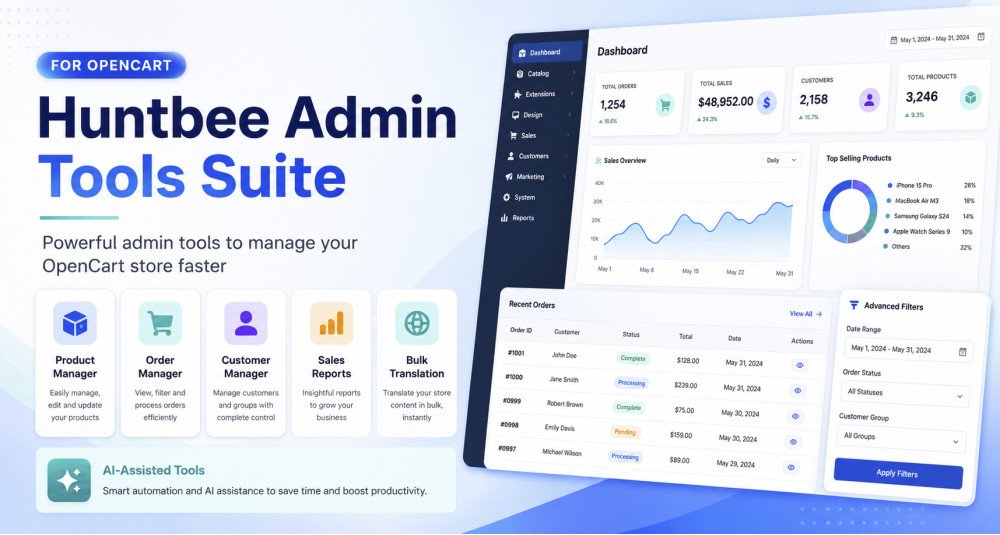
Huntbee Admin Tools Suite is a collection of powerful administration and productivity tools designed to make everyday OpenCart store management faster, easier, and more efficient.

Instead of installing multiple unrelated extensions for reporting, order management, customer management, product management, translation, and other administrative tasks, this suite brings essential tools together inside one organized OpenCart solution.

The suite is designed especially for growing stores where managing hundreds or thousands of products, customers, and orders through the standard OpenCart administration can become time-consuming.


Problem Statement

Managing an OpenCart store becomes increasingly difficult as the store grows.

Store administrators often need to:

  • Edit large numbers of products.
  • Find and manage orders quickly.
  • Analyse sales performance.
  • Review customer information.
  • Update product information without opening every product individually.
  • Translate store content into additional languages.
  • Perform repetitive administrative tasks.
  • Switch between multiple extensions to complete simple operations.

The default OpenCart administration is suitable for basic store management, but many everyday operations require several clicks or repetitive manual work.

Huntbee Admin Tools Suite reduces these repetitive tasks and gives store owners a more efficient way to manage their OpenCart store.


Who Is This Extension For?

This OpenCart extension is useful for:

  • OpenCart store owners managing growing product catalogues.
  • Store administrators processing large numbers of orders.
  • Ecommerce managers who need better sales information.
  • Multi-language stores requiring faster content translation.
  • Stores with hundreds or thousands of products.
  • Developers and agencies managing OpenCart websites for clients.
  • Businesses with regular product, customer, and order management tasks.
  • Store owners who want to reduce repetitive admin work.

It can be especially valuable for stores where several people work regularly inside the OpenCart administration panel.


Key Benefits

  • Save Administration Time
    Perform common store-management tasks with fewer clicks.
  • Manage Large Catalogues Faster
    Quickly work with products without repeatedly opening individual product pages.
  • Improve Order Management
    Find, review, and manage orders more efficiently.
  • Understand Sales Performance
    Access useful sales information that helps you understand how your store is performing.
  • Manage Customers More Efficiently
    Quickly locate and review important customer information.
  • Reduce Repetitive Work
    Automate or simplify everyday OpenCart administration tasks.
  • Centralised Admin Tools
    Access multiple useful tools from one organized suite.
  • Better Workflow for Store Teams
    Make regular administrative operations simpler for employees and store managers.
  • Built for Modern OpenCart Stores
    Designed around the latest generation of OpenCart architecture.
  • Expandable Suite Architecture
    Additional administration tools can be introduced through future suite updates.

Purpose of the Extension

The purpose of Huntbee Admin Tools Suite is not simply to add more functionality to OpenCart.

Its main purpose is to reduce the amount of time required to manage an ecommerce store.

Many OpenCart administrative tasks involve opening multiple pages, searching for information, editing records individually, or exporting data to external tools.

The Admin Tools Suite provides specialised interfaces and utilities that allow store administrators to perform these operations more efficiently.

The result is a cleaner and more productive workflow inside OpenCart.


Complete Feature List

Product Manager

The Product Manager provides a faster and more convenient way to manage products directly from a dedicated product management interface.

Instead of opening every product individually, administrators can quickly review and modify important product information.

Key capabilities include:

  • Fast Product Management
  • Inline Product Editing
  • Quick Product Search
  • Advanced Product Filtering
  • Product Status Management
  • Price Management
  • Special / Offer Price Visibility
  • Stock and Quantity Management
  • Model and Product Identifier Management
  • Store-Aware Product Management
  • Quick Product Creation Tools
  • Direct Access to Additional Product Data
  • Faster Catalogue Maintenance

This is especially useful for stores containing hundreds or thousands of products.


Order Manager

The Order Manager is designed to simplify day-to-day OpenCart order administration.

Store administrators can work with orders through a more productive interface without navigating through unnecessary screens.

Typical capabilities include:

  • Advanced Order Search
  • Order Filtering
  • Quick Order Review
  • Order Status Management
  • Customer and Order Information Access
  • Faster Order Processing
  • Improved Administrative Workflow

The objective is to reduce the time required to locate, review, and manage customer orders.


Customer Manager

The Customer Manager provides a more efficient way to work with OpenCart customer accounts.

Instead of repeatedly opening individual customer pages, store administrators can quickly locate and review customer information.

Features include:

  • Customer Search
  • Advanced Customer Filtering
  • Customer Account Information
  • Order History Access
  • Customer Status Management
  • Customer Group Information
  • Faster Customer Administration

This can be particularly helpful for stores with a large registered customer database.


Sales Performance Report

The Sales Performance Report helps store owners understand how their OpenCart business is performing.

It provides useful sales statistics in a format designed for practical ecommerce analysis.

Reporting can help you review:

  • Sales Revenue
  • Order Performance
  • Yearly Sales
  • Historical Sales Performance
  • All-Time Performance
  • Sales Trends
  • Business Growth Patterns
  • Performance Comparisons

Instead of manually exporting orders and calculating totals, important information can be reviewed directly from OpenCart.


Bulk Translation Tools

Managing multilingual OpenCart stores can require a significant amount of manual translation.

The Bulk Translation tools simplify this process by helping administrators translate store content more efficiently.

Depending on configuration, translation can use supported translation or AI services.

Features include:

  • Bulk Content Translation
  • Source Language Selection
  • Target Language Selection
  • AI-Assisted Translation
  • Google Translation Support
  • Multi-Language OpenCart Support
  • Faster Translation Workflow
  • Reduced Manual Copy-and-Paste Work

This is particularly useful when launching an OpenCart store in a new language.


AI-Assisted Administration

Where supported by individual tools, the suite can integrate with configured AI services to help automate repetitive administrative work.

Supported AI capabilities may be used for operations such as:

  • Translation
  • Content processing
  • Data assistance
  • Administrative automation

AI functionality depends on the relevant component and configured AI provider.


Central Huntbee Suite Interface

All tools are integrated into the Huntbee Suite architecture, providing a consistent administrative experience.

Benefits include:

  • Consistent Interface
  • Centralised Navigation
  • Shared Configuration
  • Unified Suite Architecture
  • Cleaner OpenCart Administration
  • Easier Future Updates

Instead of having unrelated extensions scattered throughout the OpenCart menu, Huntbee tools are organised into a structured suite.


Modular Architecture

The Admin Tools Suite uses a modular architecture.

Individual components can provide specialised functionality while remaining part of the same suite.

This allows Huntbee to introduce new administration tools without requiring customers to install a completely separate management system.


Optimised for OpenCart Administration

The suite is designed specifically for OpenCart rather than being a generic external management platform.

This means administrators continue working inside the familiar OpenCart administration panel while gaining additional productivity features.


How to Use

Using the Huntbee Admin Tools Suite is straightforward.

Step 1 – Install Huntbee Suite Manager

Install the required Huntbee Suite Manager / Framework if it is not already installed.

The framework provides the shared architecture used by Huntbee suites.

Step 2 – Install Admin Tools Suite

Upload and install the Admin Tools Suite package through your OpenCart administration.

Step 3 – Activate Your License

Activate the extension using your Huntbee license information where required.

Step 4 – Open Huntbee Suites

Navigate to the Huntbee Suites section in the OpenCart administration menu.

Step 5 – Select the Required Tool

Choose the administration tool you want to use, such as:

  • Product Manager
  • Order Manager
  • Customer Manager
  • Sales Performance Report
  • Bulk Translation

Step 6 – Configure the Component

Some components may contain their own settings.

Configure these according to your store requirements.

Step 7 – Start Managing Your Store

Use the specialised interfaces to perform regular administrative operations faster than through the standard OpenCart workflow.


Use Cases

Managing Thousands of Products

A store has 5,000 products and regularly needs to update pricing, quantity, status, or other information.

Instead of opening hundreds of individual product edit pages, the Product Manager provides a faster way to locate and update products.


Reviewing Monthly Sales

A store owner wants to understand whether sales are increasing or decreasing.

The Sales Performance Report provides useful historical information that can help identify business trends.


Processing Large Numbers of Orders

A busy ecommerce store receives many orders every day.

The Order Manager helps administrators locate and manage orders more efficiently.


Managing a Large Customer Database

A store has thousands of registered customers.

The Customer Manager makes it easier to search, review, and manage customer information.


Launching Another Store Language

An OpenCart store wants to introduce another language.

Instead of manually translating every product and category one at a time, the Bulk Translation functionality can significantly reduce the amount of manual work required.


Reducing Daily Administrative Work

A store administrator spends several hours each week performing repetitive catalogue and order management tasks.

Using specialised Admin Tools Suite components can reduce the number of steps required for these operations.


Managing Multiple Huntbee Tools

A store already uses other Huntbee suites or components.

The shared suite architecture provides a more consistent interface and navigation experience across Huntbee products.


Expected Results

After installing and configuring Huntbee Admin Tools Suite, store administrators can expect:

  • Faster daily OpenCart administration
  • Reduced repetitive manual work
  • Fewer unnecessary page loads
  • Faster product catalogue management
  • More efficient order processing
  • Better access to customer information
  • Improved understanding of sales performance
  • Simpler multilingual store management
  • More organised administrative workflows
  • Better productivity for store employees
  • Less dependence on external spreadsheets for routine operations

The exact improvement will depend on the size of the store and which tools are used.

For stores with large product catalogues, customer databases, or order volumes, the time savings can become significant.


Requirements

  • OpenCart: Designed for supported modern OpenCart 4 releases.
  • Huntbee Suite Manager / Framework: Required and available separately.
  • Extension License: A valid Huntbee license may be required for updates and licensed functionality.
  • PHP: Compatible PHP version required by the supported OpenCart release.
  • Database: Standard OpenCart-supported MySQL / MariaDB environment.
  • Admin Access: Administrator permissions are required for installation and configuration.
  • AI Features: An API account/key for the supported AI provider may be required when using AI-powered functionality.
  • Translation Services: External API credentials may be required for certain translation providers.
  • Cron: Some automated or background functionality may require an OpenCart/server cron job.

OpenCart Version Policy

Development and future enhancements are focused primarily on newer OpenCart releases.

Customers are encouraged to keep OpenCart updated so they can use the latest Huntbee improvements, security changes, performance optimisations, and new suite functionality.

Compatibility with older generations of OpenCart 4 may not always be guaranteed when OpenCart itself introduces architectural or API changes.


Why Choose Huntbee Admin Tools Suite?

Managing an ecommerce store should not require spending hours performing repetitive administrative work.

Huntbee Admin Tools Suite for OpenCart provides practical tools built specifically around the everyday problems faced by OpenCart store owners and administrators.

Whether you are managing products, orders, customers, sales reports, translations, or other store operations, the suite is designed to help you complete those tasks with fewer steps and a more efficient workflow.

As the Huntbee Suite ecosystem continues to evolve, additional productivity tools can be introduced while maintaining the same centralised architecture and familiar OpenCart administration experience.

Why Choose HuntBee for Your OpenCart Store?

When you install a HuntBee extension, you are choosing a solution built by an experienced OpenCart specialist who understands real-world store challenges.

  • VerifiedOfficial OpenCart Partner with proven expertise
  • Established OpenCart Specialist Since 2012
  • 14+ Years Dedicated to OpenCart Development
  • 100+ Extensions Used by OpenCart Stores Worldwide
  • Performance-focused and SEO-friendly architecture
  • Continuous improvements and dependable support

Complete Feature Catalogue

Explore what this extension can do for your store, with practical examples.

Features for OpenCart 4

Storefront Features

Feature What it does / Real-world example
View shipment details from the customer account When enabled, signed-in customers can see parcels, tracking numbers, shipped quantities and dates for orders they own.
Open a courier's tracking page A shipment's tracking link can include the courier's tracking-number format so the customer can check delivery progress directly.
Receive a shipment email when the store sends one An administrator can send an email describing a parcel, its courier, tracking information and shipped items.

Admin & Management

Feature What it does / Real-world example
Manage eight admin tools in one Suite Access Product Manager, Order Manager, Customer Dashboard, Sales Performance, Profit & Analytics, Bulk Translate, PDF Invoice and Shipment Manager.
View and edit products from a searchable table Find catalogue products without opening a separate full product form for each change.
Find products needing attention Filter low-stock, out-of-stock, disabled, recently added, on-special, image-less or uncategorized products.
Filter the catalogue by store and product details Narrow results by store, manufacturer, category, availability and other supported criteria.
Choose the information shown in product rows Display stock, price, identifiers, special price, manufacturer, categories, stores and other optional columns.
Edit common product fields directly in the list Update supported values by double-clicking an editable table cell.
Edit a product in a focused popup Manage supported product data, associations, images, language content and attributes without leaving the grid.
Edit product descriptions in individual languages Maintain translated names, descriptions, tags and meta fields in their corresponding language records.
Add a missing product-language record Create a supported content row for a language that does not yet have product text.
Edit main and additional product images Choose, upload, reorder or remove supported images through the product editing tools.
Manage product attributes by language Look up attributes and edit their values for the appropriate languages.
Manage categories, filters and related products Add or remove supported product associations in a single editing workflow.
Assign products to selected storefronts Add, remove or replace store associations so an item appears in the intended shops.
Manage promotional prices Review and update eligible customer-group specials and promotional date ranges.
Review quantity-based discount prices See tier prices separately from a current special price so the two are not confused.
Maintain stock and availability settings Edit product quantity, subtract-stock behavior, stock status and availability-related fields.
Preview bulk product operations before saving See matching products, changes, skipped items and possible master/variant conflicts.
Change many product values at once Apply eligible price, status, quantity and similar updates to a chosen product selection.
Update product associations in bulk Add, remove or replace supported categories, stores, filters and related products.
Select all products matching current filters Work with a filtered selection beyond the visible page while reviewing the operation first.
Monitor product bulk processing Review completed, skipped and failed records, cancel unprocessed work and retry eligible failures.
Respect master and variant product relationships Distinguish master, variant and orphan products and avoid unsupported changes to inherited values.
Identify duplicate product identifiers Find matching SKU or similar code values and distinguish expected variant inheritance from unrelated duplicates.
Quickly add or duplicate products Create a basic new product or copy an existing one without reusing conflicting identifiers and SEO URLs.
Delete selected products with confirmation Use controlled deletion and additional master/variant safeguards instead of removing records without review.
Configure Product Manager display defaults Choose page size, language, thumbnail dimensions, low-stock threshold and preferred identifier.
Search orders by customer or reference Find an order by number, invoice, customer name, email or telephone.
Filter orders by detailed criteria Narrow orders by date, amount, status, store, buyer type, product, payment or delivery information.
Open ready-made order worklists Review today's orders, unprocessed orders, high-value orders or other common operational views.
Create your own reusable order views Save filters, sort settings and columns for a repeated task such as checking pending COD orders.
Customize the order table Choose product, contact, invoice, shipping, payment, age and other available columns.
Color-code order statuses Choose badges and row colours so important order states stand out.
Inspect an order without leaving the list Open a panel for overview, customer, addresses, items, history and available related tools.
Review shipments from an order Open the order's shipment information when Shipment Manager is installed and available.
Update status or add order-history notes Use OpenCart's supported order-status workflow from within Order Manager.
Edit supported order addresses Correct permitted payment and shipping details with validation and permission checks.
Manage order reward and commission entries Review and apply eligible reward point and affiliate commission actions from the order panel.
Navigate between nearby orders Move to the previous or next eligible order while reviewing customer orders.
Change many order statuses together Preview eligible orders and apply a chosen status in a managed bulk run.
Choose whether bulk updates email customers Keep customer notifications off by default, or deliberately enable them for an eligible status update.
Review bulk status progress and failures See completed, skipped and uncertain orders and retry only work safe to repeat.
Permanently delete selected orders through a guarded run Preview the selected orders, confirm explicitly and monitor eligible deletion work.
Delete selected order history records when authorized Use supported confirmation and processing controls for order-history cleanup.
Export order data as CSV or Excel Download eligible selected or filtered order information with the available export formats.
Select the columns in exported orders Choose supported order, customer, address and product data rather than exporting everything blindly.
Generate invoices and packing slips for selected orders Use the optional PDF component's integrated document actions from Order Manager when available.
Restrict sensitive order operations Configure which user groups can perform destructive actions and full-data exports.
Check Order Manager readiness Review API availability, database capabilities, event logging and recommended indexes.
Control expensive history filters on very large stores Limit status-age queries when large history tables lack the recommended index.
Find customers using search and detailed filters Search by contact details, group, store, country, purchases, status and amount spent.
Identify repeat, loyal, VIP and inactive buyers Segment customers based on eligible order counts and the time since their last purchase.
See customer lifetime value and purchase frequency Review purchases, average order value, repeat rate and other customer metrics.
Inspect a customer's order and account history Open a profile with available orders, purchased products, contact information and account details.
Review carts and wishlists for a customer See supported shopping-cart, wishlist and product-interest information where available.
Inspect account activity and reward information Review available addresses, searches, IPs, reward entries and customer activity.
Email a customer from their profile Send a message with a subject and body through the available admin action.
Manage accounts and selected customer deletions Open native account editing or remove chosen customers with appropriate authorization.
Analyze customer growth and returning customers Compare first-time versus repeat buyers, customer registrations and customer segments over time.
Compare guest buyers with registered customers Measure guest orders and revenue within a selected reporting period.
Find customers who bought a selected product Use product-buyer analysis and view customer distribution by eligible country and segment.
Customize customer segment thresholds Set the windows for new and inactive customers and the order counts for repeat, loyal and VIP groups.
Export customer and buyer reports when permitted Restrict personal-data downloads to configured administrative user groups.
Review customer metric refresh and rebuild status See pending metrics, rebuild progress and recommended indexes.
Monitor orders, revenue and units sold Review total orders, order revenue, average order value, distinct buyers and products sold.
Filter performance by store and order status Choose one or all stores, time periods and the order statuses used for calculations.
Compare sales with previous periods Compare current results against an earlier period or the same period last year.
See monthly and yearly sales charts Explore month-by-month, year-by-year and all-time sales trends.
Find the products responsible for sales Review top sellers, high-revenue products and low-performing items.
Identify products with declining or no sales Use product health reports to find dormant products, declining sellers and new successes.
Compare sales by buyer type and other dimensions Analyze guest versus registered buyers and other supported performance breakdowns.
Review coupon use and related sales See coupon order counts, discount amounts and revenue from orders using coupon codes.
Understand order totals separately from product revenue Review product-line sales, full order totals and supported order-total breakdowns.
See returned quantities alongside sales figures Review returned units as a separate measure instead of automatically subtracting them from sales revenue.
Export supported sales reports Download available performance summaries and product analysis data.
Record product purchase costs Maintain unit costs to calculate gross profit rather than treating the selling price as profit.
Keep cost history with effective dates Record when a cost became applicable so earlier sales can use suitable historical values.
Manage costs for different stores Use store-specific costs and eligible default-store inheritance where currency settings permit.
Update many product costs together Preview and apply fixed-amount or percentage cost adjustments.
Import and export product cost records Use supported CSV import and export tools for larger cost updates.
Capture costs for existing orders Run a controlled historical capture so past sales can be included in profitability reports.
Recalculate order profit after fixing historical costs Choose an explicit Recost operation rather than changing old captured order figures silently.
See gross profit, cost of goods and profit margin Compare qualifying sales revenue with recorded product costs and known profit.
Find low-margin, profitable and loss-making products Review item performance by gross profit, margin, missing cost and decline over time.
See the profitability of individual orders Inspect order revenue, item costs, gross profit and margin where cost data is sufficient.
Open a detailed order profit calculation See product lines, discounts, classified totals and recorded cost sources behind the result.
Identify missing or unreliable profit information Check cost coverage, missing historical costs, estimates, currency issues and other data-quality problems.
Classify totals from other extensions Choose whether suitable extra order totals count as income, discount, cost or should be ignored.
Control use of costs recorded after an order Exclude later costs from historical profit or include them as explicitly estimated values.
Restrict access to profit and cost downloads Choose user groups allowed to export commercially sensitive data.
Tune profit reporting for large stores Use configurable report caching and apply suggested database indexes when needed.
Translate catalogue text to selected store languages Choose a source language and one or more target languages for supported content.
Translate multiple kinds of catalogue records Work with products, categories, information pages, articles, topics, attributes, options and filters.
Choose which fields to translate Select supported names, descriptions, meta tags and other language fields rather than replacing the entire record.
Choose AI or Google Cloud Translation Use an AI provider configured in HuntBee Framework or a Google Translation API key.
Fill missing translations or deliberately overwrite them Select a missing-only operation to preserve existing text, or overwrite when replacing translations is intended.
Review translation coverage before processing See which supported content and language fields are populated or still need translation.
Monitor the translation queue See pending, completed and failed translation jobs rather than running the whole catalogue in one web request.
Retry failures and restore supported translations Retry unsuccessful jobs and restore earlier translated values from activity records where available.
Translate repeated catalogue terminology Translate supported reusable attribute, option and filter terms through the Catalog Terms workflow.
Inspect translation activity and error logs View and clear processing records to troubleshoot provider failures or unusual translation results.
Generate invoices from saved order information Create PDF invoices using the order details stored at checkout rather than today's product data.
Create packing slips for preparing parcels Produce separate packing documents with optional product prices and contact details.
Combine several invoices or slips into one PDF Generate a multi-order PDF with separate order sections or pages.
Preview PDFs before saving or printing Check a document against a real order before distributing it.
Use and customize document designs Choose built-in invoice or packing-slip templates and duplicate them to create your own.
Customize PDF layout and appearance Control item columns, product images, colours, page orientation, paper size and spacing where supported.
Add store branding and custom header or footer text Show a store logo, business contact information and safe formatted content with placeholders.
Display special text for matching orders Add rules such as showing bank-transfer details only on bank-transfer invoices.
Use document overrides for individual stores Keep shared settings with optional per-store template and branding choices.
Choose the document language Use the language saved with the order or the configured administrative language.
Add a watermark to invoices or packing slips Place optional text or a local image watermark with configured opacity.
Include a barcode or QR code in documents Encode supported order-related values in a QR code or barcode.
Create shipments with courier and tracking details Record the courier, tracking number, shipped date, expected delivery and product quantities for a parcel.
Ship order items in multiple parcels Record partial quantities and see already shipped and remaining quantities for each order line.
Maintain couriers and tracking URL formats Add couriers, enable or disable them and configure their tracking links.
Find shipments quickly Filter shipments by store, customer, courier, date, tracking number or email delivery status.
Edit recorded shipment details Update permitted shipment information and explicitly unlock shipped quantities when they need correction.
Choose a standard or compact shipment form Select a detailed form or a compact layout with a preferred starting quantity.
Send or resend shipment emails Choose to send customer notifications and review whether previous delivery was successful, failed or uncertain.
Optionally update the order status when creating a shipment Choose an allowed order status and whether shipment details should be included in the order history comment.
Customize shipment history text per language Set the wording and placeholders used when shipment information is recorded in order history.
Apply selected shipment settings by store Override supported settings for individual storefronts while inheriting shared defaults.
Delete a shipment while preserving historical records Remove the parcel record and restore remaining shippable quantities without undoing already sent emails or order history.

Automation & Maintenance

Feature What it does / Real-world example
Translate queued catalogue content through scheduled processing With background mode enabled, the Suite's shared worker processes queued translations in limited batches.
Recover failed or interrupted translation jobs Stalled jobs are retried within limits or marked failed, with their status available for later review.
Protect HTML and placeholders when translating The translation processor preserves protected tokens and checks that translated rich text has the expected structure.
Process large product updates in manageable batches Bulk operations track updated, skipped and failed products without requiring one lengthy request.
Handle inherited product data safely Supported master-product edits are propagated appropriately while incompatible variant changes are skipped.
Use controlled runs for large order operations Bulk status changes and eligible deletions are broken into manageable steps with progress tracking.
Avoid repeating order actions whose outcome is unclear Interrupted status changes or deletions requiring review are not blindly replayed, reducing duplicate side effects.
Protect against accidental repeat status emails Notified bulk status changes with uncertain outcomes are held for review rather than automatically re-sent.
Skip unconfirmed orders during bulk status changes Orders with no confirmed status are excluded to avoid triggering unexpected customer order confirmations.
Clean temporary export files The order export workflow removes its temporary files after their useful lifetime.
Notice order changes that affect customer statistics Registered OpenCart events mark affected customer records for a metrics refresh.
Rebuild customer metrics in limited background steps The shared worker processes pending customers and advances a complete rebuild without recalculating all customers in one request.
Reuse cached sales reports when enabled Sales Performance can cache eligible report results instead of repeating expensive calculations for every view.
Queue product-cost capture for qualifying orders Relevant order updates can schedule order-line cost processing for subsequent profitability calculations.
Process cost backfills and Recost jobs incrementally The background worker advances pending historical profit calculations using bounded work batches.
Use historical costs instead of current costs when appropriate Eligible sales are matched to purchase costs effective on their date, where that data exists.
Avoid invalid cost inheritance across different currencies Store cost resolution checks base-currency compatibility before reusing inherited costs.
Prevent shipping more than the remaining order quantity Shipment operations compare recorded shipments with ordered quantities before saving more parcels.
Show tracking details only to the matching customer The storefront shipment block checks customer ownership of the order before displaying it.
Keep order-status changes and shipment emails optional Creating a shipment does not automatically send mail or add history unless the chosen settings request it.
Build PDFs using the original order details Invoices and packing slips use the order's saved products, prices and addresses, even after later catalogue changes.
Run multiple Admin Tools background features from one worker One Suite cron entry point handles enabled translation, customer metrics and profit-processing tasks.
Enforce staff permissions on sensitive exports Order, customer and profit exports follow their protected user-group access rules.
OPENCART
Compatibility 4.1.0.4

VERSION : 4.3.1DATE RELEASED: 14 Oct 2026

Sales Performance – Reporting Accuracy & Maintenance

  • Verified that All-Time Analysis and yearly comparison charts use complete calendar-year sales data (January–December), independently of the selected reporting date range.
  • Confirmed consistent historical data calculations across sales, orders, and products sold.
  • Verified that All-Time CSV exports use the same complete historical data.
  • Added regression checks to prevent partial-year reporting issues in future updates.
  • General maintenance and package validation improvements.

VERSION : 4.3.0DATE RELEASED: 24 Sep 2026

A major expansion since the last official 4.0.0 release, which included only Product Manager.

New components added:

  • Order Manager
  • Shipment Manager
  • Customer Dashboard
  • Sales Performance
  • Profit & Analytics
  • Bulk Translate
  • PDF Invoice

Also includes shared reporting infrastructure, background processing, improved filtering and exports, performance optimizations, and numerous UI, stability and compatibility improvements across the Suite.


VERSION : 4.0.0DATE RELEASED: 03 Sep 2026
  • Added product manager component.

VERSION : 1.0.0DATE RELEASED: 25 Aug 2026
  • Testing
Customer feedback

Reviews (0)

0 / 5
0 reviews
Share your experience

Write a review

Note: HTML is not translated!
Choose 1 to 5 stars
Captcha
Tags
This extension / product is currently unavailable to download. Enter your email address below and we will notify you as soon as the product becomes active.
Name
Email
Comments