
HuntBee Suite Manager for OpenCart 4
- Developer: Priyabrata Ghorai
- Product Code: Suite
- Availability: In Stock
- OpenCart Link ($0.00)
-
$0.00
The Core Framework That Powers All HuntBee Suites
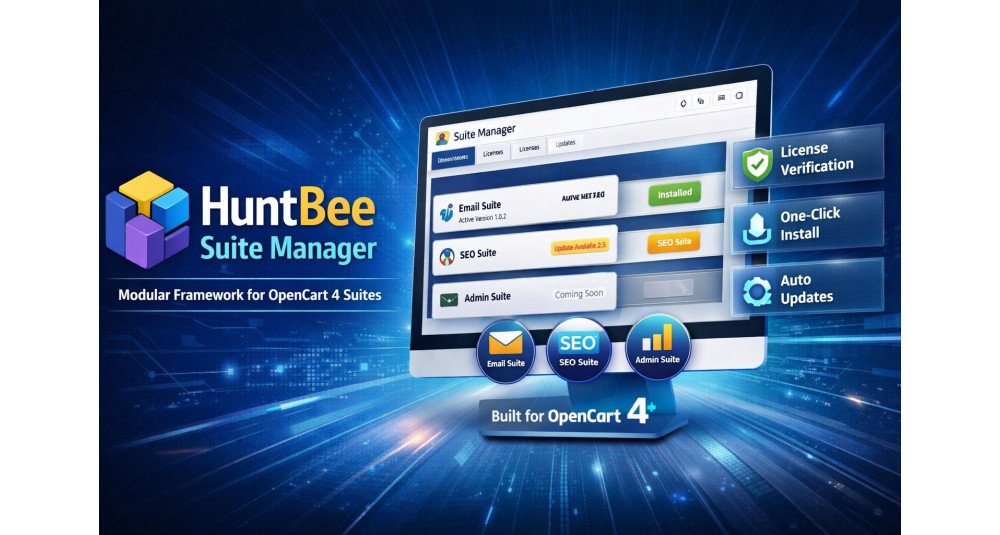
HuntBee Suite Manager is a completely free OpenCart 4 extension that gives you one central place to manage HuntBee products, install updates, manage licenses, configure AI services, organize media, and troubleshoot OpenCart events.
It is the foundation of the HuntBee Suite ecosystem, but it is more than just a framework. Even by itself, it provides useful administration tools including Media Manager, Events Manager, centralized AI Settings, update management, diagnostics, and HuntBee Suite management.
Once installed, compatible HuntBee Suites such as SEO Suite, Admin Tools Suite, Email Suite, and Tracking & Analytics Suite can use the same shared system.
Download it free. No license is required for HuntBee Suite Manager.
Problem Statement
Managing multiple advanced OpenCart extensions can quickly become complicated.
You may need to:
- Visit different product pages to check for updates
- Download and upload ZIP files manually
- Keep track of installed extension versions
- Manage different license systems
- Configure AI API keys separately in different extensions
- Work with OpenCart events when troubleshooting extensions
- Manage images and files using different interfaces
- Navigate through many unrelated administration pages
HuntBee Suite Manager brings these common operations together into one organized OpenCart administration system.
The result is less repetitive maintenance and a much simpler way to manage HuntBee-powered stores.
Who Is This Extension For?
HuntBee Suite Manager is useful for:
- OpenCart 4 store owners who want easier extension management
- Existing HuntBee customers using compatible HuntBee products
- Stores using multiple HuntBee Suites
- Developers and agencies maintaining OpenCart stores
- Users working with AI-powered HuntBee features
- Administrators who need easier media management
- Developers troubleshooting OpenCart events
- Anyone planning to use future HuntBee Suite products
Because the Suite Manager itself is free, you can install it even before purchasing a HuntBee Suite.
Key Benefits
Completely Free
HuntBee Suite Manager itself does not require a paid license.
Install it and immediately get access to the shared HuntBee management tools.
Much Easier HuntBee Updates
See when updates are available directly from your OpenCart admin.
Supported HuntBee Suite updates can be downloaded and installed through the Suite Manager, reducing the need to repeatedly visit the HuntBee website, download packages, and upload files manually.
One Dashboard for HuntBee Suites
View installed Suites, versions, available releases, update status, licenses, and setup information from one place.
Built-In Media Manager
Browse, upload, search, preview and organize OpenCart media files from a modern centralized interface.
Central AI Configuration
Configure OpenAI, Google Gemini or Anthropic Claude once and allow compatible HuntBee Suite features to use the shared AI configuration.
OpenCart Events Manager
Inspect HuntBee and other OpenCart events, enable or disable events, edit event configuration and use optional event logging when troubleshooting.
Centralized License Management
Activate and view licenses for commercial HuntBee Suites from the same administration area.
Designed for Future HuntBee Products
Install the core framework once and use it with additional compatible HuntBee Suites as the ecosystem grows.
Purpose of the Extension
The purpose of HuntBee Suite Manager is to make the HuntBee OpenCart ecosystem easier to install, update, configure and maintain.
Instead of every advanced HuntBee extension creating its own update system, AI configuration, media tools, licensing infrastructure and supporting utilities, these services can be provided centrally.
This means individual HuntBee Suites can concentrate on their actual business features while Suite Manager handles the common infrastructure.
Complete Feature List
Suite Management & Updates
- Centralized Suite Dashboard
View compatible HuntBee Suites from one OpenCart administration page. - Installed Version Information
Quickly see the version currently installed on your store. - Latest Version Detection
Check whether a newer compatible release is available. - Update Availability Indicator
Clearly identify Suites requiring an update. - Integrated Updates
Download and install supported HuntBee Suite updates through the Suite Manager. - Framework Updates
Keep the HuntBee Suite Manager itself updated. - Changelog Viewer
See what has changed before installing an available release. - Complete Setup Workflow
When updated Suite files are detected, complete the required installation steps directly from the Suite Manager. - Repair Options
Repair Suite installations when setup requires attention. - Manual Package Upload
Manually provide an update package if automatic downloading is unavailable. - FTP Installation Alternative
Use the provided manual installation approach when server restrictions prevent automatic package installation.
Media Manager
HuntBee Suite Manager includes a centralized Media Manager for OpenCart.
Use it to manage files without leaving the HuntBee administration environment.
Features include:
- Browse OpenCart Media Files
- Upload Files
- Drag & Drop Upload
- Create Folders
- Search Within Folders
- Grid and List Views
- Image Preview
- Rename Files and Folders
- Move Multiple Items
- Delete Files
- Delete Empty Folders
- Copy Relative File Paths
- View File Size
- View File Type
- View Image Dimensions
- View Modification Information
- Select Media for Compatible HuntBee Features
- OpenCart Permission Integration
The same Media Manager can also be used by compatible HuntBee Suite components whenever they need image or file selection.
HuntBee AI Settings
Configure AI services centrally instead of entering API configuration separately inside every compatible HuntBee feature.
Supported providers include:
- OpenAI
- Google Gemini
- Anthropic Claude
Available configuration includes:
- Default AI Provider
- Enable or Disable Individual Providers
- Secure API Key Configuration
- Default Model Selection
- Custom Model ID
- Reasoning Effort
- Verbosity Controls Where Supported
- Maximum Output Tokens
- Temperature Where Supported
- Test Connection
- Optional AI Request Logging
- AI Log Viewer
- Clear AI Logs
Once configured, compatible HuntBee features such as AI content generation and translation tools can use this shared AI infrastructure.
This means you configure your preferred AI service once and reuse it across supported HuntBee Suites.
Events Manager
OpenCart relies heavily on events to allow extensions to modify behaviour without editing core files.
HuntBee Suite Manager provides an Events Manager that makes these events easier to inspect and troubleshoot.
Features include:
- View HuntBee Events
- View Other OpenCart Events Separately
- See Event Code
- See Event Description
- View Trigger
- View Event Action
- View Sort Order
- View Event Status
- Edit Existing Events
- Enable Events
- Disable Events
- Bulk Event Actions
- Delete Events
- Optional HuntBee Event Logging
- Event Log Viewer
- Clear Event Logs
Event logging is intended primarily for troubleshooting and can remain disabled during normal store operation.
This can be especially useful when diagnosing extension conflicts or confirming whether HuntBee event handlers are being triggered correctly.
License Management
- Centralized License Activation
Activate compatible commercial HuntBee Suites from one place. - License Verification
Verify licenses with the HuntBee licensing service. - License Status Display
Quickly identify whether a Suite license is active. - License Expiry Information
See license validity information directly from the Suite Manager. - Offline Activation Support
Alternative activation is available for environments where normal online activation cannot be completed.
Administration & Maintenance
- Organized HuntBee Navigation
- Consistent HuntBee Suite Interface
- Shared HuntBee Infrastructure
- OpenCart Permission Management
- Installation Diagnostics
- Lifecycle Logging
- Online Documentation Access
- Quick Access to HuntBee Support
- OpenCart-Native Architecture
- No Third-Party Framework Required
- Expandable Architecture for Future HuntBee Suites
How to Use
1. Install HuntBee Suite Manager
Download and install the free HuntBee Suite Manager on your supported OpenCart 4 store.
2. Open HuntBee Suites
Access the HuntBee Suite Manager from your OpenCart administration menu.
3. Use the Free Tools
You can immediately use available shared tools such as:
- Media Manager
- Events Manager
- AI Settings
- Suite update management
4. Configure AI If Required
If you use AI-powered HuntBee features, configure your preferred OpenAI, Gemini or Claude account under HuntBee AI Settings.
5. Add HuntBee Suites
Activate and install compatible commercial HuntBee Suites whenever you need additional functionality.
6. Keep Everything Updated
Return to Suite Manager to check versions, view changelogs and install compatible updates.
Use Cases
Keeping HuntBee Extensions Updated
Instead of manually checking HuntBee product pages, use the Suite Manager to identify available Suite updates from your OpenCart admin.
Managing Store Media
Upload, browse, search, preview, rename and organize OpenCart media files using the included Media Manager.
Using AI Across Multiple HuntBee Products
Configure OpenAI, Gemini or Claude once and reuse the configuration with compatible HuntBee AI features.
Troubleshooting OpenCart Events
Inspect HuntBee and other OpenCart events and temporarily enable event logging when diagnosing problems.
Managing Multiple HuntBee Suites
Keep SEO, administration, email, analytics and future HuntBee products organized under the same management environment.
Maintaining Client Stores
Developers and agencies can quickly check HuntBee Suite versions, licenses, events and update availability when maintaining customer websites.
Expected Results
After installing HuntBee Suite Manager, you can expect:
- Easier HuntBee Suite updates
- Less manual downloading and uploading of extension packages
- Clear visibility of installed and latest versions
- One central dashboard for HuntBee products
- Easier media and file management
- One AI configuration shared by compatible HuntBee features
- Better visibility into OpenCart events
- Easier troubleshooting
- Centralized license management
- Cleaner HuntBee administration
- Easier long-term maintenance
- A ready foundation for future HuntBee Suites
Most importantly, the Suite Manager reduces the work required to maintain your HuntBee extensions over time.
Install it once, and future compatible HuntBee products and updates become much easier to manage.
Requirements
OpenCart 4
HuntBee Suite Manager is developed specifically for the modern OpenCart 4 architecture.
Supported OpenCart Releases
Currently intended for supported OpenCart 4.1.x installations.
Suite Manager Is Free
No paid HuntBee license is required to install or use the HuntBee Suite Manager itself.
Paid Suites Require Their Own License
Commercial HuntBee Suite products require the applicable license for activation, updates and support.
AI Provider Account Required for AI Features
Using OpenAI, Gemini or Claude requires your own applicable provider API credentials. API usage charges, if any, are billed by the respective AI provider and are not included with HuntBee Suite Manager.
Internet Connection
Online license verification, update checking, automatic package downloads and AI services require internet connectivity from your OpenCart server.
Keep OpenCart Updated
HuntBee Suite development prioritizes current OpenCart releases. Keeping your OpenCart installation reasonably up to date is recommended when using newer HuntBee Suite releases.
| OPENCART | |
| Compatibility | 4.1.0.4, 4.1.0.3 |
| VERSION : 4.1.4 | DATE RELEASED: 10 Sep 2026 |
| |
| VERSION : 4.1.3 | DATE RELEASED: 09 Sep 2026 |
| |
| VERSION : 4.1.2 | DATE RELEASED: 03 Sep 2026 |
| |
| VERSION : 4.1.0 | DATE RELEASED: 31 Aug 2026 |
| |
| VERSION : 4.0.5 | DATE RELEASED: 29 Aug 2026 |
| |
| VERSION : 1.4.14 | DATE RELEASED: 15 Aug 2026 |
| |
| VERSION : 1.4.2 | DATE RELEASED: 02 Aug 2026 |
| |
| VERSION : 1.2.3 | DATE RELEASED: 02 Aug 2026 |
| |
| VERSION : 1.1.1 | DATE RELEASED: 01 Aug 2026 |
Updates to huntbee framework suites installation | |
| VERSION : 1.0.1 | DATE RELEASED: 15 Feb 2026 |
| |
Related Products

Huntbee Email Suite
Huntbee Email Suite is a complete customer email communication and automation solution for OpenCart stores. It brings essential ecommerce email tools together in one organised suite, helping store owners recover lost sales, notify customers at the righ..
$49.99

HuntBee SEO Suite
HuntBee SEO Suite is a complete SEO management solution developed specifically for modern OpenCart 4 stores. It brings technical SEO, metadata management, structured data, XML sitemaps, indexing controls, SEO URLs, redirects, broken-link monitoring, im..
$49.99
Huntbee Admin Tools Suite
Huntbee Admin Tools Suite is a collection of powerful administration and productivity tools designed to make everyday OpenCart store management faster, easier, and more efficient. Instead of installing multiple unrelated extensions for reporting, order..
$39.99

Huntbee Tracking Suite
HuntBee Tracking Suite is a unified analytics, advertising, conversion tracking, consent, and attribution solution built specifically for OpenCart 4. Instead of installing separate OpenCart extensions for Google Analytics, Google Ads, Meta, TikTok, Mic..
$29.99
Tags: OpenCart 4, OpenCart Suite Manager, HuntBee OpenCart, OpenCart Modular Extension, OpenCart Framework, OpenCart License Manager, OpenCart Auto Update, OpenCart Email Suite, OpenCart SEO Suite, OpenCart Ecosystem
