• Search
  • Huntbee Tracking Suite

Unified Analytics, Conversion Tracking, Attribution & Consent for OpenCart

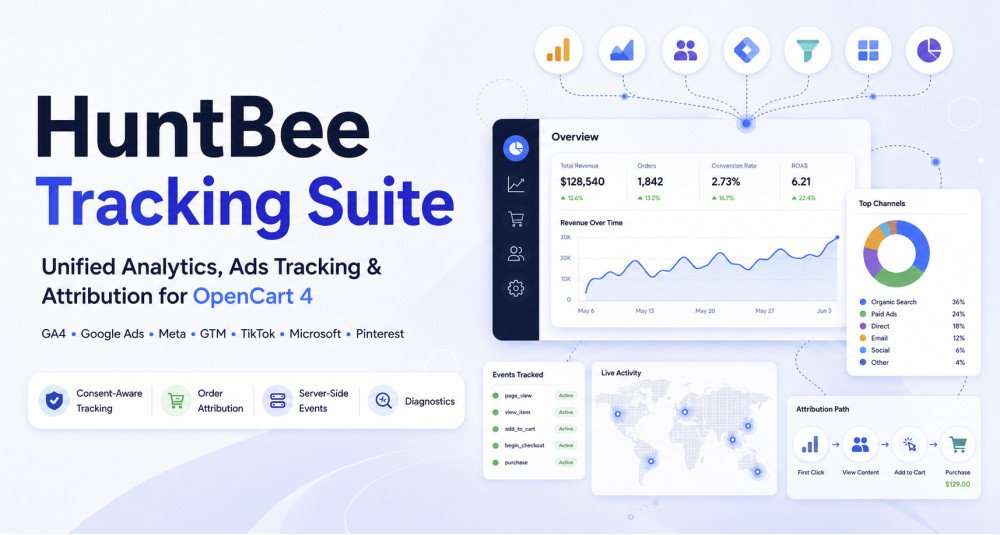
HuntBee Tracking Suite is a unified analytics, advertising, conversion tracking, consent, and attribution solution built specifically for OpenCart 4.

Instead of installing separate OpenCart extensions for Google Analytics, Google Ads, Meta, TikTok, Microsoft, Pinterest, consent management, attribution, and tracking diagnostics, the Tracking Suite brings these tools together under one coordinated system.

The Suite is designed to track an OpenCart customer action once, process the ecommerce data once, and intelligently distribute the required information to the enabled analytics and advertising platforms.


Problem Statement

Modern OpenCart stores often use several tracking platforms at the same time. Google Analytics, Google Ads, Meta Pixel, TikTok, Microsoft Ads, Pinterest, GTM, and consent systems may all need information from the same product, cart, checkout, and order events.

Installing separate tracking extensions can result in duplicate scripts, repeated database queries, conflicting event listeners, duplicate conversions, inconsistent product IDs, and difficult troubleshooting.

HuntBee Tracking Suite provides a coordinated OpenCart tracking architecture where shared ecommerce data, consent signals, attribution information, browser events, and server events are handled centrally.


Who Is This Extension For?

HuntBee Tracking Suite is suitable for OpenCart stores that depend on analytics or paid advertising and want better control over how customer and ecommerce events are tracked.

It is especially useful for:

  • OpenCart stores using Google Analytics 4
  • Stores running Google Ads conversion campaigns
  • Businesses using Meta Pixel and Conversions API
  • Stores using Google Tag Manager
  • Merchants advertising through TikTok
  • Businesses using Microsoft Advertising
  • Stores using Pinterest advertising
  • Merchants who need order attribution and campaign tracking
  • Multi-store OpenCart installations
  • Agencies managing tracking configurations for OpenCart clients
  • Stores that want centralized tracking diagnostics and consent-aware delivery

Key Benefits

  • Unified OpenCart Tracking
    Manage major analytics and advertising integrations from one coordinated OpenCart Suite instead of maintaining multiple unrelated tracking extensions.
  • Reduced Duplicate Tracking
    Centralized event handling helps prevent duplicate ecommerce events, duplicate Google tags, duplicate GTM containers, and repeated purchase conversions.
  • Better OpenCart Performance
    Product, customer, cart, and order information can be loaded once and reused across enabled tracking providers instead of being queried repeatedly.
  • Server-Side Tracking Without Slowing Checkout
    Supported server-side events are processed asynchronously, keeping external marketing API requests away from customer-critical OpenCart pages.
  • Improved Conversion Attribution
    Preserve first-touch and last-touch campaign information, advertising click identifiers, landing pages, and referrers against completed OpenCart orders.
  • Consent-Aware Tracking
    Shared consent information can be translated into the requirements of Google, Meta, Microsoft, TikTok, Pinterest, and other supported platforms.
  • Multi-Store Ready
    Configure tracking providers independently for different OpenCart stores.
  • Centralized Diagnostics
    Identify missing settings, queue failures, conflicting tags, consent issues, duplicate configurations, and tracking problems from one place.

Purpose of the Extension

The purpose of HuntBee Tracking Suite is not simply to add more tracking scripts to OpenCart.

It provides a shared tracking layer between OpenCart and external analytics or advertising platforms.

A product view, add-to-cart action, checkout, purchase, refund, login, registration, or other supported OpenCart activity can be converted into a normalized internal event and then distributed only to the integrations that actually require it.

This approach reduces duplicated processing and provides a cleaner foundation for managing modern ecommerce tracking.


Complete Feature List

Google Analytics 4

  • GA4 Ecommerce Tracking
    Track important OpenCart ecommerce activity using Google Analytics 4 recommended ecommerce events.
  • Product View Tracking
    Track product detail page views with relevant item information.
  • Product List Tracking
    Track category, search, manufacturer, special, and supported product-list interactions.
  • Product Selection Tracking
    Track when customers select products from supported OpenCart product listings.
  • Add to Cart Tracking
    Track products added to the OpenCart shopping cart.
  • Remove from Cart Tracking
    Track products removed from the cart.
  • View Cart Tracking
    Track cart views with current ecommerce information.
  • Wishlist Tracking
    Track supported OpenCart wishlist actions.
  • Checkout Tracking
    Track checkout start, shipping method selection, and payment method selection.
  • Purchase Tracking
    Send server-authoritative OpenCart order values including transaction ID, products, currency, tax, shipping, discounts, and other supported ecommerce information.
  • Purchase Duplicate Protection
    Helps prevent a refreshed OpenCart success page from repeatedly generating the same purchase conversion.
  • GA4 Refund Tracking
    Supports server-authoritative refund reporting using Google Analytics Measurement Protocol where the required original tracking information is available.
  • GA Client and Session Identification
    Preserve supported Google client/session information where required for downstream tracking such as refunds.
  • GA4 Debug and Validation Tools
    Assist with validating supported GA4 payload structures without treating validation requests as real conversions.

Google Ads

  • Google Ads Conversion Tracking
    Track important OpenCart conversion actions in Google Ads.
  • Configurable Conversion Actions
    Configure conversion identifiers and labels for supported actions such as purchases and registrations.
  • Enhanced Conversions
    Send supported consent-aware customer matching information using Google's required normalization and hashing rules.
  • Shared Purchase Data
    Reuse the same authoritative OpenCart purchase information used by other enabled integrations.

Google Tag Manager

  • GTM Integration
    Push normalized OpenCart ecommerce events to the Google Tag Manager dataLayer.
  • Existing GTM Support
    Use a GTM container already installed on the website without loading another copy.
  • HuntBee-Managed GTM Mode
    Optionally allow HuntBee Tracking Suite to load the configured GTM container.
  • Duplicate Google Tracking Protection
    Coordinate GA4, Google Ads, Google tag, and GTM delivery modes to reduce accidental double tracking.

Meta Tracking

  • Meta Pixel Integration
    Send supported browser events to Meta Pixel.
  • Meta Conversions API
    Send supported server-side conversion events through Meta CAPI.
  • Browser and Server Event Deduplication
    Share the appropriate event identity between browser and server events where Meta requires deduplication.
  • Asynchronous Meta CAPI Delivery
    External Meta API requests are processed through the shared queue rather than blocking important storefront requests.
  • Meta Test Event Code
    Support Meta testing workflows when configuring or validating server events.
  • Independent Meta Content ID Mapping
    Configure Meta content identifiers independently instead of forcing Meta to use the same product identifier as Google Analytics.

TikTok Tracking

  • TikTok Pixel Integration
    Track supported OpenCart ecommerce events using TikTok Pixel.
  • TikTok Events API
    Support applicable server-side event delivery according to current TikTok requirements.
  • TikTok Event Deduplication
    Use supported event identifiers where TikTok browser/server deduplication applies.
  • TikTok Customer Matching
    Prepare supported matching information using TikTok-specific requirements.
  • TikTok Test and Debug Support
    Assist with supported TikTok testing workflows.

Microsoft Advertising

  • Microsoft UET Integration
    Send supported OpenCart conversion and ecommerce events through Microsoft Advertising UET.
  • Microsoft Consent Signal Support
    Translate central Tracking Suite consent information into Microsoft's required advertising consent signal.
  • Microsoft Conversion Tracking
    Track supported purchase and other conversion activities without creating unsupported server-side capabilities.

Microsoft Clarity

  • Microsoft Clarity Integration
    Load Microsoft Clarity using the configured project ID.
  • Consent-Aware Clarity Loading
    Integrate the shared consent state with supported Microsoft Clarity consent controls.
  • Multi-Store Configuration
    Configure different Clarity projects or disable Clarity independently for each OpenCart store.

Pinterest Tracking

  • Pinterest Tag Integration
    Track supported browser-side ecommerce activity.
  • Pinterest Conversions API
    Deliver supported server-side events through the shared asynchronous queue.
  • Pinterest Event Deduplication
    Coordinate browser and server event identities according to Pinterest requirements.
  • Pinterest Customer Matching
    Prepare supported customer matching information according to Pinterest's required format.

Order Attribution

  • First-Touch Attribution
    Preserve the original attributable visit that introduced a customer to the store.
  • Last-Touch Attribution
    Record the latest meaningful attributable visit before conversion.
  • UTM Tracking
    Capture supported UTM parameters including source, medium, campaign, term, and content.
  • Advertising Click ID Tracking
    Capture supported identifiers such as Google, Meta, TikTok, and Microsoft advertising click IDs when permitted.
  • Landing Page Tracking
    Preserve original and latest attributable landing pages.
  • Referral Tracking
    Record relevant external referrer information.
  • Configurable Attribution Lookback
    Control how long attribution information remains relevant.
  • Self-Referral Protection
    Avoid treating the merchant's own OpenCart website as a new campaign referral.
  • Order Attribution Report
    Inspect campaign and attribution information associated with completed OpenCart orders.
  • CSV Export
    Export stored order attribution data for further analysis.

Consent & Privacy

  • Central Consent Signal Broker
    Provide one shared consent state for supported tracking integrations.
  • Google Consent Mode Support
    Coordinate supported Google consent signals including analytics and advertising storage requirements.
  • Runtime Consent Updates
    Allow consent state to be updated after a customer changes their preferences.
  • Third-Party Consent Integration
    Designed to work with existing cookie consent extensions, CMP solutions, or custom implementations.
  • Provider-Specific Consent Translation
    Translate one central consent state into the different formats required by Google, Microsoft, Clarity, and supported advertising providers.

HuntBee Tracking Suite provides technical consent controls but is not itself a legal compliance service or full legal CMP.


Tracking Diagnostics

  • Integration Health Overview
    Check which analytics and advertising integrations are currently enabled.
  • Configuration Warnings
    Identify missing IDs, tokens, labels, API credentials, or other required settings.
  • Duplicate Tag Detection Assistance
    Warn about configurations that may cause duplicate Google tags, GTM containers, Meta Pixel tracking, or overlapping HuntBee tracking extensions.
  • Server Queue Monitoring
    View failed, pending, or problematic asynchronous tracking events.
  • Provider Delivery Status
    Review recent server-event delivery information.
  • GA4 Refund Diagnostics
    Identify refund events that cannot be sent because the original GA client identifier is unavailable.
  • Safe Payload Preview
    Inspect supported tracking payload structures without exposing access tokens or unnecessary customer information.
  • Cron Health Monitoring
    Check whether asynchronous tracking jobs are being processed.

Shared Tracking Architecture

  • Normalized Internal Event Model
    OpenCart actions are converted into shared HuntBee events before being translated into provider-specific formats.
  • Shared Product Identity Mapper
    Reuse OpenCart product data while supporting different item/content ID strategies for different providers.
  • Shared Customer Context
    Retrieve required customer information once and apply provider-specific normalization only where necessary.
  • Requirement Resolver
    Load customer, address, category, attribution, and matching data only when an enabled integration actually requires it.
  • Shared Asynchronous Queue
    Use one queue infrastructure for supported server-side integrations instead of separate provider queues.
  • Shared Scheduler
    One Tracking Suite scheduler manages server-event delivery and queue maintenance.
  • Provider Failure Isolation
    A problem with one analytics provider should not prevent another provider from operating or interfere with the OpenCart checkout process.

Refund Management

  • OpenCart Refund Panel
    Manage supported full and partial tracking refunds directly from the OpenCart order area.
  • Partial Refund Tracking
    Record individual product quantities when supported.
  • Repeated Refund Support
    Maintain separate refund occurrences for legitimate repeated or partial refunds.
  • Refund Duplicate Protection
    Prevent accidental double-clicks or repeated submissions from creating duplicate refund events.
  • Optional Refunded Order Status Mapping
    Optionally map a selected OpenCart order status to a full-refund tracking action.
  • Permanent Refund History
    Maintain Tracking Suite refund records until they are intentionally removed through complete uninstall.

How to Use

Install the required HuntBee Framework first and then install HuntBee Tracking Suite through the standard HuntBee Suite installation workflow.

Open HuntBee Suite Manager → Tracking Suite, select the required component, choose the OpenCart store where the integration should operate, and enter the relevant provider credentials or tracking IDs.

Enable only the services your store actually uses. For example, a store may use only GA4 and Order Attribution while another OpenCart store in the same installation uses Meta, TikTok, and Pinterest.

Configure the preferred Google delivery method if using GA4, Google Ads, or Google Tag Manager.

Configure Consent & Privacy when tracking behavior must react to customer consent information.

For server-side integrations, configure the Tracking Suite cron so queued events can be processed asynchronously.

Use Tracking Diagnostics after configuration to identify missing settings, conflicts, queue problems, or potential duplicate tracking.


Use Cases

  • OpenCart Store Running Google Ads
    Track purchases using Google Analytics 4 and Google Ads while optionally using Enhanced Conversions for improved customer matching.
  • Meta Advertising Store
    Combine Meta Pixel with Conversions API while using shared event IDs to reduce browser/server duplicate conversions.
  • Multi-Channel Ecommerce Advertising
    Send the same OpenCart purchase information to Google, Meta, TikTok, Microsoft, and Pinterest without independently loading the order for every integration.
  • OpenCart Multi-Store Business
    Use GA4 on one store, Meta and TikTok on another, and different tracking identifiers for each store.
  • Existing GTM Website
    Push OpenCart ecommerce information into an existing dataLayer without injecting another GTM container.
  • Campaign Attribution Analysis
    See which UTM campaign, referrer, landing page, or advertising click ID was associated with an OpenCart order.
  • Privacy-Conscious Tracking Setup
    Coordinate supported analytics and advertising integrations with the consent state supplied by an existing cookie consent solution.
  • Tracking Troubleshooting
    Use centralized diagnostics instead of checking multiple unrelated OpenCart extensions to identify configuration or queue problems.
  • Refund Reporting
    Record full or partial OpenCart refunds and send supported refund information to applicable analytics platforms.

Expected Results

HuntBee Tracking Suite is designed to provide a cleaner and more maintainable tracking setup for OpenCart stores using multiple analytics and advertising services.

Merchants can expect fewer duplicated tracking implementations, better reuse of OpenCart order and product data, centralized troubleshooting, and more consistent conversion information across supported platforms.

The asynchronous server-event architecture also prevents supported marketing APIs from becoming a direct dependency of important storefront operations such as checkout and purchase completion.

Actual reporting, attribution, campaign performance, and conversion matching results depend on the merchant's provider configuration, customer consent, advertising account setup, and the behavior of each external platform.


Requirements

  • OpenCart: OpenCart 4.1.x
  • HuntBee Framework: Required
  • PHP: Version supported by the installed OpenCart 4 release
  • Cron: Recommended/required for asynchronous server-event processing
  • HTTPS: Strongly recommended for production tracking and consent functionality
  • Provider Accounts: Appropriate accounts must be available for the analytics or advertising services being used
  • Provider Credentials: Relevant measurement IDs, pixels, conversion IDs, API tokens, secrets, container IDs, project IDs, or account IDs are required depending on the enabled integration
  • Modification Permission: OpenCart administrator permissions are required to configure the Suite
  • Multi-Store: Supported with individual store-level configuration

HuntBee Tracking Suite does not modify OpenCart core files and does not require OCMOD or VQMod for its Tracking Suite runtime.


Why Choose HuntBee for Your OpenCart Store?

When you install a HuntBee extension, you are choosing a solution built by an experienced OpenCart specialist who understands real-world store challenges.

  • VerifiedOfficial OpenCart Partner with proven expertise
  • Established OpenCart Specialist Since 2012
  • 14+ Years Dedicated to OpenCart Development
  • 100+ Extensions Used by OpenCart Stores Worldwide
  • Performance-focused and SEO-friendly architecture
  • Continuous improvements and dependable support

Complete Feature Catalogue

Explore what this extension can do for your store, with practical examples.

Features for OpenCart 4

Storefront Features

Feature What it does / Real-world example
Track visits to your store pages When a visitor opens a page, enabled integrations can receive their supported page-view tracking data.
Track when shoppers view a product When someone opens a product page, supported analytics or advertising platforms can receive a product-view event.
Track products shown in category and other lists Eligible product listings can produce a list-view event showing which products were displayed.
Track product clicks from listings Supported Google Analytics tracking can record when a shopper selects a product from a displayed list.
Track products added to the cart When a shopper adds an item, enabled platforms can receive its product details, quantity and value where supported.
Track quantity changes in the cart Adding or reducing an existing item's quantity can produce the corresponding add-to-cart or remove-from-cart event.
Track products removed from the cart Removing an item can be recorded separately so you can understand changes in shopping-cart activity.
Track when shoppers open their cart Supported Google Analytics tracking can record the products and value in a viewed shopping cart.
Track products added to a wish list When a shopper saves an item to their wishlist, supported platforms can record the action.
Track when a shopper starts checkout A begin-checkout event helps reveal how many customers move from shopping into checkout.
Track shipping information during checkout Where a supported shipping step is submitted, Google Analytics can receive an add-shipping-info event.
Track payment information during checkout Where a supported payment step is submitted, eligible platforms can receive its checkout event.
Track completed orders and their value When an order reaches OpenCart's success flow, supported integrations can receive an order conversion with available items, currency and total.
Track new customer registrations An account sign-up can be recorded as a registration event by platforms that support it.
Track customer logins Google Analytics and configured Google Ads actions can track eligible customer login events.
Track searches performed inside the store Supported integrations can record internal product searches when a visitor submits a search query.
Remember where a buyer originally came from When permitted, campaign links or referring sites can be recorded and attached to the eventual order.
Respect the shopper's tracking consent choices When a consent source is configured, eligible measurement or advertising events wait for the permissions they require.
Send eligible held events if permission is granted later If a visitor allows tracking after an interaction on the same page, compatible browser events can be released from temporary memory.
Study visitor behavior with Microsoft Clarity With a configured Clarity project, session analytics can run on your storefront according to its consent settings.

Admin & Management

Feature What it does / Real-world example
Connect your store to Google Analytics 4 Enter your GA4 Measurement ID and enable the integration to record supported shopping and customer events.
Let HuntBee install the Google tag Choose the managed Google-tag mode to load gtag and send enabled Google Analytics and Google Ads browser events.
Use a Google tag already loaded by your website Tell HuntBee that your theme or another extension supplies the Google tag so it does not intentionally install a second copy.
Let HuntBee load your Google Tag Manager container Enter your GTM container ID and send normalized ecommerce events into the dataLayer.
Send ecommerce events to an existing GTM container Keep your existing Tag Manager setup and let HuntBee provide the event data for tags configured in your container.
Choose how products are identified in Google Analytics Use OpenCart product ID, model or SKU according to the identifiers used in your Google Merchant Center feed.
Test GA4 tracking with DebugView Enable the optional GA4 debug setting to make testing your ecommerce events easier.
Configure GA4 server-side refund tracking Supply a Measurement Protocol API secret so eligible recorded refunds can be reported without relying on the shopper's browser.
Use the EU collection endpoint for GA4 refunds Optionally send eligible server-side Google Analytics refund events through Google's EU endpoint.
Connect Google Ads conversion tracking Enter your Google Ads conversion ID to send supported conversion actions through your selected Google delivery mode.
Choose which store actions count as Google Ads conversions Assign conversion labels to eligible actions such as purchase, signup, checkout, add to cart, login or wishlist addition.
Configure several Google Ads conversion actions Add different conversion labels for different store events without limiting tracking to purchases alone.
Use enhanced conversions for Google Ads When enabled and advertising user-data consent is granted, eligible conversions can include suitable hashed customer details.
Set up the Meta Pixel for your store Enter the Meta Pixel or Dataset ID to send supported browser events to Meta.
Send Meta conversion events from the server Configure a Conversions API token to queue supported server-side events for Meta.
Choose Meta browser, server or combined delivery Run the Pixel, Conversions API or both, with shared event IDs for browser/server deduplication.
Choose product identifiers for Meta tracking Select product ID, model or SKU so tracked items can match identifiers used in your Meta catalogue.
Use a Meta test event code Enter a temporary Events Manager test code to inspect server events before clearing it on a live store.
Set up TikTok Pixel events Enter a TikTok Pixel ID so supported shopping and conversion actions can be measured in the browser.
Use TikTok Events API for server tracking Configure an Events API token to send supported events from the server through the background queue.
Choose TikTok browser, server or both Enable a suitable delivery mode, with matching event IDs when both Pixel and Events API are used.
Match tracked products to your TikTok catalogue Choose the product ID, model or SKU used as the content identifier.
Configure TikTok test events Use the platform's temporary test code while checking event delivery.
Connect Microsoft Advertising UET Enter your Microsoft UET tag ID to record supported shopping and conversion events in the browser.
Enable Microsoft Ads enhanced conversions With advertising user-data consent, supported conversion events may include hashed customer email or phone details.
Provide Microsoft Advertising's own consent signal The integration sends UET consent updates separately from Google's consent commands.
Connect Pinterest Tag tracking Enter the Pinterest Tag ID to send supported page, shopping and conversion events in the browser.
Send Pinterest conversions from your server Configure a Pinterest ad account and Conversions API token for supported background event delivery.
Choose Pinterest Tag, API or both Use browser-only, server-only or combined tracking with a shared ID for event deduplication.
Match tracked items to Pinterest product identifiers Choose OpenCart product ID, model or SKU according to your Pinterest catalogue.
Test Pinterest server events Enable Pinterest's test-mode option when you want to check server events without counting real conversions.
Connect Microsoft Clarity Enter the Clarity project ID to enable session analysis on the storefront.
Control when Clarity is allowed to load Optionally delay the Clarity script until analytics consent is granted rather than loading it beforehand.
Use Clarity's current consent API The suite passes the appropriate analytics and advertising storage signals through Clarity Consent API v2.
Choose where tracking permission comes from Use OpenCart's cookie policy, an external consent platform or a no-gate mode where legally appropriate.
Use OpenCart's existing cookie banner for tracking decisions When the built-in cookie policy is properly configured, its accept or decline choice controls the suite's consent signals.
Work with an external consent platform Use consent signals from a compatible external platform without making HuntBee install another banner.
Control analytics and advertising permissions separately The shared consent model handles analytics storage, ad storage, advertising user data and ad personalization.
Connect a custom consent solution through JavaScript A developer API lets compatible custom banners update the Tracking Suite when they cannot publish standard consent signals.
Manage consent signals without adding another banner The suite acts as a consent-signal broker; it does not itself provide a customer-facing cookie banner or legal compliance guarantee.
Enable order attribution independently of ad platforms Record order acquisition details even when you do not enable every supported advertising integration.
See first-touch and last-touch order sources View the earliest and latest tracked landing pages, external referrers and their timestamps for an attributed order.
Capture campaign details from marketing links Track available UTM source, medium, campaign, term and content parameters with the resulting order.
Remember advertising click IDs linked to orders When consent permits, record available Google, Meta, TikTok and Microsoft click identifiers for attribution.
Choose how long attribution information is retained in the browser Set a lookback period so expired campaign information is not attached to a later purchase.
Browse attributed orders in the OpenCart admin Review order numbers, totals, campaign source, landing page and first/last touch information.
Filter attribution reports by order, date and source Locate orders associated with a campaign or referring source without reviewing every sale individually.
Export order attribution records to CSV Download attribution reports for further campaign analysis or internal reporting.
Check whether an order captured its GA4 client ID The attribution screen can indicate whether the identifier needed for a later GA4 server refund is available.
Check tracking integration health in one dashboard See which platforms are enabled, which settings need attention and whether store tracking events are installed.
Verify the store's event hooks are registered Diagnostics shows how many of the expected OpenCart tracking events are currently enabled.
Monitor purchase identification for GA4 refunds Review how many recent orders captured a valid measurement identifier for supported server refund reporting.
Monitor pending, delivered and failed server events See the current server delivery queue status rather than guessing whether a queued conversion was sent.
Inspect the last delivery results for each integration Review supported platform delivery status, most recent success and diagnostic error information.
Inspect deliveries with an uncertain result When a request might have reached a provider but no final response was confirmed, diagnostics identifies it separately.
Decide whether to retry an uncertain conversion After verifying the provider did not receive an uncertain event, retry that specific event manually rather than risking automatic duplicates.
Review server-event payloads safely Inspect a preview with access tokens and customer identifiers removed from the displayed data.
Validate a GA4 refund payload without sending a conversion Check the payload structure against Google's validation endpoint; it does not confirm credentials or create a conversion.
Enable browser-console tracking diagnostics See which normalized events were prepared, delivered to browser integrations or held back by consent.
Search and clear tracking debug event logs When debug logging is enabled, inspect bounded event records by event, provider or status and clear them when no longer needed.
Support themes that use non-jQuery cart requests Optionally observe Fetch-based AJAX responses so compatible customized storefronts can still report cart changes.
Optionally send a signed-in customer ID as a measurement identifier Use the OpenCart customer ID rather than an email address as the optional analytics user ID.
Record tracking refunds from the OpenCart order page A dedicated order panel lets an administrator record a refund event without actually refunding payment or changing the order.
Record a full tracking refund Choose to mark all remaining items as refunded for measurement purposes.
Record a partial refund for selected order items Select an order line and quantity so the tracking refund reflects only those purchased units.
See how many purchased items remain refundable The order refund panel shows ordered, previously recorded and remaining quantities for each line.
Review past tracking refunds for an order See the sequence, date, source, product and quantities of previously recorded refund events.
Map an order status to a full tracking refund Optionally choose an OpenCart order status that should automatically record a full remaining refund when applied.
Prevent repeat recording of the same refund The refund ledger protects against double submissions and avoids automatically issuing another status-based refund for an already recorded order.
Check when a GA4 refund cannot be reported Diagnostics identifies supported GA4 refund gaps, including cases missing the original client ID or necessary API configuration.
Configure scheduled server-side event delivery Use OpenCart's registered cron or the provided server command/URL to process queued conversions.
Control background delivery and cleanup schedules Choose enabled jobs, their frequencies and batch sizes according to your store's requirements.
See when background tracking jobs last ran Review supported job status and last-run or next-run information when troubleshooting scheduled delivery.

Automation & Maintenance

Feature What it does / Real-world example
Capture supported shopping actions using OpenCart events The suite listens to supported storefront and order lifecycle events rather than requiring direct edits to OpenCart core files.
Prepare one normalized store event for enabled platforms A common event system collects the shopping action and passes provider-specific data to the integrations you enabled.
Dispatch eligible tracking events in the browser Supported product, cart, checkout and purchase events are prepared for browser delivery without waiting for a server cron job.
Read AJAX cart responses without changing the cart operation The browser script can process tracking information included in supported cart responses while leaving the actual add or remove action intact.
Update tracking when visitors change consent Supported Google, Microsoft, Clarity and other browser integrations receive current consent decisions as appropriate.
Hold browser events briefly until permission is granted Eligible events withheld by consent stay in temporary browser memory and can be released if consent is granted during that page visit.
Apply recorded consent to server-side events The server can use stored consent information when deciding whether an eligible event may be sent in the background.
Capture permitted advertising click parameters When appropriate consent has been given, supported click IDs can be remembered for a later conversion.
Protect the integrity of browser attribution state First-party attribution data is kept in a signed browser cookie rather than written into the database after every page view.
Save campaign attribution when an order is confirmed First and latest permitted campaign details are recorded against the completed order for later reporting.
Capture Google Analytics identifiers after purchase When available, the browser submits the original GA4 client and session identifiers so later server-side refunds can reference the order.
Use stable identifiers for each tracked event Unique event IDs help prevent a single event occurrence from being queued more than once per server provider.
Deduplicate events sent through browser and server Meta, TikTok and Pinterest use matching event IDs when both delivery channels are configured, allowing the platforms to recognize duplicates.
Queue server events rather than delaying checkout Supported server-side conversions are saved for later delivery instead of waiting for external advertising APIs during checkout.
Send queued events in manageable scheduled batches The background worker processes due events in bounded groups rather than attempting an unlimited number at once.
Retry confirmed temporary delivery failures Failed requests that are safe to retry can be rescheduled using increasing delays, subject to an attempt limit.
Avoid replaying uncertain conversions automatically Events with an ambiguous delivery outcome are kept for administrator review instead of being resent without confirmation.
Prevent duplicate entries for the same server event A unique provider/store/event identifier prevents the same occurrence from being inserted into the queue repeatedly.
Automatically clean old completed server-event records Daily cleanup can remove delivered and failed queue rows after their configured retention periods.
Remove expired diagnostic event logs Scheduled cleanup also removes old bounded tracking debug records while preserving order attribution and refund histories.
Queue eligible GA4 refund reports for later delivery After a supported tracking refund is recorded, its eligible server-side payload can be dispatched without delaying the order admin page.
Record a full remaining tracking refund when a chosen status is set Optional status mapping detects the configured order-history transition and uses the shared refund ledger.
Prevent recording more refunded units than were ordered The refund ledger checks previously recorded quantities before accepting another partial or full tracking refund.
Handle overlapping refund submissions safely Refund operations for the same order are serialized to keep remaining quantities consistent.
Keep tracking integrations separate for different stores Each storefront can use its own available provider IDs, consent source and tracking options.
Keep server API credentials out of browser event payloads Server delivery loads provider secrets from stored settings when sending events rather than placing them into the queued public payload.
Keep unrelated tracking integrations operating if one fails A failure in one provider's tracking adapter is recorded without deliberately stopping every other enabled integration.
OPENCART
Compatibility 4.1.0.4

VERSION : 4.0.1DATE RELEASED: 09 Sep 2026
  • Fixed Tracking Suite Overview compatibility with the updated Framework permission handling.
  • Removed redundant secondary Save buttons from Tracking component pages.
  • Tracking component pages now use a single Save button in the standard OpenCart top action bar.
  • Improved consistency and usability across Tracking Suite administration pages.

VERSION : 4.0.0DATE RELEASED: 30 Aug 2026
  • Official Release
  • Initial stable release of HuntBee Tracking Suite
  • Tested with OpenCart 4.1.0.4
  • Tested with Journal 3.2
  • Includes core tracking integrations, consent-aware event handling, diagnostics, and multi-channel tracking support
  • Production-ready release for live stores
Customer feedback

Reviews (0)

0 / 5
0 reviews
Share your experience

Write a review

Note: HTML is not translated!
Choose 1 to 5 stars
Captcha
Tags
This extension / product is currently unavailable to download. Enter your email address below and we will notify you as soon as the product becomes active.
Name
Email
Comments