
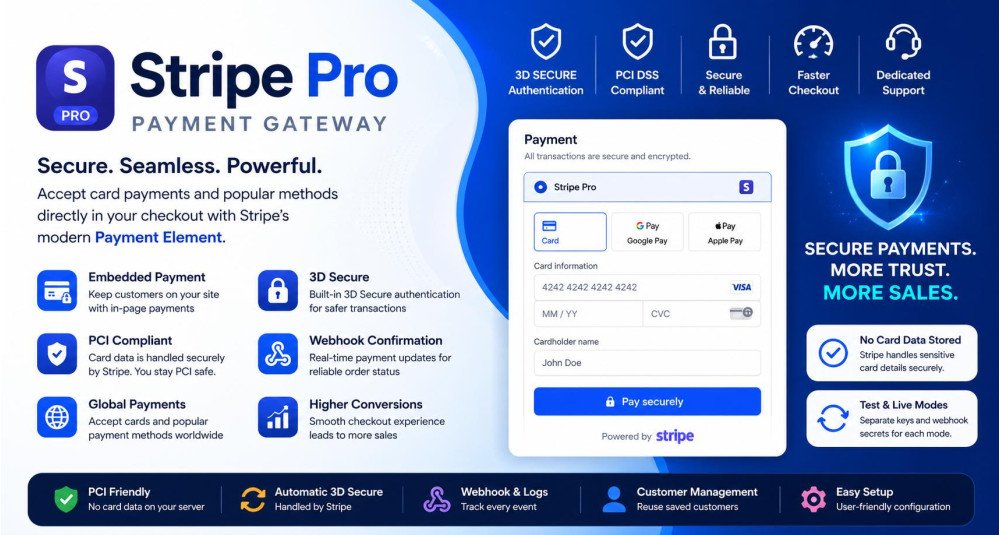
Stripe Pro Payment Gateway for OpenCart
- Developer: Priyabrata Ghorai
- Product Code: 48438
- Availability: In Stock
- Free premium support for 12 months
- OpenCart Link ($20.00)
-
$18.00
Secure Embedded Payments with 3D Secure and PCI Compliance
Stripe Pro is a modern, embedded payment gateway for OpenCart that allows customers to complete payments directly within your checkout page. It uses Stripe’s latest Payment Element and PaymentIntents API to deliver a secure, fast, and seamless checkout experience.
Unlike traditional redirect-based gateways, Stripe Pro keeps customers on your store, improving trust and conversion rates while maintaining high security standards.
This extension is built using modern Stripe architecture and follows best practices for security and performance. Sensitive payment data is always handled by Stripe, ensuring a safe and compliant payment environment.
Problem Statement
Many OpenCart stores struggle with poor checkout experiences due to payment redirections, failed confirmations, or unreliable payment status updates.
Customers often abandon checkout when redirected to external pages. At the same time, store owners face issues like delayed payment confirmation, duplicate orders, or unclear transaction tracking.
Without a robust payment integration, this directly impacts sales and customer trust.
Who Is This Extension For?
- OpenCart store owners looking for a professional payment gateway
- Businesses that want to improve checkout conversion rates
- Stores needing secure and PCI-friendly payment handling
- Merchants who prefer embedded checkout instead of redirects
- Developers managing scalable and reliable payment workflows
Key Benefits
- Higher conversion rates with embedded checkout experience
- Improved customer trust with secure Stripe-powered payments
- Reliable order confirmation using webhook-based validation
- Support for modern payment flows including 3D Secure
- Better control over transactions with detailed logs and tracking
Purpose of the Extension
The purpose of Stripe Pro is to provide a complete and reliable payment solution for OpenCart that aligns with modern eCommerce standards.
It ensures smooth payment processing, eliminates checkout friction, and gives store owners full visibility into transactions while maintaining strong security practices.
Complete Feature List
- Embedded Payment Element – Accept payments directly inside OpenCart checkout without redirecting customers
- Stripe PaymentIntents API – Modern and reliable payment processing with built-in authentication support
- Automatic 3D Secure Handling – Stripe automatically triggers authentication when required
- Webhook-Based Order Confirmation – Ensures accurate and reliable payment status updates
- Test Mode & Live Mode Support – Easily switch between testing and production environments
- Separate Test & Live Credentials – Manage keys and webhook secrets independently
- Transaction Management Panel – View and track all Stripe payment records inside admin
- Webhook Logs Monitoring – Debug and verify Stripe events with detailed logs
- Customer Mapping System – Reuse Stripe customers for faster checkout experience
- Guest Checkout Support – Works seamlessly for both guest and registered users
- Secure Payment Flow – No card data is stored in OpenCart
- Geo Zone Control – Enable payment method based on customer location
- Minimum & Maximum Order Total Rules – Control payment availability
- Order Status Automation – Automatically update order status based on payment result
- Retry Payment Support – Customers can retry failed payments without issues
- Multi-Currency Handling – Supports different currencies with accurate conversion
- Zero-Decimal Currency Support – Proper handling for currencies like JPY
- Debug Logging System – Logs useful information without exposing sensitive data
How to Use
- Install the Stripe Pro extension in your OpenCart store
- Enter your Stripe API keys (Test or Live)
- Configure webhook endpoint in your Stripe dashboard
- Set order statuses and payment rules
- Enable the extension
During checkout:
- Customer selects Stripe Pro
- Payment form loads inside checkout
- Customer enters card details securely
- Payment is processed via Stripe
- Order is confirmed automatically
Use Cases
- Reduce checkout abandonment by avoiding payment redirects
- Accept secure card payments globally using Stripe infrastructure
- Handle high-volume stores with reliable webhook-based confirmation
- Improve customer experience with smooth in-page payments
- Track and debug payments easily using transaction and webhook logs
Expected Results
- Improved checkout completion rate
- Reduced payment failures and confusion
- Faster and more reliable order processing
- Better customer satisfaction and trust
- Increased overall sales and revenue
Many stores using embedded payment solutions report noticeable improvements in conversion and user experience.
Requirements
- PHP 7.4 or higher (supports PHP 8.x)
- SSL (HTTPS) enabled for live transactions
- Active Stripe account
- Proper webhook configuration for reliable payment updates
| OPENCART | |
| Compatibility | 4.1.0.4, 4.1.0.3, 4.1.0.2, 4.1.0.1, 4.1.0.0, 3.0.5.1, 3.0.5.0, 3.0.4.1, 3.0.4.0, 3.0.3.9, 3.0.3.8, 3.0.3.7, 3.0.3.6, 3.0.3.5, 3.0.3.3, 3.0.3.2, 3.0.3.1, 3.0.3.0, 3.0.2.0, 3.0.1.2, 3.0.1.1, 3.0.1.0, 3.0.0.0 |
Admin Demo
You can explore the admin panel demo here: https://opencart-demo.huntbee.com/demo/admin/index.php?route=extension/payment/hb_stripe_pro
The access credentials are already prefilled for quick access.
Storefront Demo
A storefront demo is not publicly available because the extension requires valid Stripe API credentials for payment processing and webhook functionality.
However, you can experience the live checkout flow directly on our website while placing an order using Stripe.
Open demo instruction in new tab
| VERSION : 4.0.2 | DATE RELEASED: 10 Sep 2026 |
| |
| VERSION : 3.0.2 | DATE RELEASED: 10 Sep 2026 |
| |
| VERSION : 3.0.1 | DATE RELEASED: 14 May 2026 |
Improvements
Enhancements
Compatibility
Stability
| |
| VERSION : 3.0.0 | DATE RELEASED: 30 Apr 2026 |
| |
Related Products
Worldpay Business Payment Gateway
The Worldpay Business Payment Gateway extension restores the functionality of the removed Worldpay Business Payment Gateway in newer OpenCart versions. While OpenCart now includes Worldpay Online Payments, this extension ensures merchants who pr..
$18.00

Stripe Checkout
Stripe Checkout is a free OpenCart payment extension that allows you to accept secure online payments using Stripe’s hosted checkout page. Instead of handling sensitive card data within your store, customers are redirected to a Stripe-managed paymen..
$0.00
Tags: opencart, stripe, stripe payment gateway, opencart stripe, stripe pro, opencart payment module, embedded checkout, 3d secure, pci compliant, online payments, payment integration, stripe element, opencart checkout, secure payment
