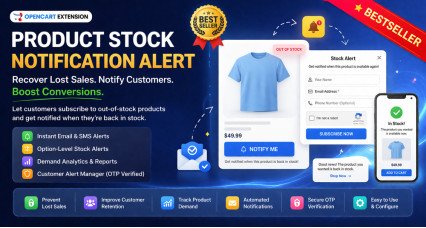
The Premium Stock Alert Page Add-on for OpenCart provides customers with a dedicated self-service area where they can view and manage their product stock notifications directly from the storefront.
This enterprise-level add-on enhances the usability of your existing OpenCart stock alert system by giving customers full visibility over their alert subscriptions. Customers can quickly return to products, remove outdated alerts, and purchase items as soon as they are available.
By empowering customers to manage alerts themselves, store owners can improve user experience, reduce support requests, and increase conversion opportunities when products come back in stock.
Problem Statement
Standard stock alert systems notify customers when products become available, but customers often have no easy way to review or manage their alert subscriptions afterward.
Customers may:
- Forget which products they subscribed to
- Register alerts using different email addresses
- Continue receiving notifications for products they no longer need
- Miss purchase opportunities due to lack of easy access to alerted products
Without a centralized page, managing alerts becomes inconvenient for customers and increases unnecessary support requests for store owners.
This OpenCart add-on solves these problems by providing a professional stock alert management interface directly in the customer account area.
Who Is This Extension For?
This OpenCart add-on is ideal for store owners who:
- Sell products that frequently go out of stock
- Want to improve customer experience and retention
- Receive repeated stock enquiry emails from customers
- Want customers to manage their own notifications independently
- Operate medium to large OpenCart stores with many returning customers
- Want a more professional and enterprise-level stock alert system
- Want to improve conversion rates when products are restocked
Key Benefits
- Improves customer experience by giving control over stock alerts
- Encourages faster purchase decisions when products return to stock
- Reduces customer support requests related to stock notifications
- Improves trust and professionalism of your OpenCart store
- Helps customers track products they are interested in purchasing
- Provides a clean and organized interface similar to wishlist functionality
- Supports both registered customers and guest alert subscriptions
- Creates additional sales opportunities from previously unavailable products
Purpose of the Extension
The purpose of this OpenCart add-on is to provide customers with a convenient way to access and manage their product stock alerts in one centralized location.
Instead of relying only on email notifications, customers can actively monitor the products they are waiting for, remove alerts that are no longer relevant, and quickly purchase items once they become available.
This improves customer satisfaction and increases the likelihood of converting interest into sales.
Complete Feature List
- Dedicated Stock Alert Page
Provides a customer-facing page where users can view all active stock alert subscriptions.
- Automatic Alert Matching for Logged-in Customers
Displays alerts associated with the customer’s account email automatically.
- Guest Email Verification System
Allows customers to access alerts created using other email addresses through secure email verification.
- One-Time Verification Code Protection
Sends a secure verification code to ensure only authorized users can access guest alerts.
- Separate Section for Verified Guest Alerts
Displays alerts linked to verified email addresses in an organized structure.
- Product Information Display
Shows product image, product name, and stock status for each alert.
- Quick Access to Product Page
Allows customers to easily navigate to the product page once stock becomes available.
- Add to Cart Option
Enables customers to quickly purchase products that are available without additional navigation.
- Remove Alert Option
Allows customers to remove alert subscriptions that are no longer needed.
- Session-Based Guest Access Control
Ensures guest alert access is securely limited to verified email addresses only.
- Enterprise-Level Customer Experience
Provides a professional interface similar to wishlist or saved items functionality in OpenCart.
- Optimized for Performance
Reuses existing stock alert data structure without duplicating product records.
- Secure Access Architecture
Ensures alert visibility and deletion permissions are properly validated.
How to Use
After installing the add-on, customers can access the stock alert management page from the storefront.
Logged-in customers automatically see alerts associated with their account email.
If customers previously registered alerts using another email address, they can enter that email on the same page and request a verification code.
Once the email is verified, alerts related to that email are displayed in a separate section.
Customers can then review alerts, remove unwanted subscriptions, or visit product pages to purchase available items.
Use Cases
- Customers tracking products that are temporarily out of stock
- Stores selling seasonal or high-demand products
- Customers monitoring multiple products for availability
- Businesses wanting to reduce repeated stock enquiry emails
- Customers who previously subscribed using different email addresses
- Stores offering pre-launch or upcoming products
- B2B customers monitoring bulk product availability
- Returning customers checking availability of previously unavailable items
Expected Results
- Increased conversion rate when products are restocked
- Improved customer engagement and retention
- Reduced manual customer support related to stock enquiries
- Better shopping experience for returning customers
- More efficient management of product demand
- Increased trust in your OpenCart store
- Higher likelihood of completing purchases after stock replenishment
Requirements
- Requires the main Product Stock Notification Alert extension for OpenCart
- Requires email functionality configured in OpenCart for verification emails
- Compatible with most OpenCart themes following standard structure
Why Choose HuntBee for Your OpenCart Store?
When you install a HuntBee extension, you are choosing a solution built by an experienced OpenCart specialist who understands real-world store challenges.
- VerifiedOfficial OpenCart Partner with proven expertise
- Established OpenCart Specialist Since 2012
- 14+ Years Dedicated to OpenCart Development
- 100+ Extensions Used by OpenCart Stores Worldwide
- Performance-focused and SEO-friendly architecture
- Continuous improvements and dependable support