• Search
  • FeedbackFlow: Post-Purchase Review Invitation for OpenCart

Gather More Product Reviews with FeedbackFlow

Collecting product reviews has never been easier with FeedbackFlow, a powerful OpenCart extension designed to streamline the review collection process. This extension automatically sends review request emails to customers after their purchase, helping you gather valuable feedback and improve conversions. Whether you wish to send emails for all purchased products or specific categories, FeedbackFlow offers the flexibility you need to build trust and drive sales.

FeedbackFlow is an OpenCart extension that helps you collect customer reviews by sending automated post-purchase emails. These emails encourage customers to share feedback on their recent purchases, increasing the number of reviews and enhancing customer trust.


Problem Statement:

Customer reviews are a critical factor in influencing purchasing decisions, yet collecting these reviews is often a challenging and overlooked aspect for many eCommerce businesses. Despite providing quality products, many OpenCart store owners struggle to gather sufficient feedback from customers due to:

  1. Customer Inactivity Post-Purchase: Once a purchase is made, customers rarely return to leave reviews unless prompted.
  2. Manual Follow-Ups: Sending review requests manually is time-consuming and inefficient, especially for stores with a high order volume.
  3. Low Engagement Rates: Without proper reminders or incentives, customers tend to ignore review requests, resulting in low participation.
  4. Lack of Automation: Many OpenCart stores lack tools to automate review collection, leading to inconsistent or missed opportunities to gather feedback.

This lack of reviews not only affects product credibility but also hampers sales and customer trust.

FeedbackFlow: Post-Purchase Review Invitation addresses these challenges by automating the review request process, ensuring timely and efficient collection of customer feedback to enhance your store’s reputation and conversions.


Purpose of the Extension:

FeedbackFlow helps online store owners overcome the challenge of collecting customer reviews. By sending well-timed emails, you can encourage your customers to share their feedback, fostering trust and boosting product sales. Reviews also offer valuable insights into customer experiences, helping you improve your offerings.


Features:

  1. Automated Review Emails
    Schedule emails to send after a specific number of days post-purchase.

  2. Flexible Email Options
    Choose between sending a single email listing all products or individual emails for each purchased product.

  3. Product and Category Control
    Specify eligible products or categories for review email triggers.

  4. Custom Review Form
    Includes a dedicated review form page with auto-login functionality for easy feedback submission.

  5. Reminder Emails
    Send follow-up reminders to customers who haven't submitted reviews, increasing response rates.

  6. Cron Job Automation
    Automates email sending without manual intervention.

  7. Multi-Language and Multi-Store Support
    Fully compatible with multiple languages and store setups in OpenCart.


How to Use:

  1. Install FeedbackFlow in your OpenCart store.
  2. Configure email settings, including the email template and timing (e.g., 14 days after purchase).
  3. Define eligible products or categories for review requests.
  4. Set up a cron job for automation.
  5. Start collecting reviews and monitor customer feedback.

Benefits:

  • Boost Sales and Conversions: Positive reviews influence purchasing decisions, driving more sales.
  • Build Trust: Customer reviews add authenticity to your products.
  • Gain Insights: Understand customer preferences and areas for improvement.
  • Save Time: Automated processes reduce manual effort in collecting reviews.

Use Cases:

  • General Stores: Collect reviews for all products effortlessly.
  • Niche Businesses: Focus on high-impact products or categories.
  • Multi-Language Stores: Engage customers in their preferred language.

Expected Results:

  • Increased number of product reviews.
  • Higher customer trust and engagement.
  • Better visibility and conversions for your OpenCart store.

Customer Success Stories

1. Real Success Story

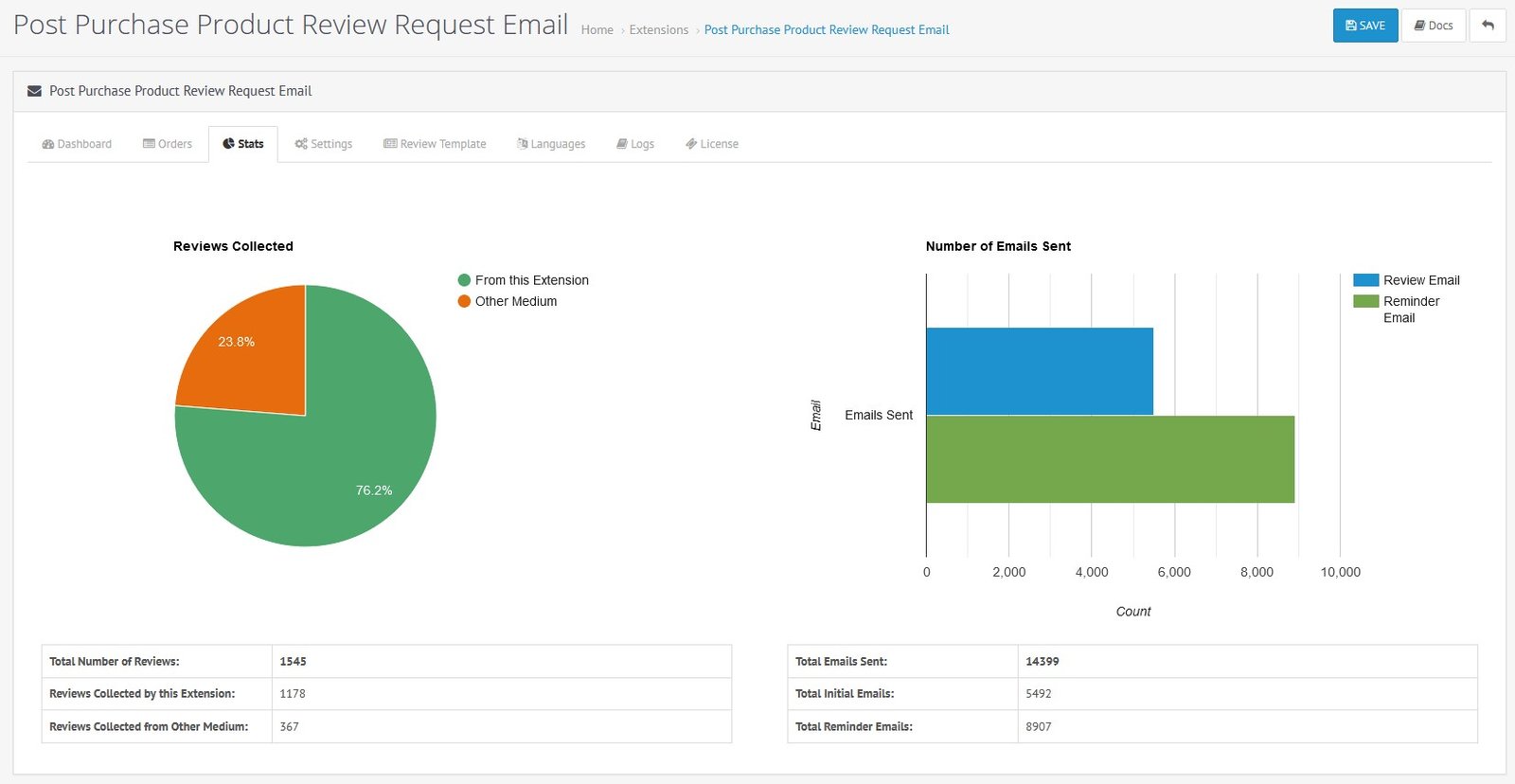
One of our customers collected 1,178 product reviews using FeedbackFlow. Out of these, a staggering 76.2% were directly generated through the extension, showcasing its effectiveness in driving customer feedback.


customer success story

2. Boosting Engagement

Another retailer using FeedbackFlow reported an 80% increase in review submissions within the first three months. Their most popular product alone gained 200+ reviews, significantly boosting customer confidence and sales.

3. Improved Customer Feedback

A fashion store saw a 65% improvement in review collection for their latest collection. By targeting specific categories with FeedbackFlow, they turned first-time buyers into loyal customers by actively responding to their feedback.


Why Choose HuntBee for Your OpenCart Store?

When you install a HuntBee extension, you are choosing a solution built by an experienced OpenCart specialist who understands real-world store challenges.

  • VerifiedOfficial OpenCart Partner with proven expertise
  • Established OpenCart Specialist Since 2012
  • 14+ Years Dedicated to OpenCart Development
  • 100+ Extensions Used by OpenCart Stores Worldwide
  • Performance-focused and SEO-friendly architecture
  • Continuous improvements and dependable support

Complete Feature Catalogue

Explore what this extension can do for your store, with practical examples.

Features for OpenCart 3

Storefront Features

Feature What it does / Real-world example
Invite customers to review products they purchased After an eligible order, the customer can receive an email inviting them to share their experience with the products they bought.
Open a dedicated review page from the email The review invitation includes a link to a review page that shows products from the customer's order.
Review different purchased products separately An order containing several products can show a separate review form for each product, so the shopper can describe individual items.
Give each product a rating from one to five A customer can select a star rating and write a comment describing how the purchased product performed.
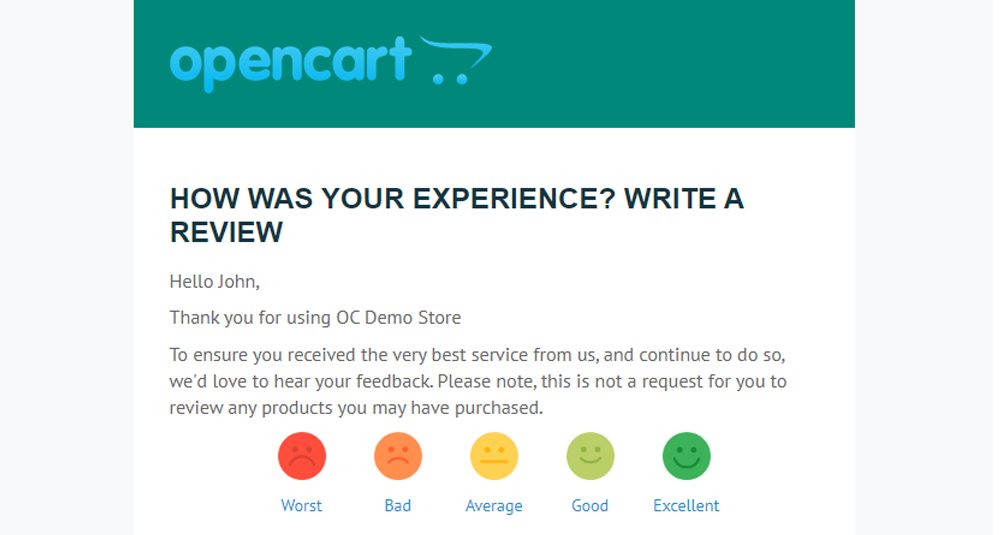
Start a review by clicking a rating in the email Rating links in the invitation can open the review page with the chosen score already passed to the form.
Show the purchased products on the review page The customer can recognize the item they are reviewing by its name and image, with a link back to the product.
Use the customer's order details in review forms The review page can prefill the shopper's name from the relevant order, reducing repetitive typing.
Invite guests as well as registered customers Orders with a guest email address can be selected for invitations without requiring the buyer to have a registered account.
Save submitted reviews through OpenCart's review system The submitted name, rating and comment are passed to OpenCart's standard product review model, where the store's normal review moderation rules apply.
Show confirmation or validation messages after submitting The review page displays a success message when a product review is accepted, or explains problems with required fields.
Thank the customer after finishing the review forms When the displayed review process is completed, the shopper can see a thank-you message and a link back to the store.
Avoid showing products already reviewed through the recorded invitation The review page checks available review records and can omit products already reviewed, instead of asking for the same product feedback again.
Show configurable review-page wording in the customer's language The review page can use the order's recorded language for its rating labels, submit button and thank-you message.
Let shoppers unsubscribe from review invitations An unsubscribe link in the invitation lets recipients add their email address to the review-email suppression list.
Choose a simpler rating form when needed The storefront can use the optional Bootstrap star-rating control or standard one-to-five radio buttons if the theme has a JavaScript conflict.

Admin & Management

Feature What it does / Real-world example
See the review-invitation history from one dashboard Review recorded orders, recipients, email activity and product feedback without searching through individual orders.
Inspect recorded review invitation activity The invitation history lists order number, recipient, language and the date of the recorded request.
Check reminders associated with each invitation See how many reminder attempts are recorded and their available dates for an order.
See recorded email-open activity The dashboard indicates when an invitation's tracking image was loaded, which may depend on the recipient's email application.
See which ordered products have submitted reviews Open a recorded invitation to inspect the reviewed products and the number of product reviews attributed to it.
See review progress for each invitation Compare the number of reviewed products with the number of products in an order to understand how much feedback has been collected.
Search invitation records by order or email Find the correct review-invitation history using the order number or recipient's email address.
See orders waiting for their first review email A separate Orders list shows qualifying orders for which the extension has not recorded an initial review invitation.
Inspect items in an order awaiting an invitation Review product names, models, quantities, options and totals before manually requesting feedback.
Send a review invitation manually Choose an eligible order from the admin and send its initial review email without relying on the scheduled job.
Preview the exact email before sending it Check the subject and rendered message for a selected order and confirm the send from the admin dialog.
See recorded invitations, reminders and attributed reviews The Stats page summarizes recorded initial requests and reminder attempts, alongside product reviews linked to the extension.
Compare extension-attributed reviews with all product reviews Statistics show reviews collected through the extension alongside the overall OpenCart product-review count.
Choose the order status that starts review invitations For example, select a delivered or completed status so customers are contacted after a qualifying order reaches that status.
Choose how many days to wait before requesting a review Set the delay in days between a qualifying order's recorded status-update date and its first invitation.
Choose whether follow-up review emails are enabled Turn scheduled reminders on or off; the worker uses saved invitation records, reminder timing and count limits when selecting follow-ups.
Limit how many reminder emails are scheduled Configure the maximum reminder count so review invitations do not continue indefinitely.
Choose the number of days between reminders Set a gap such as three days between eligible follow-up invitation attempts.
Choose order-level or product-level review targeting Select whether invitations are evaluated against the order as a whole or against the individual products it contains. Product-specific email behavior should be tested before use.
Restrict product-level invitations to selected items If only selected products should receive individual requests, choose them from the product selector.
Restrict product-level invitations to selected categories Choose categories whose products should qualify for individually selected review requests.
Hide older orders from the pending-invitation list Set a cutoff date so the admin Orders tab does not show older uninvited orders you do not intend to contact.
Set up review invitations separately for multiple stores Switch between OpenCart stores to manage that store's email templates, scheduling settings and recorded invitations.
Choose separate first and reminder email templates for each language Give English and other store languages different messages for initial invitations and follow-ups.
Customize customer-facing review-page text for each language Change star-rating descriptions, form labels and thank-you wording without editing the review-page template.
Create, edit and remove review email templates Manage multiple saved invitation designs rather than being limited to one unchangeable message.
Customize the appearance and wording of review emails Edit the HTML email body and its content using the supplied email template editor.
Start from ready-made email layouts Choose a supplied layout and sample content to build an invitation design more quickly.
Adjust basic email template colours and width Change available layout colours and width options to better suit the store's branding.
Customize sender, reply-to and BCC settings Set the email subject, sender identity, reply-to address and optional BCC for an invitation template.
Insert customer, store and review details into email templates Use supported shortcodes for names, store information, product blocks and the review link rather than entering order details manually.
Show purchased-product information in invitation emails Add a reusable block that displays purchased products and their review links in the message.
Include a clickable rating block in email templates Choose a supplied rating-block design to let recipients start a one-to-five-star review from the invitation.
Choose a rating-block layout per language Use a suitable available rating template for each translated email.
Choose how products are displayed in email content Select the supplied purchased-product layout for each language's invitation template.
Preview email templates at desktop, tablet and mobile widths Inspect how a template looks at different screen sizes before assigning it to invitations.
Adjust product image sizes in invitation emails Configure the thumbnail width and height used for product pictures shown in review emails.
Adjust product image sizes on the review page Configure the width and height of the product images shown to customers while writing feedback.
View customers who opted out of review requests Review saved unsubscribed email addresses and their recorded dates or IP details.
Remove an email address from the opt-out list An administrator can delete a selected unsubscribe entry when a valid reason exists to restore review-email eligibility.
Inspect review email processing activity Review log messages relating to scheduled runs, sent emails and configuration or delivery errors.
Clear old review processing logs Remove accumulated activity log text from the admin when it is no longer needed.
Copy the suggested daily scheduled-job command The settings page provides a cron command containing the storefront route and configured passkey.
Set the access key required for automated sending Configure the secret passkey checked before the storefront's scheduled review-email route runs.
Browse review invitations page by page The invitation history is split into pages so you can inspect recorded requests without displaying every order at once.

Automation & Maintenance

Feature What it does / Real-world example
Automatically send initial requests for qualifying orders On each scheduled run, the extension finds orders with the selected status and configured day delay, then prepares review invitations.
Send scheduled review reminders when enabled The job selects recorded invitations that meet the reminder timing and count rules and prepares follow-up emails.
Use a separate template for reminder emails Initial and subsequent requests can use different messages rather than repeating the same email wording.
Avoid deliberately scheduling the first invitation twice Before an automatic first email, the worker checks whether an invitation record already exists for that order and email address.
Check whether a requested product has already been reviewed For an individual-product request, the processor consults tracked reviews and supported native product reviews before preparing another invitation.
Skip recipients on the review-email unsubscribe list The sending process checks whether an email address is suppressed before sending its invitation.
Record a review invitation open when images are loaded Sent emails can include a small tracking image that marks the invitation as viewed when the recipient's email application loads it.
Record which product was reviewed from an invitation When a submitted review succeeds, the extension stores the association between the invitation, product and customer for reporting.
Maintain reminder counts and follow-up dates The extension updates the reminder counter, reminder log and most recent activity date for each processed follow-up.
Use the order language for invitation content The email composer reads the language stored with an order when choosing translated templates and review-page wording.
Fill email templates with current order and store values The composer replaces supported placeholders such as the review URL, product information and customer details before sending.
Add source tags to links from review invitations Links to products and the review form can include HuntBee's campaign parameters so supported analytics can distinguish review-email visitors.
Process the storefront associated with each scheduled route Each store's scheduled request uses its own configured review settings and selects orders belonging to that store.
Use HuntBee Email Template Designer when installed If the compatible separate email designer extension is installed, review invitation composition and delivery can use its template service.
OPENCART
Compatibility 3.0.5.1, 3.0.5.0, 3.0.4.1, 3.0.4.0, 3.0.3.9, 3.0.3.8, 3.0.3.7, 3.0.3.6, 3.0.3.5, 3.0.3.3, 3.0.3.2, 3.0.3.1, 3.0.3.0, 3.0.2.0, 3.0.1.2, 3.0.1.1, 3.0.1.0, 3.0.0.0,

2.3.0.2, 2.3.0.1, 2.3.0.0, 2.2.0.0, 2.1.0.2, 2.1.0.1, 2.0.3.1, 2.0.2.0, 2.0.1.1, 2.0.1.0, 2.0.0.0
Requirement No OCMOD / VQMOD dependency
Core Files Overwrite NO
Multi-store Yes
Multi-lingual Yes
TECHNOLOGIES
Framework OpenCart
Languages PHP, HTML, CSS, AJAX, JQUERY
Existing Libraries Used Jquery, Bootstrap, fontawesome.io
Additional Libraries Added / Used bootstraptoggle

VERSION : 3.2.7DATE RELEASED: 09 Aug 2026
  • Minor Fixes

VERSION : 3.2.6DATE RELEASED: 18 Oct 2025
  • Implemented cURL handling to fix CORS conflicts in multi-store setups for admin-side manual operations.

VERSION : 3.2.5DATE RELEASED: 02 Aug 2024
  • Fixed product language 

VERSION : 3.2.4DATE RELEASED: 03 Feb 2024
  • Minor fixes related to PHP 8+

VERSION : 3.2.3DATE RELEASED: 20 Dec 2023
  • Minor Update. Correct documentation link in the email template editor. (opencart 2.3.x.x & 3.x.x.x)

VERSION : 3.2.2DATE RELEASED: 17 Oct 2023
  • Fix bug related to sending email using the normal method
  • Review Link Fix

VERSION : 3.2.1DATE RELEASED: 15 Oct 2023
  • Minor bug fixed related to issue saving template (for OpenCart 3x versions)

VERSION : 3.2.0DATE RELEASED: 02 Sep 2023
  1. New Feature: Email template system redesigned. Admin can create unlimited email templates
  2. Email template system is now compatible with our Email Marketing Tools & Campaign Management Extension. Admin can also create email templates from this Email Designer Extension and more features of Email Template Designer can be incorporated for the Email Tempate.
  3. New Feature: Eligible Products & Eligible Categories filter. With the feature, admin can optionally assign products or category of products for which Review Invitation email has to be sent.
  4. New Feature: Enable/Disable Bootstrap Rating Script to overcome template conflicts noticed for few customers.
  5. More error validation
  6. Language file updates
  7. More sample email templates
  8. Code Optimization

VERSION : 3.1.4DATE RELEASED: 01 Sep 2022
  • {review_link} short-code fix

VERSION : 3.1.2DATE RELEASED: 27 Jan 2021
  • Fixed minor bug w.r.t unsubscribe

VERSION : 3.1.1DATE RELEASED: 17 Dec 2020
  • Added Unsubscribe Option
  • Multi-language text missing issue fix
  • Language Addition for the email subject line (<Product name> and <count> more item(s))

VERSION : 3.0.3DATE RELEASED: 02 Jun 2020
  1. Validation added if product count in any order is 0
  2. Added number_format for Reviewed Products Percentage
  3. Orders List tab : Show oldest order first

VERSION : 3.0.2DATE RELEASED: 20 May 2020

Minor issue fixed related to hiding the older order records. 

The following file is updated

[23xx-3xxx] admin/controller/extension/hbapps/order_review.php  
[2000-2200] admin/controller/hbapps/order_review.php

VERSION : 3.0.1DATE RELEASED: 16 May 2020
  1. Bug fixed. [Link that registers the review which was missed to update is fixed].

VERSION : 3.0.0DATE RELEASED: 29 Apr 2020
  1. Extension algorithm redesigned
  2. Maximum compatibility code added
  3. Improvised Email Samples
  4. Easy Setup
  5. Email Preview
  6. Dashboard Improved
  7. Google Graph Added
  8. Reminder Sent Date log added
  9. Email skips for products already reviewed by the same customer
  10. Cron Job link updated
  11. Better Email Tracking Code

Update Instruction:

Please submit a support ticket in https://www.huntbee.com/get-support for the extension upgrade.


VERSION : 2.0.1DATE RELEASED: 01 Nov 2017
  • Minor template bug fixed
  • Folder restructured for 3.x.x.x due to OpenCart directory level permission restriction

VERSION : 2.0DATE RELEASED: 10 Sep 2017
  1. The entire extension has been designed 
  2. Compatibility for OpenCart 2.0.x.x, 2.1.x.x, 2.2.0.0, 2.3.x.x, 3.0.x.x
  3. New Feature: Send email by Order 
  4. Cron Job script optimized and added more security feature
  5. Separate email template for initial email and reminder emails
  6. Sample Email templates
  7. Log Feature added
  8. Online documentation added https://www.huntbee.com/documentation/docs/productorder-review-request-email/

VERSION : 1.1.1DATE RELEASED: 12 Feb 2017

Minor bug fixed. {product_name} shortcode was not working on reminder emails.


VERSION : 1.0DATE RELEASED: 22 Jun 2016

First Release

Customer feedback

Reviews (7)

5 / 5
Excellent
7 reviews
Yevhen Vasin 05/05/2025
Excellent
I really like how this module is designed – everything is customizable, and the default templates are quite helpful to start from! I was able to configure the extension within 1 day, which includes setting up the extension, creating email template, adjustments for the reviews page template.

I also appreciate the functionality: flexibility of settings, reminder feature, pixel for tracking if email was opened, and if the review was submitted (and even for how many products out of the specific order!).

Thank you!
MANMOHAN TAMADA 21/12/2022
Excellent
VERY USEFUL PRODUCT AND HAS GOOD SUPPORT
Milen 04/07/2022
Excellent
Perfect product and service. Very happy.
As advise I would say it could be good to add the possibility to send a coupon code as a kind of offer to the client who leaved a review.
Juliana 22/10/2020
Excellent
A extensão é muito boa. Fácil e usar, fácil de instalar. Tudo configurável. Funcionando direitinho. Só consegui avaliações quando comecei a usar ela.
Kwame Ferg 06/05/2020
Excellent
great extension...Highly recommend.
David Cropley 19/02/2018
Excellent
Really useful tool as it will save me £100s on fees from greedy review companies for their so called automated systems. Easy to use and versatile enough so that I can create my own template with links to 3rd party reviewers such as Google reviews, etc and nice page to entice customers to leave product reviews on-site. Quick and helpful support from Huntbee as usual too. Fantastic!
Simone Steiger 22/08/2016
Excellent
Beside the fact that this tool is really useful the support of the creator is stunning!! Highly recommended!!
Showing 1 to 7 of 7 (1 Pages)
Share your experience

Write a review

Note: HTML is not translated!
Choose 1 to 5 stars
Captcha
Tags

Frequency Asked Questions (FAQs)

How can FeedbackFlow: Post-Purchase Review Invitation for OpenCart help increase my store's sales?
FeedbackFlow: Post-Purchase Review Invitation for OpenCart boosts your store's sales by encouraging customers to leave reviews through automated emails. Positive reviews build trust and can significantly influence purchasing decisions of potential customers.
Can I target specific products for review requests in OpenCart using FeedbackFlow?
Yes, with FeedbackFlow: Post-Purchase Review Invitation for OpenCart, you can select specific products or categories that will trigger review request emails. This helps focus feedback on key items in your store.
Does FeedbackFlow support sending reminders for reviews in OpenCart?
Absolutely, FeedbackFlow: Post-Purchase Review Invitation for OpenCart includes the feature to send reminder emails to customers who have not yet submitted a review, enhancing the likelihood of receiving feedback.
How does FeedbackFlow handle multi-language setups in OpenCart?
FeedbackFlow: Post-Purchase Review Invitation for OpenCart is fully compatible with multi-language setups, allowing you to engage with customers globally in their native language, thus improving customer satisfaction and feedback rates.
Is FeedbackFlow suitable for OpenCart stores with multiple store setups?
Yes, FeedbackFlow: Post-Purchase Review Invitation for OpenCart supports multi-store setups, making it an ideal choice for businesses operating several OpenCart stores under different brands or markets.
How can automated review emails from FeedbackFlow improve customer engagement in OpenCart?
FeedbackFlow: Post-Purchase Review Invitation for OpenCart sends timely automated emails to customers, prompting them to share their experiences. This not only helps in gathering valuable feedback but also keeps your customers engaged with your brand.
What are the advantages of using FeedbackFlow over manual review requests in OpenCart?
Using FeedbackFlow: Post-Purchase Review Invitation for OpenCart automates the entire review request process, saving time and reducing the effort compared to manual methods. Automated reminders also increase the chances of receiving feedback.
Can I customize the review invitation emails sent by FeedbackFlow in OpenCart?
Yes, FeedbackFlow: Post-Purchase Review Invitation for OpenCart allows you to customize the emails, offering flexibility whether to send a single email for all products or individual emails per product, tailored to your brand’s voice.
How does the custom review form provided by FeedbackFlow enhance the review process in OpenCart?
The custom review form included in FeedbackFlow: Post-Purchase Review Invitation for OpenCart features auto-login functionality, making it easier for customers to submit their feedback directly, thus improving response rates and user experience.
What is the role of cron job automation in FeedbackFlow for OpenCart?
Cron job automation in FeedbackFlow: Post-Purchase Review Invitation for OpenCart ensures that review invitation and reminder emails are sent out efficiently without any manual intervention, enhancing the reliability of the process.
How does FeedbackFlow help in collecting more authentic customer reviews for OpenCart stores?
By automating the sending of timely and personalized review request emails, FeedbackFlow: Post-Purchase Review Invitation for OpenCart encourages more customers to share honest feedback, leading to more authentic and valuable reviews.
Can FeedbackFlow's automated emails be scheduled at a specific time after purchase in OpenCart?
Yes, FeedbackFlow: Post-Purchase Review Invitation for OpenCart allows you to schedule the automated review emails to be sent out after a specific number of days post-purchase, ensuring optimal timing for maximum response rate.
What makes FeedbackFlow a critical tool for improving service quality in OpenCart stores?
FeedbackFlow: Post-Purchase Review Invitation for OpenCart collects valuable customer insights, which can be instrumental in understanding customer needs and improving product offerings and service quality in your OpenCart store.
How does increasing customer feedback with FeedbackFlow impact SEO for OpenCart stores?
More customer reviews generated through FeedbackFlow: Post-Purchase Review Invitation for OpenCart can improve SEO by creating fresh, user-generated content that helps increase organic search visibility and drive more traffic to your store.
Why should I choose FeedbackFlow for my OpenCart store instead of other review tools?
FeedbackFlow: Post-Purchase Review Invitation for OpenCart is specifically designed for OpenCart, with features like multi-store and multi-language support, automated and customizable emails, and a user-friendly review form, making it highly effective and tailored for OpenCart users.
This extension / product is currently unavailable to download. Enter your email address below and we will notify you as soon as the product becomes active.
Name
Email
Comments