
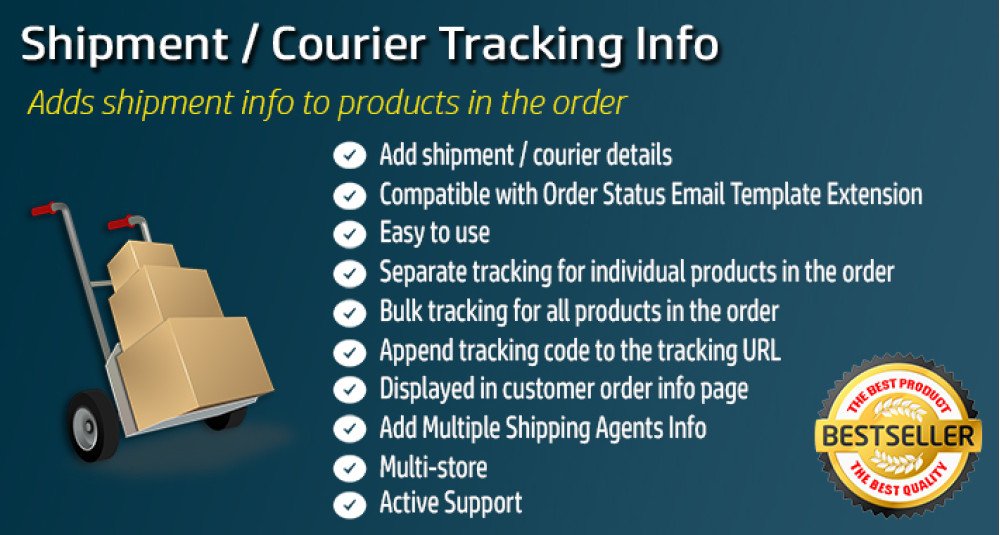


Order Shipment Tracking Details with Email for OpenCart
- Developer: Priyabrata Ghorai
- Product Code: OpenCart Extension
- Availability: In Stock
- Free premium support for 6 months
- OpenCart Link ($22.00)
-
$21.00
Easily Manage Shipment Tracking & Notifications in OpenCart
Order Shipment Tracking Details is an OpenCart extension that helps store owners manage manual shipment tracking information directly from the admin order workflow. Admins can add shipment rows per order product, assign courier partners, save tracking numbers, and send shipment emails to customers without leaving the order management flow.
This OpenCart shipment management solution is designed for stores that want a practical way to maintain tracking records, improve post-purchase communication, and show shipment details to logged-in customers on the order info page. The default package does not include the separate guest tracking page, which is treated as a paid add-on.
Problem Statement
Many OpenCart stores ship orders manually or work with multiple courier partners, but OpenCart does not provide a complete built-in workflow to manage shipment tracking details at the order-product level. This makes it harder to store tracking data properly, notify customers, and keep shipment communication organized.
Without a proper OpenCart shipment tracking workflow, customers often need to contact the store to ask for courier information, shipment updates, or tracking numbers. That increases support workload and creates unnecessary delays in post-purchase communication.
Who Is This Extension For?
This OpenCart extension is suitable for:
- Stores that manually manage shipments and courier assignments
- Businesses using multiple shipping partners
- Stores that need shipment tracking details for individual ordered products
- Merchants who want better shipment email communication
- OpenCart stores that want shipment details visible in the customer account order page
- Businesses looking for a more structured shipment handling process inside OpenCart admin
Key Benefits
- Improves customer communication by allowing shipment emails with tracking details to be sent from the order workflow.
- Reduces support questions by making shipment information available to logged-in customers in their OpenCart account order page.
- Keeps shipment records organized by storing courier, tracking ID, shipped quantity, delivery date, and related shipment data in the database.
- Supports real operational workflows by allowing shipment rows per order product instead of forcing a single basic tracking note for the entire order.
- Gives more control over shipment emails with templates, preview options, quick send settings, and shipped-item block templates.
- Works well for OpenCart stores with multiple themes through theme-specific OCMOD handling for default, Journal2, and Journal3 related logic.
Purpose of the Extension
The purpose of this OpenCart extension is to give store owners a reliable system to manage shipment tracking details, courier information, and shipment email communication from within the OpenCart admin area. It helps maintain accurate shipment records while improving the customer experience after an order is dispatched.
It is especially useful for businesses that need manual control over shipment handling, want to keep shipment data structured, and prefer sending shipment notifications based on actual order shipment entries rather than generic order status updates alone.
Complete Feature List
- Shipment partner management
Add and manage courier or shipping partners from admin. Each courier can include its own tracking link structure and store-specific data. - Shipment row management per order product
Save shipment rows against specific order products, including shipped quantity, courier, tracking ID, delivery date, and shipment status-related data. - Admin order integration through OCMOD
The extension injects shipment tracking controls into the OpenCart admin order workflow, making shipment handling more convenient during order processing. - Logged-in customer order page integration
Shipment details are injected into the account order info page for logged-in customers using OCMOD. - Shipment email notifications
Send shipment emails to customers after shipment data is saved. Email behavior includes preview, send flow, and mail flag tracking on shipment rows. - Customizable shipment email templates
Manage template mapping, single-item and multi-item shipment templates, shipped-item block templates, and email content layouts. - Template preview and quick send options
Control preview and quick save/send behaviors through settings for a smoother shipment email workflow. - Order history comment support
Add shipment-related history comments when shipment data is saved, based on configured language-specific settings. - Optional SMS integration hooks
Includes SMS-related settings and hooks for stores that want to extend shipment communication beyond email. - Admin dashboard sections for shipment operations
The admin UI is organized into tabs such as shipped orders, shipment partners, settings, templates, SMS, logs, and guest tracking page information. - Theme-aware OCMOD support
Supports theme-specific OCMOD template selection for default, Journal2, and Journal3 environments. - Guest tracking page as a separate paid add-on
A dedicated public tracking page for non-logged-in users is not included in the default package and is supplied separately on request.
How to Use
1. Install the extension
Copy the upload files into your OpenCart root, install or update the extension using your normal admin workflow, and refresh modifications. Clear theme or modification cache if required.
2. Configure shipment partners
Go to the shipment partner management area and add the courier services you use for shipping. This allows the extension to link shipment rows with courier records.
3. Adjust settings
Configure the important shipment settings, including template mapping, shipped-item block template, eligible statuses, shipped status, image dimensions, preview options, quick-send settings, and shipment history comment text.
4. Manage shipment data from the order workflow
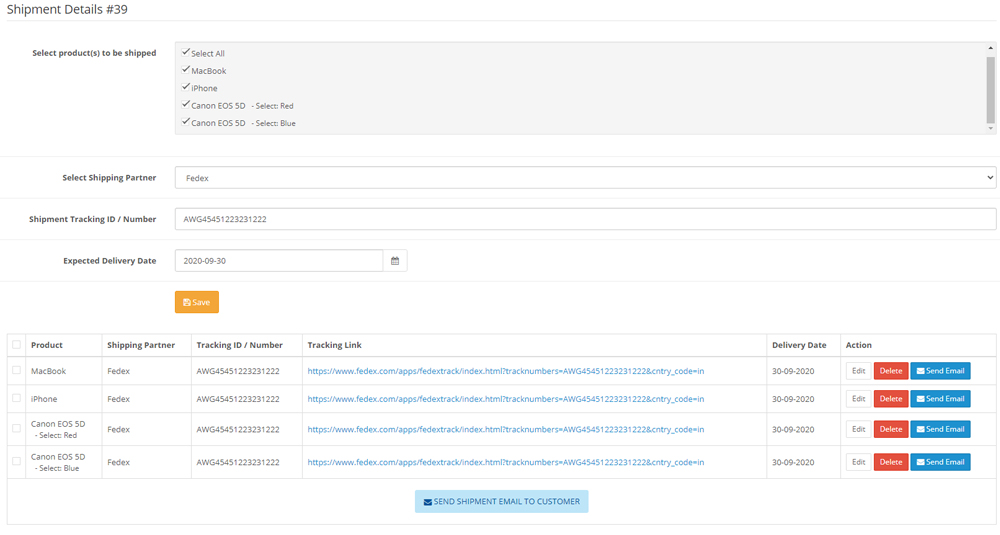
Open an order in admin and use the injected shipment interface to add shipment rows for the relevant order products. Save courier, tracking number, shipped quantity, delivery date, and other shipment details.
5. Send shipment emails
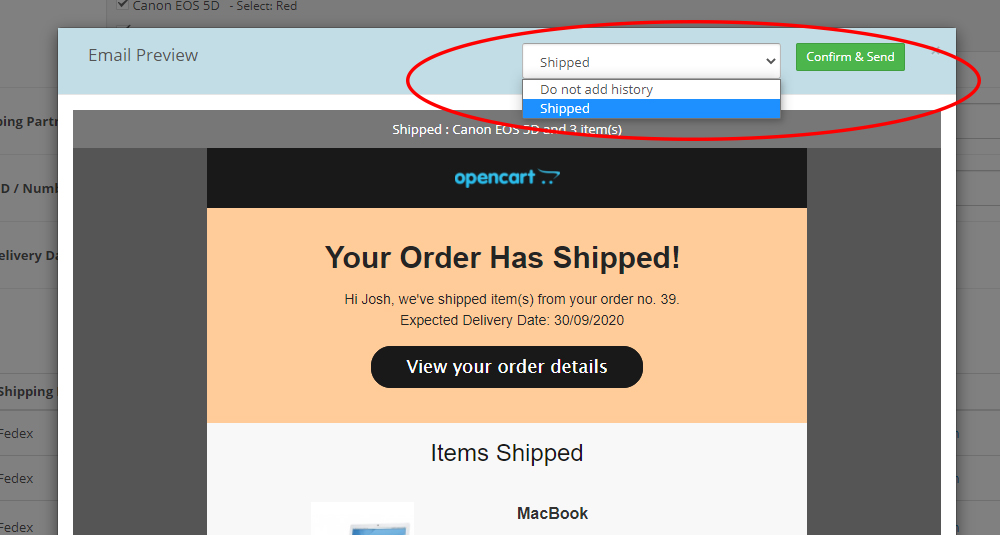
Once shipment rows are saved, use the shipment email tools to preview and send the shipment notification to the customer.
6. Customer views shipment details
Logged-in customers can see their shipment details on the OpenCart account order info page if the OCMOD integration is active.
Use Cases
- Manual shipment operations
Ideal for OpenCart stores that manually dispatch orders and want structured shipment tracking records. - Multiple courier workflows
Useful for businesses working with different shipping partners for different order types. - Product-level shipment handling
Suitable for stores where items in the same order may be shipped separately or tracked individually. - Post-purchase communication improvement
Helps stores send more meaningful shipment emails instead of relying only on basic order status updates. - Customer self-service for logged-in users
Allows logged-in customers to view shipment details inside their OpenCart account order page. - Paid upgrade opportunity for guest tracking
Stores that want a dedicated shipment lookup page for guest users can request the separate premium add-on.
Expected Results
- Customers receive clearer shipment communication through structured shipment emails.
- Store owners maintain better shipment records inside OpenCart admin.
- Logged-in customers can view shipment details without contacting support.
- Admin teams can process shipment updates more efficiently from within the order workflow.
- OpenCart stores can present a more professional post-order experience with courier details, tracking IDs, and customizable shipment email templates.
| OPENCART | |
| Compatibility | 4.1.0.3, 4.1.0.2, 4.1.0.1, 4.1.0.0, 4.0.2.3, 4.0.2.2, 4.0.2.1, 4.0.1.1, 4.0.1.0, 4.0.0.0, 3.0.5.0, 3.0.4.1, 3.0.4.0, 3.0.3.9, 3.0.3.8, 3.0.3.7, 3.0.3.6, 3.0.3.5, 3.0.3.3, 3.0.3.2, 3.0.3.1, 3.0.3.0, 3.0.2.0, 3.0.1.2, 3.0.1.1, 3.0.1.0, 3.0.0.0, 2.3.0.2, 2.3.0.1, 2.3.0.0, 2.2.0.0, 2.1.0.2, 2.1.0.1, 2.0.3.1, 2.0.2.0, 2.0.1.1, 2.0.1.0, 2.0.0.0 |
| Requirement | OCMOD |
| Core Files Overwrite | No Core files overwritten |
| Multi-store | Yes, Supports Multi-store |
| Multi-lingual | Yes, Support Multi-language website |
| TECHNOLOGIES | |
| Framework | OpenCart |
| Languages | PHP, HTML, CSS, AJAX, JQUERY, JAVASCRIPT |
Admin Demo
Admin Panel:
https://opencart-demo.huntbee.com/demo/admin/index.php?route=extension/hbapps/order_shipment&store_id=0
Login credentials are pre-filled for convenience.
This page shows the main configuration interface where you can manage all shipment-related settings.
From this section you can:
- Configure shipment settings
- Manage courier / shipment partners
- Configure email templates
- Configure shipped product block layout
- View shipment logs
- Control email preview and quick-send behavior
- Configure eligible order statuses and shipped status
- Configure shipment email content structure
How to test shipment workflow in admin
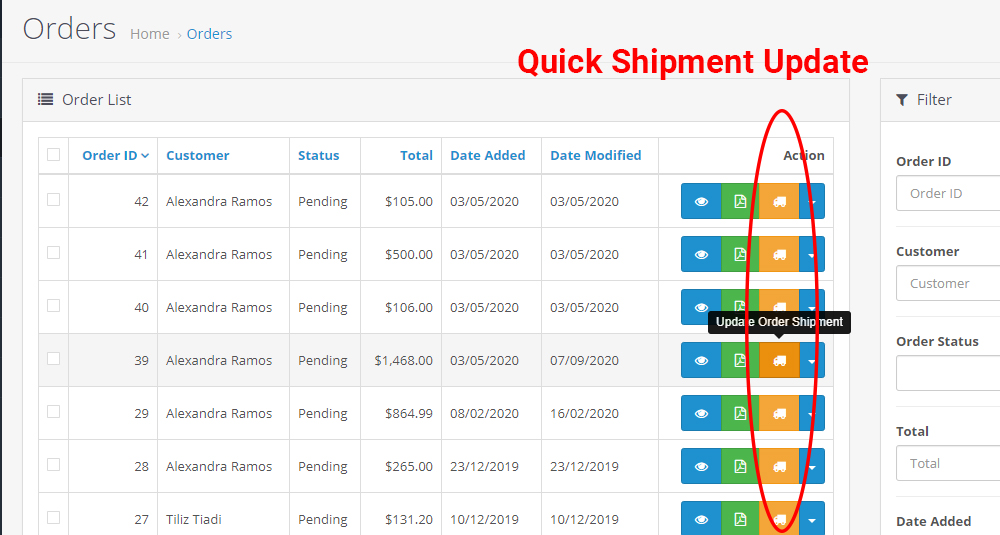
- Go to Sales → Orders
- You will see a Shipment button available for each order row
- You can either:
- Click the Shipment button directly from the order list, OR
- Click the View button to open the order details page
- Inside the order view page, the shipment form is integrated directly into the order interface.
- From the shipment form you can:
- Select the product to ship
- Choose courier partner
- Enter tracking number
- Enter shipped quantity
- Enter delivery date (optional)
- Add shipment notes
- Save shipment information
- Send shipment email notification to customer
Shipment entries are stored in the database and can be edited later if required.
Customer Account Demo
Frontend customer login is also pre-filled in the demo store.
After logging in:
- Go to My Account → Orders
- Open any order using the View button
- Shipment details will be visible inside the order page
Customers can see:
- Courier partner name
- Tracking number
- Shipment details per product
- Multiple shipment entries if products are shipped separately
This helps customers easily access delivery information without contacting the store.
Optional Guest Tracking Page (Premium Add-on)
Demo URL:
https://opencart-demo.huntbee.com/demo/index.php?route=extension/module/order_shipment
This page allows customers who are not logged in (guest users) to check shipment information using:
- Order ID
- Email address
This feature is not included in the standard package and is available as an additional add-on. Some themes may require minor frontend adjustments depending on layout structure.
Demo Tips
- Try creating multiple shipment entries for the same order to see how separate shipments are handled.
- Test email preview before sending shipment notifications.
- Review how shipment details appear in the customer order page.
- Explore shipment partner configuration and template settings for flexible email formatting.
Open demo instruction in new tab
| VERSION : 3.6.0 | DATE RELEASED: 04 Apr 2026 |
For OpenCart 3x Versions only
| |
| VERSION : 5.1.3 | DATE RELEASED: 16 Dec 2021 |
| |
| VERSION : 5.1.2 | DATE RELEASED: 09 Mar 2021 |
| |
| VERSION : 5.1.1 | DATE RELEASED: 18 Feb 2021 |
| |
| VERSION : 5.1.0 | DATE RELEASED: 18 Dec 2020 |
| |
| VERSION : 5.0.0 | DATE RELEASED: 07 Sep 2020 |
To update to this version, raise a support ticket. | |
| VERSION : 4.0.1 | DATE RELEASED: 06 Jan 2020 |
| |
| VERSION : 4.0.0 | DATE RELEASED: 24 Dec 2019 |
Update Instruction (3.x.x to 4.0.0)
| |
| VERSION : 3.0 | DATE RELEASED: 17 Feb 2018 |
| |
Related Products

Order Status Email / SMS Template Designer PRO
The Order Status Email / SMS Template Designer PRO extension enhances OpenCart’s default mailing system by allowing full customization of order-related emails and SMS notifications. It overrides the standard OpenCart order confirmation, or..
$21.00

Email Template Designer PRO Pack
The Email Template Designer PRO Pack is the ultimate email marketing and automation solution for OpenCart. This pack combines powerful tools to help you design, customize, and automate email communications with customers, imp..
$46.00

Order ID PRO Setup
By default, OpenCart generates single-digit order IDs, which may not give your store a professional and established feel. A 5-digit, 6-digit, or 7-digit order ID creates the impression of a well-established and trusted eCommerce business, enhancing custom..
$15.00

PDF Invoice Generator and Email Attachment PRO
The PDF Invoice Generator and Email Attachment extension for OpenCart automates the process of generating professional-looking PDF invoices and shipping labels. It allows you to send invoices as attachments via email when specific..
$18.00

Sales Performance Report
The Sales Performance Report extension for OpenCart helps you track and analyze your store’s sales data with ease. Sales reports are crucial for understanding your business performance, identifying trends, and making informed decisions for future gr..
$20.00

Secure Order Page Access Link
This OpenCart extension allows customers to access their order information page without requiring login credentials. The order page is secured by a unique key in the URL, ensuring only users with the link can view the order details. This feature..
$17.00

Shipping Method Restrictions based on Pincode or Category
The Shipping Method Restrictions extension for OpenCart allows you to enable or disable specific shipping methods at checkout based on the customer’s Pincode or the product category in their cart. This extensi..
$19.00
Orders Manager PRO
Orders Manager PRO is a powerful OpenCart extension designed to help store owners manage orders seamlessly. With advanced AJAX search, bulk order updates, and customizable order views, this tool saves time and improves workflow. Whether you..
$18.00
Tags: opencart order tracking, shipment tracking email, courier tracking opencart, manual shipment update, order tracking extension, customer order history tracking, opencart shipping update, order fulfillment management
