• Search
  • Abandoned Cart Emails - PRO

Recover Abandoned Carts & Boost Sales with Automated Emails

Abandoned Cart Emails - PRO is a complete OpenCart abandoned cart recovery extension designed to help store owners recover lost sales through automated, well-timed email follow-ups.

Instead of relying on a basic first email and reminder system, you can now build a complete multi-step abandoned cart email sequence, schedule each email in hours, assign different templates, offer progressively better coupon incentives, and track the complete recovery process.

The extension works with registered customers, guest customers, and identifiable visitors, making it suitable for stores that want a more complete approach to OpenCart abandoned cart recovery.


Problem Statement

Customers frequently add products to their cart but leave the store without completing checkout. This can happen because of distractions, price hesitation, checkout issues, payment problems, or simply because the customer decides to purchase later.

Without an automated recovery system, these potential orders are easily lost. Manually following up with every abandoned customer is also impractical for a busy OpenCart store.

Abandoned Cart Emails - PRO automates this process and gives store owners the tools required to bring potential customers back and measure the actual results.


Who Is This Extension For?

This OpenCart extension is ideal for:

  • Stores experiencing a high number of abandoned carts.
  • Store owners who want to automate abandoned cart follow-ups.
  • Businesses that want to send multiple recovery emails at different intervals.
  • Stores that use discount coupons as part of their recovery strategy.
  • Multi-language and multi-store OpenCart websites.
  • Stores that want better visibility into abandoned cart conversions and recovered revenue.
  • Businesses that want to track both registered and guest abandoned carts.

Key Benefits

  • Recover Lost Sales – Automatically follow up with customers who leave products in their cart.
  • Automate the Recovery Process – Create a complete sequence of emails instead of manually following up.
  • Send Emails at the Right Time – Configure each email delay in hours for more precise scheduling.
  • Increase Conversion Opportunities – Send multiple follow-up emails if the customer does not return after the first message.
  • Offer Smarter Discounts – Configure different coupon incentives for different recovery stages.
  • Restore Carts Instantly – Customers can return to their saved cart using a secure recovery link.
  • Track Recovery Performance – Monitor sent emails, email opens, recovered orders, coupons, and recovered revenue.
  • Understand Which Email Works Best – Compare the performance of each email step in your recovery sequence.
  • Reduce Manual Work – Cron-based automation continuously handles eligible abandoned carts.
  • Improve Customer Experience – Send timely reminders instead of generic repeated messages.

Purpose of the Extension

The purpose of Abandoned Cart Emails - PRO is to provide OpenCart store owners with a structured and automated system for recovering abandoned shopping carts.

The extension helps you identify potential customers, communicate with them through a configurable email sequence, encourage them with optional coupons, and measure whether those recovery efforts actually result in completed orders.


Complete Feature List

Dynamic Abandoned Cart Email Sequence

  • Unlimited-Style Recovery Workflow – Configure multiple abandoned cart email steps instead of being limited to a first email and basic reminders.
  • Add Multiple Email Steps – Create different stages such as First Reminder, Second Reminder, Final Reminder, or any custom recovery flow.
  • Enable or Disable Individual Steps – Temporarily disable a specific email without deleting the sequence.
  • Custom Email Names – Give every recovery step an easy-to-understand internal name.
  • Hour-Based Scheduling – Configure exactly how many hours should pass before each email is sent.
  • Sequential Timing – The first email is scheduled after cart abandonment, while later emails are scheduled after the previous email.
  • Duplicate Prevention – Each configured sequence step is sent only once for the same abandoned cart.
  • Hourly Cron Compatible – Designed to work efficiently with an hourly cron job while respecting the configured email intervals.

Email Templates

  • Separate Template for Every Email Step – Use different messaging at different stages of the recovery process.
  • Multi-Language Templates – Select a different template for each configured OpenCart language.
  • Built-in Email Template System – Create professional abandoned cart email content directly from the extension.
  • Shortcode Support – Insert dynamic customer, cart, product, coupon, and recovery information into emails.
  • Global Product Image Dimensions – Configure a consistent product image size for recovery emails.
  • Personalized Content – Create more relevant follow-up emails using customer and cart information.

Manual Email Sending

  • Manual Recovery Email Sending – Send an abandoned cart email directly from the admin panel.
  • Select Specific Email Step – Choose exactly which configured sequence email should be sent.
  • Uses Correct Template and Coupon Settings – Manual emails follow the configuration of the selected email step.
  • Manual Send Logging – Manual emails are recorded separately in the email history.

Advanced Coupon Generation

  • Coupon Configuration Per Email Step – Decide whether each recovery email should generate a coupon.
  • Different Incentives at Different Stages – Offer a small discount initially and a stronger incentive later.
  • Cart Value Based Coupon Rules – Generate different discounts depending on the abandoned cart value.
  • Percentage Discounts – Generate percentage-based coupon codes.
  • Fixed Amount Discounts – Generate fixed-value coupon codes.
  • Multiple Coupon Rules – Configure several cart value thresholds in a single rule set.
  • Custom Coupon Validity – Configure how many days the generated coupon remains valid for each email step.
  • Product-Specific Coupons – Optionally restrict the generated coupon to products already present in the abandoned cart.
  • Free Shipping Support – Configure generated coupons to include free shipping where required.
  • Automatic Expired Coupon Cleanup – Automatically remove expired abandoned cart coupons.
  • Conditional Coupon Blocks – Hide coupon-related email content automatically when no coupon can be generated.

Example coupon rules:

0:10:p

Generates a 10% discount coupon regardless of cart value.

100:10:p, 200:15:p, 300:20:f

Can generate:

  • 10% discount when the cart meets the first threshold.
  • 15% discount when the cart meets the second threshold.
  • Fixed discount based on the configured third threshold.

Cart Recovery

  • One-Click Cart Recovery – Customers can return to their abandoned cart using the recovery link in the email.
  • Encrypted Recovery Links – Recovery URLs are generated securely.
  • Product and Cart Restoration – Helps customers continue from where they previously stopped.
  • Customer Last Action Tracking – View the customer's last recorded interaction with the store.
  • Last Visited Page Tracking – Quickly understand where the customer left the website.

Registered Customer Tracking

  • Registered Customer Cart Tracking – Monitor abandoned carts belonging to logged-in customers.
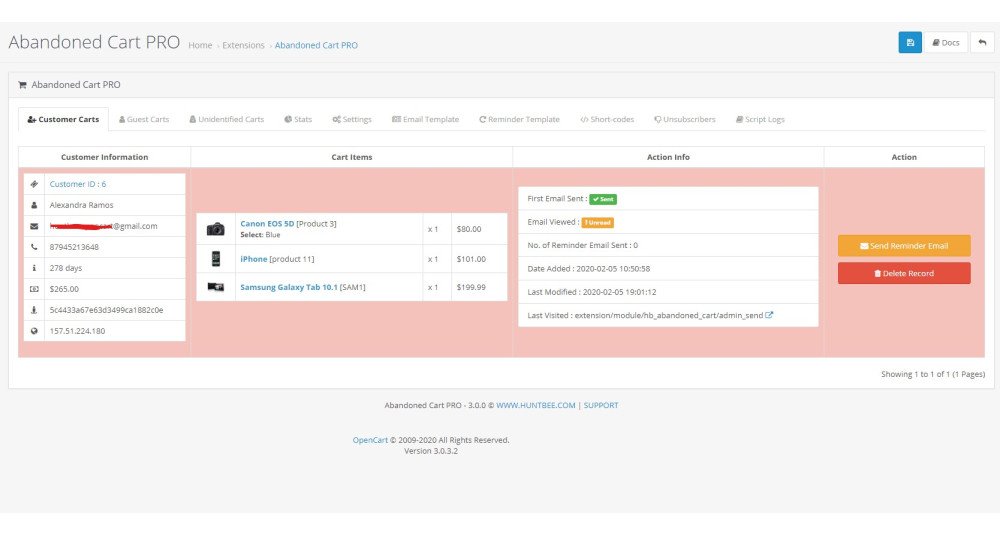
  • Customer Information Display – View relevant customer information directly from the abandoned cart dashboard.
  • Previous Customer Details – Helps identify whether the abandoned customer is an existing buyer.

Guest Cart Intelligence

  • Guest Abandoned Cart Tracking – Track carts belonging to visitors who are not registered customers.
  • Guest Email Capture – Collect email addresses from guest users for abandoned cart recovery.
  • Potential Customer Detection – Identify visitors showing purchasing intent even before completing registration.
  • IP Address Matching – Helps associate returning visitors with previously captured abandoned cart activity.

Exit Intent and Email Capture

  • Exit Intent Popup – Display a popup when a visitor appears ready to leave the website.
  • Guest Email Capture Popup – Encourage guest users to provide their email before leaving.
  • Improved Recovery Coverage – Increase the number of abandoned carts that can be followed up by email.

Email History

  • Complete Email History Per Cart – View all recovery emails associated with an abandoned cart.
  • Sequence Step Tracking – See which email step was sent.
  • Email Name and Template Tracking – Identify exactly which configured email was used.
  • Date and Time Logging – View when each recovery email was sent.
  • Cron / Manual Send Identification – Easily distinguish automated and manually sent messages.
  • Coupon Logging – View whether a coupon was generated and which coupon code was used.
  • Failed Email Information – Store useful failure information when available.
  • Improved Troubleshooting – Quickly investigate customer queries related to emails or coupons.

Conversion Tracking

  • Recovery Conversion Tracking – Identify abandoned carts that later become completed orders.
  • Email Open Tracking – Track whether recovery emails have been viewed.
  • Recovered Order Tracking – Connect successful recoveries with the corresponding order.
  • Recovered Revenue Tracking – Measure revenue generated from abandoned cart recovery.

Advanced Statistics

  • Abandoned Cart KPI Dashboard – View important abandoned cart metrics at a glance.
  • Emails Sent Statistics – Track how many recovery emails have been sent.
  • Email Open Statistics – Monitor engagement with recovery emails.
  • Recovered Orders – See how many abandoned carts resulted in completed orders.
  • Recovery Rate – Measure the percentage of abandoned carts successfully recovered.
  • Recovered Revenue – Understand the financial value generated by the extension.

Email Sequence Performance

  • Performance Per Email Step – Compare First Email, Second Email, Third Email, and additional configured steps.
  • Sent Count – See how often each recovery email was sent.
  • Open Performance – Compare customer engagement between different sequence emails.
  • Recovered Orders by Email Step – Identify which email stage contributes most to recovery.
  • Recovery Rate by Step – Discover which follow-up strategy performs best.

Coupon Performance Analytics

  • Coupons Generated – Track recovery coupons generated by the extension.
  • Coupons Used – Identify generated coupons that resulted in purchases.
  • Coupon Usage Rate – Measure how effectively discount incentives are being used.
  • Coupon Revenue Tracking – Measure revenue associated with coupon-based recoveries.
  • Performance by Email Step – Compare coupon effectiveness across different recovery stages.

Recovery Funnel

Track the customer recovery journey through stages such as:

  • Abandoned Carts
  • Emails Sent
  • Emails Opened
  • Coupons Generated
  • Coupons Used
  • Recovered Orders

This helps identify where customers are dropping out of the recovery process.

Revenue Recovery Insights

  • Abandoned Cart Value – Understand the potential value of abandoned carts.
  • Recovered Revenue – Measure sales successfully recovered.
  • Lost Cart Value – Compare recovered revenue against unrecovered opportunities.
  • Revenue Recovery Rate – Understand how effectively abandoned cart value is being converted back into sales.

Google Analytics Tracking

  • UTM Campaign Tracking – Add campaign tracking information to recovery links.
  • Analyze Recovery Traffic – Measure abandoned cart email traffic through Google Analytics.
  • Campaign Performance Insights – Compare abandoned cart recovery traffic with other marketing channels.

Multi-Store and Multi-Language

  • OpenCart Multi-Store Support – Configure and monitor abandoned cart recovery across multiple stores.
  • Multi-Language Support – Assign language-specific email templates to each sequence step.
  • Flexible Store Configuration – Suitable for larger OpenCart installations with different storefront requirements.

Compatibility

  • OpenCart Integration – Designed specifically for OpenCart.
  • Journal3 Quick Checkout Compatibility – Includes compatibility support for Journal3 Quick Checkout.

How to Use

  1. Install Abandoned Cart Emails - PRO from the OpenCart admin panel.
  2. Configure the abandoned cart tracking and cron settings.
  3. Create the required email templates.
  4. Build your abandoned cart email sequence.
  5. Configure the delay in hours for each email step.
  6. Assign the appropriate email template for each language.
  7. Optionally enable coupon generation and configure coupon rules for selected email steps.
  8. Configure the hourly cron job.
  9. Enable guest email capture or exit intent features if required.
  10. Monitor customer carts, guest carts, email history, conversions, and recovery statistics from the extension dashboard.

You can also manually send a specific recovery email from an abandoned cart record whenever required.


Use Cases

  • Recovering Recent Abandoned Carts – Send the first reminder a few hours after the customer leaves.
  • Multi-Step Recovery Campaigns – Follow up again after 24 hours, 48 hours, or several days.
  • Progressive Discount Strategy – Start without a coupon and offer stronger discounts in later emails.
  • High-Value Cart Incentives – Generate different discounts depending on cart value.
  • Guest Cart Recovery – Capture guest email addresses and bring potential customers back.
  • Customer Support Follow-Up – Manually send a selected recovery email when helping a customer.
  • International Stores – Send different abandoned cart templates based on customer language.
  • Performance Optimization – Compare sequence steps and remove emails that generate little engagement or recovery.
  • Revenue Monitoring – Measure exactly how much revenue is being recovered from abandoned carts.

Expected Results

After properly configuring the extension, OpenCart store owners can expect:

  • More recovered orders from customers who would otherwise leave without purchasing.
  • Higher abandoned cart conversion rates through systematic follow-up.
  • Better use of discounts by applying coupons only at selected recovery stages.
  • Improved customer engagement through timely and personalized email communication.
  • Greater visibility into which recovery emails and coupons are actually working.
  • Reduced manual effort through automatic hourly processing.
  • Better revenue insights through recovered order and recovered revenue tracking.

Actual results depend on store traffic, product pricing, checkout experience, email content, recovery timing, and discount strategy.


Requirements

  • A supported OpenCart installation.
  • Cron job access is recommended for automatic abandoned cart email processing.
  • A correctly configured OpenCart mail system for sending emails.
  • Email templates must be configured for the required store languages.
  • Customers or guest visitors must provide a valid email address before recovery emails can be sent.
  • Coupon functionality requires standard OpenCart coupon support.
  • Journal3-specific functionality requires the applicable Journal3 checkout environment.

Why Choose HuntBee for Your OpenCart Store?

When you install a HuntBee extension, you are choosing a solution built by an experienced OpenCart specialist who understands real-world store challenges.

  • VerifiedOfficial OpenCart Partner with proven expertise
  • Established OpenCart Specialist Since 2012
  • 14+ Years Dedicated to OpenCart Development
  • 100+ Extensions Used by OpenCart Stores Worldwide
  • Performance-focused and SEO-friendly architecture
  • Continuous improvements and dependable support

Complete Feature Catalogue

Explore what this extension can do for your store, with practical examples.

Features for OpenCart 3

Storefront Features

Feature What it does / Real-world example
Keep track of products left in shopping carts The extension records cart items when visitors add products, so your store can identify shopping carts that were not completed.
Recognize abandoned carts from registered customers When a signed-in customer leaves without placing an order, their cart can be identified using their customer account.
Track guest shopping carts Visitors do not have to create an account for the extension to record products they leave in a shopping cart.
Ask guest shoppers to save their cart by email An optional popup asks guests who have products in their cart for their email address, allowing the store to contact them about an abandoned cart.
Avoid repeatedly showing the guest email popup After a visitor closes the email popup, it can stay dismissed for three days in that browser. Once an email is saved, the popup is suppressed there.
Recognize guest email details entered during checkout When a guest enters an email address during checkout, the extension can save those available details for the abandoned-cart record.
Return shoppers to checkout from a reminder email Recovery emails can include a link that takes the shopper back to checkout and helps restore saved cart items when needed.
Address customers personally in recovery emails Email templates can insert customer details such as their first name, making a follow-up more relevant than a generic message.
Show the products shoppers left behind Reminder emails can show product names, images, options, quantities, prices, and totals, helping customers recognize their unfinished purchase.
Include customer reviews in recovery emails For a cart containing one product, an email template can show selected reviews for that product to help the shopper decide.
Include product purchase information in emails Templates can use information about how many units of a product were sold, including recent sales, when that information is available.
Offer a recovery discount in selected emails When a reminder step is configured with a coupon, the email can display its code, discount, and expiry date to encourage checkout.
Let recipients stop abandoned-cart emails Recovery emails can include an unsubscribe link. When a customer opts out, their email address is added to the suppression list.
Show an offer when a shopper is about to leave An optional exit-intent popup can display your chosen promotional message to visitors who have products in their cart.

Admin & Management

Feature What it does / Real-world example
View abandoned carts from registered customers A dedicated list shows signed-in customers who have left products in their carts, so you can review possible recovery opportunities.
View guest carts with contact information A separate list shows carts from guests whose details are available, including email addresses captured during checkout or through the popup.
See carts from visitors without contact details A separate list shows abandoned carts without an identified customer or guest email, so you can see lost shopping activity even when no reminder can be sent.
Inspect the contents and value of each abandoned cart See product images, names, options, quantities, prices, and cart totals directly in the admin cart lists.
See available customer contact information Cart records can show a customer's name, email address, telephone number, and other captured details where available.
Check a customer's previous purchase value Registered-customer records can include how long the customer has been with the store and the value of their previous completed orders.
See how long a cart has been inactive View cart activity dates, inactivity time, and the last recorded page visited to better understand an abandoned cart.
Send a recovery email manually Select an eligible customer or guest cart and send a recovery email from the admin instead of relying entirely on the scheduled job.
Choose which reminder email to send manually For manual follow-ups, select a configured email-sequence step instead of always sending the first message.
Preview a recovery email before sending Check the composed email for a selected abandoned cart, using its products and configured template, before deciding to send it.
Create a series of up to 10 reminder emails Build a follow-up sequence with an initial email and additional reminders rather than contacting a shopper only once.
Control when each reminder is sent Set the first email delay after abandonment and the delay between later emails in hours, based on your preferred follow-up schedule.
Enable, name, add, and remove reminder steps Give each email step a recognizable name, enable or disable it, and add or remove steps to shape your recovery sequence.
Use different email templates for different store languages Assign a template for each configured language at each step, so shoppers can receive an appropriate version of the reminder.
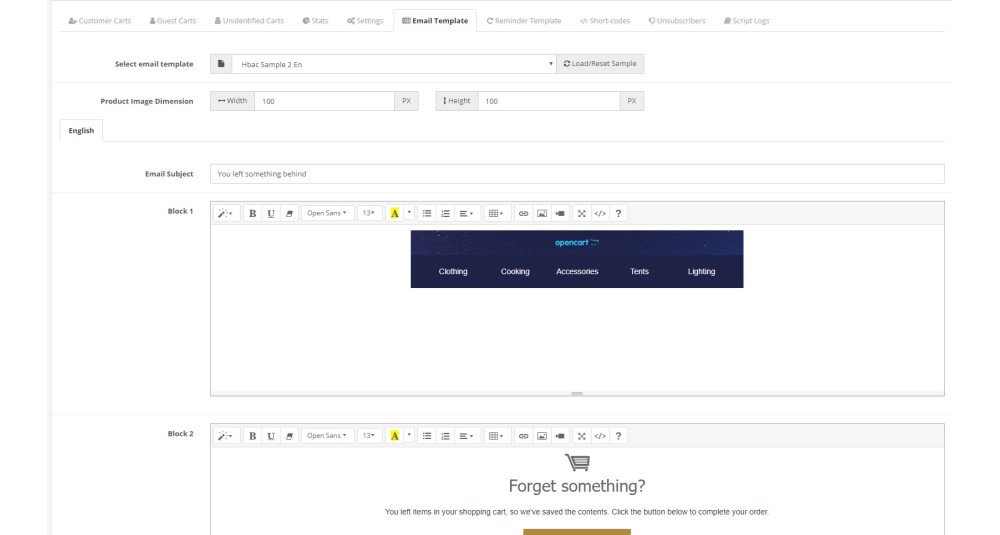
Create and manage recovery email templates Create, edit, rename, preview, and delete templates used for abandoned-cart emails.
Edit recovery emails with a visual text editor Use the built-in rich-text editor to change your email message and formatting without hand-writing the entire HTML.
Start emails from ready-made layouts Choose an available layout and content sample to generate a starting design, then customize it for your store.
Customize sender and reply details for emails Set the sender name, sender email, reply-to address, subject, and optional BCC recipients for a recovery template.
Insert live cart and store details into emails Use placeholders for customer information, store information, product details, checkout links, and coupons instead of typing those details manually.
Choose how cart products appear in emails Select from the available cart-item display templates to control the presentation of products in your reminders.
Choose how product reviews appear in emails Select a review display template for the customer-review content included in eligible recovery emails.
Check email layouts at desktop, tablet, and mobile widths The email template preview offers different viewing widths so you can review how your message looks on smaller screens.
Adjust the size of product images in emails Specify the width and height of product pictures used in recovery emails to better suit your template.
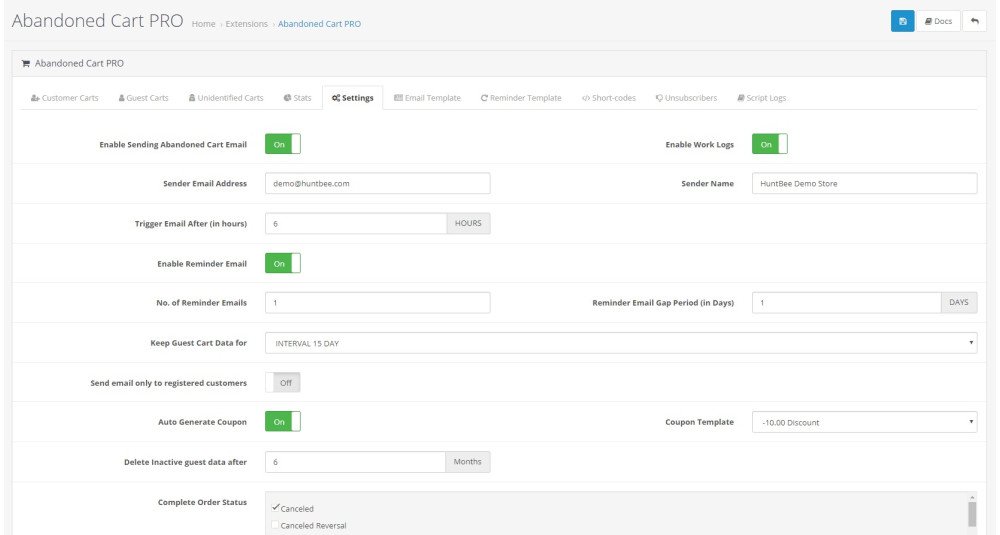
Choose whether guests receive recovery emails Configure the extension to send abandoned-cart emails only to registered customers, or also to guests when their email addresses are available.
Choose which order statuses count as a completed purchase Select the order statuses used when checking whether a shopper has already completed an order and should no longer receive a reminder.
Optionally leave unavailable products out of emails When enabled, products that are no longer available can be excluded from the cart contents shown in recovery messages.
Set different discounts for different cart values Create cart-value rules, such as a smaller discount for a low-value cart and a larger discount for a higher-value cart.
Offer percentage or fixed-amount discounts Configure recovery coupon rules to reduce an order by a percentage or a fixed amount.
Choose which reminder steps include a coupon Enable coupon generation separately for individual email steps, allowing early reminders without a discount and later reminders with one.
Set how long recovery coupons remain valid Choose the number of days a generated coupon can be used, so the offer has a defined end date.
Limit recovery coupons to products in the abandoned cart Optionally make a generated discount apply only to the products the shopper originally left in their cart.
Offer free shipping with recovery coupons Optionally include free shipping when an abandoned-cart discount coupon is created.
See abandoned-cart counts from the OpenCart admin An abandoned-cart count can appear in the admin navigation, with a link to open the extension's management page.
Review the email history for each cart See which reminder steps were attempted, their dates, templates, send status, and any recorded coupon information.
Check whether reminders were opened and carts were recovered Cart records show recorded email-open status, recovered-order status, and linked order details where available.
Monitor abandoned carts, emails, orders, and recovered revenue The statistics page shows headline figures such as abandoned carts, emails sent, emails opened, recovered orders, recovery rate, and recorded recovered revenue.
Follow cart recovery results over time View a trend chart comparing abandoned carts, recovered orders, and recovery rates across the reporting period.
See the stages of your cart recovery process A recovery funnel summarizes recorded carts, emails, email opens, coupons, and completed recoveries to reveal where shoppers drop off.
Compare the performance of reminder emails Review sent, failed, opened, and recovered-order figures for individual steps to see which follow-ups are performing.
See whether recovery discount codes are being used Review how many coupons were generated and used, their usage rate, and recorded revenue from recovered coupon orders.
Review statistics for different time periods Switch reporting between the available recent-period, current-month, and current-year views.
See which orders came from recovered carts When an order is linked to an abandoned-cart recovery, the cart records can display the order number and total.
Manage customers who opted out of reminder emails View email addresses on the abandoned-cart unsubscribe list, with their recorded date and IP address, and remove entries when appropriate.
Choose which cart details appear in admin lists Turn optional information columns on or off to keep the cart list focused on the details useful to your team.
Remove unwanted abandoned-cart records manually Delete a selected abandoned-cart record from the management page when it is no longer needed.
Inspect optional processing and email activity logs Enable work logging to review scheduled-job activity, validation results, and email processing messages, and clear the log when needed.
Add tracking parameters to product links in emails Configure campaign query parameters that can be added to product links in recovery emails for use with your analytics setup.
Configure the extension separately for multiple stores Switch between OpenCart stores to manage store-specific recovery settings, email templates, and reports.
Choose which stores the scheduled job processes Select the stores included in the unified scheduled job, or use the provided command for an individual store.
Protect the scheduled job with an access key The scheduled-job URLs use a configured passkey so they cannot be run successfully without the matching key.
Enable or disable automatic order-completion tracking Control the order-history event that marks a cart as converted and removes relevant abandoned-cart records.

Automation & Maintenance

Feature What it does / Real-world example
Send recovery emails automatically after shoppers leave Once a scheduled job is configured, the extension can send each enabled reminder after its chosen period of inactivity.
Process selected OpenCart stores from one scheduled job A unified scheduled job can invoke recovery processing for the enabled stores you selected in the admin.
Create unique recovery coupon codes automatically When an email step offers a discount and its rules match the cart, the extension creates a new coupon code for that recovery message.
Avoid sending the same automatic reminder step twice The scheduled sender checks the cart's reminder progress and skips duplicate or outdated steps rather than deliberately sending the same step again.
Stop sending reminders to unsubscribed addresses Before sending a recovery email, the extension checks its unsubscribe list and skips addresses that have opted out.
Check email addresses before sending reminders The extension checks email format, mail-domain records, and certain known mistyped or temporary domains before attempting delivery.
Skip guest carts without an email address Guest carts can still be recorded without contact details, but the automatic sender does not try to email them until an address is available.
Avoid reminders when the shopper has already ordered Before composing a recovery email, the extension checks for qualifying completed orders and stops the reminder when it finds one.
Record recovered purchases and clear related active carts When an order is connected to a recovery link, the extension can record the order and value and remove the related active abandoned-cart data.
Record email openings for recovery reporting Reminder emails can include a small tracking image. When the email client loads it, the extension records an email-open event.
Keep guest shopping carts longer than OpenCart's default period Configure how long guest carts are retained so an unfinished purchase may still be available for a later recovery email.
Recognize returning guest carts when browser details are available The extension uses saved browser identifiers to reconnect a guest's cart when their session changes. Optional IP matching is also available.
Automatically remove old guest contact records Set an inactivity period in months after which old guest email details are removed during cart cleanup.
Automatically delete expired recovery coupons When enabled, scheduled processing removes old coupons generated by the abandoned-cart extension after their validity period has passed.
Remove abandoned-cart entries for deleted products When products are deleted in the OpenCart admin, the installed modification can remove their related abandoned-cart entries.
Remove abandoned-cart entries for deleted customers When a customer account is deleted in the OpenCart admin, the installed modification can also clear its associated abandoned-cart records.
Keep saved cart records updated as shoppers edit their carts When shoppers change quantities or remove items, the extension's cart tracking updates or deletes corresponding abandoned-cart entries.
Remember the cart's language and currency Saved cart records include language and currency details so product information can be prepared for the appropriate cart context.
Keep an email-by-email record of reminder attempts The extension saves each recovery-email attempt with its sequence step, template, outcome, and available coupon details for later review.

Admin Panel

https://opencart-demo.huntbee.com/demo/admin/index.php?route=extension/hbapps/hb_cart&store_id=0

Admin Credential Pre-filled


Try adding items to carts as an customer in store frontend. You can see the cart in the admin panel.

Video Demonstration:


Open demo instruction in new tab
OPENCART
Compatibility 3.0.5.1, 3.0.5.0, 3.0.4.1, 3.0.4.0, 3.0.3.9, 3.0.3.8, 3.0.3.7, 3.0.3.6, 3.0.3.5, 3.0.3.3, 3.0.3.2, 3.0.3.1, 3.0.3.0, 3.0.2.0, 3.0.1.2, 3.0.1.1, 3.0.1.0, 3.0.0.0,

2.3.0.2, 2.3.0.1, 2.3.0.0, 2.2.0.0, 2.1.0.2, 2.1.0.1, 2.0.3.1, 2.0.2.0, 2.0.1.1, 2.0.1.0, 2.0.0.0
Requirement OCMOD EXTENSION
Core Files Overwrite NO
Multi-store Yes
Multi-lingual Yes
SUPPORT
Template Support Refer Support Tab.

VERSION : 3.4.0DATE RELEASED: 09 Aug 2026

Major Update Only for OpenCart 3.x.x.x

  • Added Dynamic Email Sequence Builder – create multiple abandoned cart recovery emails.
  • Added hour-based scheduling for each email step.
  • Added separate email template selection for every sequence step and language.
  • Added per-email coupon rules with cart-value-based discounts.
  • Added individual coupon validity settings for each email step.
  • Improved cron logic to prevent duplicate emails and maintain the correct sequence.
  • Added detailed Email History for each abandoned cart.
  • Added manual sending of any configured email sequence step.
  • Added Email Sequence Performance statistics.
  • Added Coupon Performance analytics.
  • Added Recovery Funnel reporting.
  • Added Recovered Revenue and Recovery Rate insights.
  • Redesigned abandoned cart records for a cleaner recovery activity overview.
  • Simplified email product image settings with a single global image dimension.
  • Improved overall UI and abandoned cart recovery workflow.

VERSION : 3.3.4DATE RELEASED: 09 May 2026
  • Remove redundant cart clearing logic, enhance email validation, and improve order handling
  • Removed unnecessary cart clearing logic from success.php in multiple ocmod files
  • Enhanced email validation in hb_cart.php to check for valid domains and prevent disposable email usage
  • Added new methods for checking completed orders and removing converted carts in hb_cart model
  • Improved cron job handling to ensure proper logging and execution for different store IDs.
  • Adjusted the handling of pass key to ensure consistent usage across the module.

VERSION : 3.3.2DATE RELEASED: 13 Mar 2025
  • Added an Email Popup feature for guest users who add items to their cart.
  • Versioning updated as per our latest policy

VERSION : 3.1.8DATE RELEASED: 30 Sep 2024
  1. Fix for default guest checkout guest tracking for opencart 3.0.4.0

VERSION : 3.1.7DATE RELEASED: 19 Sep 2024
  • Minor update: Prints "Cron Job Triggered" in the work log everytime the cron script is triggered, to ensure whether the cron job script triggered or not.

VERSION : 3.1.6DATE RELEASED: 06 Feb 2024
  • Fixes to chart (opencart 3.0.3.9)

VERSION : 3.1.5DATE RELEASED: 11 Aug 2023
  • Minor fixes and optimization

VERSION : 3.1.3DATE RELEASED: 13 Nov 2022
  • Fixed bug related to unsubscribe

VERSION : 3.1.2DATE RELEASED: 18 Oct 2022
  • Reminder Email Fix
  • Delete cart fix

VERSION : 3.1.0DATE RELEASED: 29 Aug 2022
  1. Email Template system redesigned
  2. Integration support for Email Template Designer
  3. SMS template feature added
  4. Integration support for OpenCart SMS
  5. Show/hide sections admin control
  6. Last Visited page when cart was active
  7. Cart Inactive time
  8. Customer since info display text updated
  9. Remove out-of-stock products from email
  10. Separate Image Dimension setup for first abandoned cart email and reminder email.
  11. Various templates for customer reviews section
  12. Coupon System Redesigned
  13. Auto delete expired coupons
  14. Coupons only applicable for the product in the cart feature
  15. Unlimited coupon generation rules
  16. Coupon expiry limit
  17. Email unsubscribe section is made compatible with Email Template Designer
  18. Enhanced work log section
  19. More cart item sample template added
  20. New shortcodes added
  21. Shortcodes works with email subject line as well.

UPDATE INSTRUCTION:

After uploading the latest version via extension installer, go to Productivity Apps > All Apps. Find Abandoned Cart PRO. Click on the update button.


VERSION : 3.0.5DATE RELEASED: 23 Mar 2021
  • Compatibility fix for OpenCart 3.0.3.6 & OpenCart 3.0.3.7

VERSION : 3.0.4DATE RELEASED: 05 Jan 2021
  • Guest Cart delete fix after guest customer completes order from the abandoned cart email

VERSION : 3.0.3DATE RELEASED: 16 Jul 2020
  1. Skipping duplicate emails
  2. Web run / cron run button added to avoid the website overloading
  3. Added script to delete records when a product is deleted or customer is deleted from admin w.r.t product id & customer id respectively
  4. Fixed log file viewing permission

VERSION : 3.0.1DATE RELEASED: 18 Feb 2020
  1. Fixes made to sample templates (4 & 6) w.r.t customer review title
  2. Updated code to limit reviews limit to maximum 5
  3. Including Simple HTML Layout Templates for easy email template setup
  4. Added IP address matching feature
  5. Improved User Interface

VERSION : 3.0.0DATE RELEASED: 06 Feb 2020
  1. Added Improvised Sample Templates
  2. Added Guest Cart Intelligence
  3. Admin options to send email only to registered customers or guest as well
  4. Type of Cart
  5. Customer previous total purchases
  6. Identification of customer by emails from previous orders
  7. Customer last action on website
  8. In-built Google analytics campaign tracking parameters
  9. Conversion Statistics
  10. Customer Unsubscribe link with encrypted data to ensure any misuse
  11. Checkout link with encrypted values to ensure any misuse
  12. Cart Recovery from checkout link
  13. Auto customer login from checkout link
  14. Exit Intent popup
  15. Improvised alogirthm to prevent website breakdown in case of incomplete installation or uninstallation
  16. Improvised Script for Email viewed
  17. Improvised setup

UPDATE INSTRUCTION:

You will need to uninstall and install this version. Previous data of this extenison will be affected. Taking backup is recommended.

  1. Delete the ocmod (Automatic Abandoned Cart) from the modification list.
  2. Refresh Modifications
  3. Refresh any other cache you have
  4. Uninstall the Abandoned Cart Extension from Extensions > Productivity Apps
  5. Install Abandonded Cart PRO Extension, follow installation instruction in the documentation.

VERSION : 2.0DATE RELEASED: 18 Oct 2017
  1. Extension Redesigned and optimized
  2. 30xx version compatibility added
  3. Added feature : 20xx version guest cart tracking
  4. Separate template for Initial email and reminder email
  5. Script work log monitoring
  6. Delete cart from admin
  7. Graphs
  8. Sample templates
  9. Documentation : https://www.huntbee.com/documentation/docs/abandoned-cart-email/
  10. Un-subscriber list

VERSION : 1.2DATE RELEASED: 24 Mar 2017

BUG FIXED, VERY IMPORTANT TO UPDATE

ISSUE: Duplicate entries recorded on each cron job run. 

How to fix it?

Option 1: Get the latest download, Copy the catalog/controller/ folder to your web directory in appropriate path

Option 2: Or you can simply reinstall the extension

Option 3: Or You can submit support ticket for the update


VERSION : 1.1DATE RELEASED: 25 Jan 2017
  • Bug fixes (remove cart undefined function, duplicate log entry, update cart session, remove records after purchase has been made)
  • Added 2 columns (total and order id) to log table
  • Updated type field in unsubscribe table
  • Added a feature to view all abandoned carts (Guest as well as Customer) (Option not available for OpenCart 2.0.x.x versions)
  • Added a feature to display total sales made via this extension
  • Updated language for more clarity in setup


UPDATE INSTRUCTION

You can uninstall the extension and then install newly. Please note the logs and records belonging to this extension will be reset. If you do not want to loose any records of this extension, please contact our support for the extension upgrade ($3 extra for this service). 


Installing or uninstalling this extension will not affect any other tables in the database. This extension works independently. 

Customer feedback

Reviews (13)

5 / 5
Excellent
13 reviews
Yevhen Vasin 23/01/2025
Excellent
Using on Opencart 3.0.4.0 with custom theme and custom checkout. Very happy with the extension so far, works like magic! The HuntBee team kindly helped with adapting the extension to work with my store. This is not the first extension purchased from Huntbee (purchased Klaviyo integration for my another store), and I'm very happy with the services provided! Highly recommended!
Ash 04/12/2024
Excellent
Really good extension with some unique features
A Booker 07/09/2023
Excellent
Great add for my opencart store
Marjan Laznik 06/09/2023
Excellent
Great support, quality extension. Thank you. I recommend this extension.
M-G 25/02/2023
Very Good
With this module I have recovered many sales, the panel is well distributed, the tabs are direct and intuitive, the configuration system is complete in my opinion, I have tried many other similar extensions but this is the best. The support always works and I have nothing to complain about. Thank you.
Victor PASCA 08/08/2022
Excellent
A great extension very useful for your sales funnel. It helps to keep closer you potential customer and sometime even to make a new sell.
I recommend this extension as a must to have for any Open Cart shop.
LuiS Salvador 21/02/2022
Very Good
Well don't know if it works but support is great!
Masoum Mahmoud 02/02/2021
Excellent
The add-on is great, it adds value to our work, and the support is very good
Kwame Ferg 25/04/2020
Excellent
Great support, quality extension.
Thanks.
Slavi Mihalev 17/04/2020
Excellent
Great support! All works great!
raj 20/08/2018
Excellent
Good support,
nice Extension
Zilvinas Junevicius 03/08/2018
Excellent
Perfect extension. Very very professionally made, very easy to set up and use.
Good support.
Florea Alex 28/11/2017
Excellent
Great module, easy to use.
Great support help for any issue with the module
Showing 1 to 13 of 13 (1 Pages)
Share your experience

Write a review

Note: HTML is not translated!
Choose 1 to 5 stars
Captcha
Tags

Frequency Asked Questions (FAQs)

How does Abandoned Cart Emails - PRO help in recovering lost sales in OpenCart?
Abandoned Cart Emails - PRO automates the process of sending reminder emails to customers who have left items in their cart without completing the purchase. This helps recover lost sales by encouraging customers to return and complete their checkout, effectively reducing cart abandonment rates.
Can Abandoned Cart Emails - PRO be used in multi-store OpenCart setups?
Yes, Abandoned Cart Emails - PRO supports multi-store setups, allowing OpenCart store owners to manage abandoned cart emails across different stores from a single admin panel. This feature is crucial for businesses operating multiple online stores.
What features does Abandoned Cart Emails - PRO offer to enhance customer engagement?
Abandoned Cart Emails - PRO enhances customer engagement through features like customizable email templates, automatic and manual email sending, exit intent popups, and guest email capture popups. These tools help in personalizing the shopping experience and encouraging customers to complete their purchases.
How does Abandoned Cart Emails - PRO improve conversion rates from abandoned carts?
By sending timely and personalized reminder emails, offering one-click cart recovery, and providing discount coupons, Abandoned Cart Emails - PRO helps improve conversion rates by making it easier and more enticing for customers to return to their carts and complete their purchases.
What analytics and tracking capabilities does Abandoned Cart Emails - PRO provide?
Abandoned Cart Emails - PRO includes conversion tracking, Google Analytics campaign tracking, and customer last action tracking. These features allow store owners to monitor the effectiveness of their email campaigns and gain valuable insights into customer behavior and email performance.
How can store owners incentivize customers to complete their purchases using Abandoned Cart Emails - PRO?
Store owners can incentivize customers using Abandoned Cart Emails - PRO by automatically generating exclusive discount codes and including them in the recovery emails. This not only encourages customers to return but also enhances the likelihood of completing the purchase.
Is Abandoned Cart Emails - PRO compatible with Journal3 Quick Checkout?
Yes, Abandoned Cart Emails - PRO is compatible with Journal3 Quick Checkout and One Page Checkout, ensuring a smooth integration for stores using these popular checkout solutions. This compatibility helps in maintaining a seamless user experience during the checkout process.
Can Abandoned Cart Emails - PRO track and recover carts of non-registered users?
Yes, Abandoned Cart Emails - PRO has the capability to track and recover abandoned carts of non-registered users through its guest cart intelligence feature. This allows store owners to address cart abandonment even for guests who haven't created an account.
What are the benefits of using exit intent popups with Abandoned Cart Emails - PRO?
Using exit intent popups with Abandoned Cart Emails - PRO helps capture the attention of users who are about to leave the website, offering them incentives or reminders that can reduce immediate cart abandonment and boost engagement.
How does the automatic email feature of Abandoned Cart Emails - PRO work?
The automatic email feature of Abandoned Cart Emails - PRO detects when a cart has been abandoned and sends a pre-configured email to the customer after a specified interval. This process is fully automated, ensuring timely follow-up without manual intervention.
What customization options are available for email templates in Abandoned Cart Emails - PRO?
Abandoned Cart Emails - PRO provides a built-in HTML email editor with shortcodes, allowing store owners to customize email templates extensively. This includes the ability to personalize emails with customer-specific details, enhancing the overall impact and effectiveness of the emails.
How does Abandoned Cart Emails - PRO help in identifying high-intent visitors?
Abandoned Cart Emails - PRO includes potential customer detection, which identifies visitors with high purchase intent based on their interactions and behaviors on the site. This allows store owners to target these potential customers more effectively with tailored messages and offers.
Why should store owners choose Abandoned Cart Emails - PRO over manual follow-up methods?
Choosing Abandoned Cart Emails - PRO over manual follow-ups provides a more efficient, consistent, and scalable solution. Automated emails ensure timely communication, reduce the workload on staff, and maintain a high level of engagement with customers, which is challenging to achieve with manual methods.
What impact does Abandoned Cart Emails - PRO have on customer retention and brand trust?
Abandoned Cart Emails - PRO positively impacts customer retention and brand trust by providing a responsive and caring shopping experience. Follow-up emails show customers that the business values their interest and is willing to assist them in completing their purchases, fostering loyalty and trust.
Which is the best OpenCart abandoned cart extension?
Abandoned Cart Emails - PRO is considered one of the best OpenCart extensions for recovering abandoned carts due to its comprehensive features, ease of use, and effectiveness in converting abandoned carts into completed sales, making it a top choice for OpenCart store owners.
This extension / product is currently unavailable to download. Enter your email address below and we will notify you as soon as the product becomes active.
Name
Email
Comments