Abandoned Cart Emails - PRO for OpenCart
- Developer: Priyabrata Ghorai
- Product Code: OpenCart Extension
- Availability: In Stock
- Free premium support for 6 months
- OpenCart Link ($22.00)
-
$20.00
Recover Abandoned Carts & Boost Sales with Automated Emails
Abandoned Cart Emails - PRO is a complete OpenCart abandoned cart recovery extension designed to help store owners recover lost sales through automated, well-timed email follow-ups.
Instead of relying on a basic first email and reminder system, you can now build a complete multi-step abandoned cart email sequence, schedule each email in hours, assign different templates, offer progressively better coupon incentives, and track the complete recovery process.
The extension works with registered customers, guest customers, and identifiable visitors, making it suitable for stores that want a more complete approach to OpenCart abandoned cart recovery.
Problem Statement
Customers frequently add products to their cart but leave the store without completing checkout. This can happen because of distractions, price hesitation, checkout issues, payment problems, or simply because the customer decides to purchase later.
Without an automated recovery system, these potential orders are easily lost. Manually following up with every abandoned customer is also impractical for a busy OpenCart store.
Abandoned Cart Emails - PRO automates this process and gives store owners the tools required to bring potential customers back and measure the actual results.
Who Is This Extension For?
This OpenCart extension is ideal for:
- Stores experiencing a high number of abandoned carts.
- Store owners who want to automate abandoned cart follow-ups.
- Businesses that want to send multiple recovery emails at different intervals.
- Stores that use discount coupons as part of their recovery strategy.
- Multi-language and multi-store OpenCart websites.
- Stores that want better visibility into abandoned cart conversions and recovered revenue.
- Businesses that want to track both registered and guest abandoned carts.
Key Benefits
- Recover Lost Sales – Automatically follow up with customers who leave products in their cart.
- Automate the Recovery Process – Create a complete sequence of emails instead of manually following up.
- Send Emails at the Right Time – Configure each email delay in hours for more precise scheduling.
- Increase Conversion Opportunities – Send multiple follow-up emails if the customer does not return after the first message.
- Offer Smarter Discounts – Configure different coupon incentives for different recovery stages.
- Restore Carts Instantly – Customers can return to their saved cart using a secure recovery link.
- Track Recovery Performance – Monitor sent emails, email opens, recovered orders, coupons, and recovered revenue.
- Understand Which Email Works Best – Compare the performance of each email step in your recovery sequence.
- Reduce Manual Work – Cron-based automation continuously handles eligible abandoned carts.
- Improve Customer Experience – Send timely reminders instead of generic repeated messages.
Purpose of the Extension
The purpose of Abandoned Cart Emails - PRO is to provide OpenCart store owners with a structured and automated system for recovering abandoned shopping carts.
The extension helps you identify potential customers, communicate with them through a configurable email sequence, encourage them with optional coupons, and measure whether those recovery efforts actually result in completed orders.
Complete Feature List
Dynamic Abandoned Cart Email Sequence
- Unlimited-Style Recovery Workflow – Configure multiple abandoned cart email steps instead of being limited to a first email and basic reminders.
- Add Multiple Email Steps – Create different stages such as First Reminder, Second Reminder, Final Reminder, or any custom recovery flow.
- Enable or Disable Individual Steps – Temporarily disable a specific email without deleting the sequence.
- Custom Email Names – Give every recovery step an easy-to-understand internal name.
- Hour-Based Scheduling – Configure exactly how many hours should pass before each email is sent.
- Sequential Timing – The first email is scheduled after cart abandonment, while later emails are scheduled after the previous email.
- Duplicate Prevention – Each configured sequence step is sent only once for the same abandoned cart.
- Hourly Cron Compatible – Designed to work efficiently with an hourly cron job while respecting the configured email intervals.
Email Templates
- Separate Template for Every Email Step – Use different messaging at different stages of the recovery process.
- Multi-Language Templates – Select a different template for each configured OpenCart language.
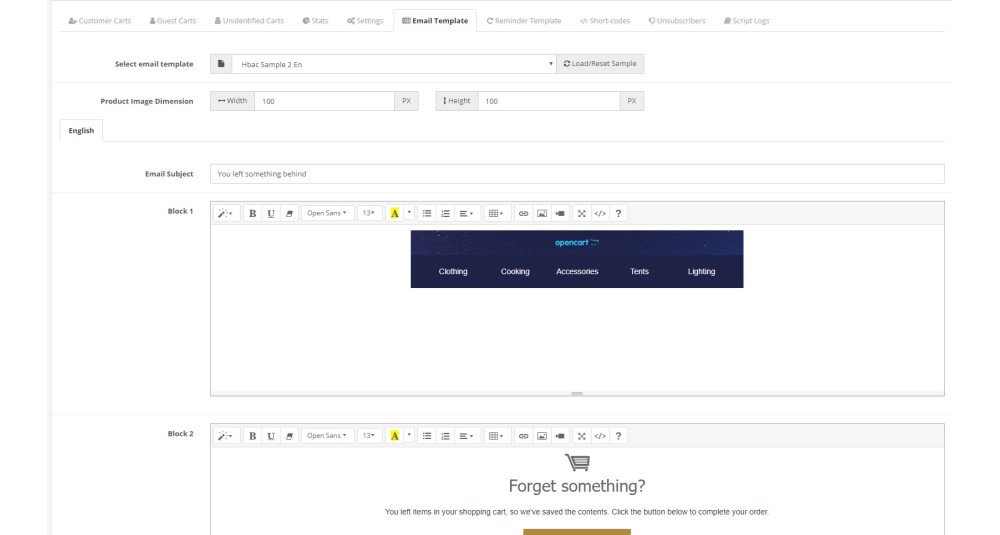
- Built-in Email Template System – Create professional abandoned cart email content directly from the extension.
- Shortcode Support – Insert dynamic customer, cart, product, coupon, and recovery information into emails.
- Global Product Image Dimensions – Configure a consistent product image size for recovery emails.
- Personalized Content – Create more relevant follow-up emails using customer and cart information.
Manual Email Sending
- Manual Recovery Email Sending – Send an abandoned cart email directly from the admin panel.
- Select Specific Email Step – Choose exactly which configured sequence email should be sent.
- Uses Correct Template and Coupon Settings – Manual emails follow the configuration of the selected email step.
- Manual Send Logging – Manual emails are recorded separately in the email history.
Advanced Coupon Generation
- Coupon Configuration Per Email Step – Decide whether each recovery email should generate a coupon.
- Different Incentives at Different Stages – Offer a small discount initially and a stronger incentive later.
- Cart Value Based Coupon Rules – Generate different discounts depending on the abandoned cart value.
- Percentage Discounts – Generate percentage-based coupon codes.
- Fixed Amount Discounts – Generate fixed-value coupon codes.
- Multiple Coupon Rules – Configure several cart value thresholds in a single rule set.
- Custom Coupon Validity – Configure how many days the generated coupon remains valid for each email step.
- Product-Specific Coupons – Optionally restrict the generated coupon to products already present in the abandoned cart.
- Free Shipping Support – Configure generated coupons to include free shipping where required.
- Automatic Expired Coupon Cleanup – Automatically remove expired abandoned cart coupons.
- Conditional Coupon Blocks – Hide coupon-related email content automatically when no coupon can be generated.
Example coupon rules:
0:10:p
Generates a 10% discount coupon regardless of cart value.
100:10:p, 200:15:p, 300:20:f
Can generate:
- 10% discount when the cart meets the first threshold.
- 15% discount when the cart meets the second threshold.
- Fixed discount based on the configured third threshold.
Cart Recovery
- One-Click Cart Recovery – Customers can return to their abandoned cart using the recovery link in the email.
- Encrypted Recovery Links – Recovery URLs are generated securely.
- Product and Cart Restoration – Helps customers continue from where they previously stopped.
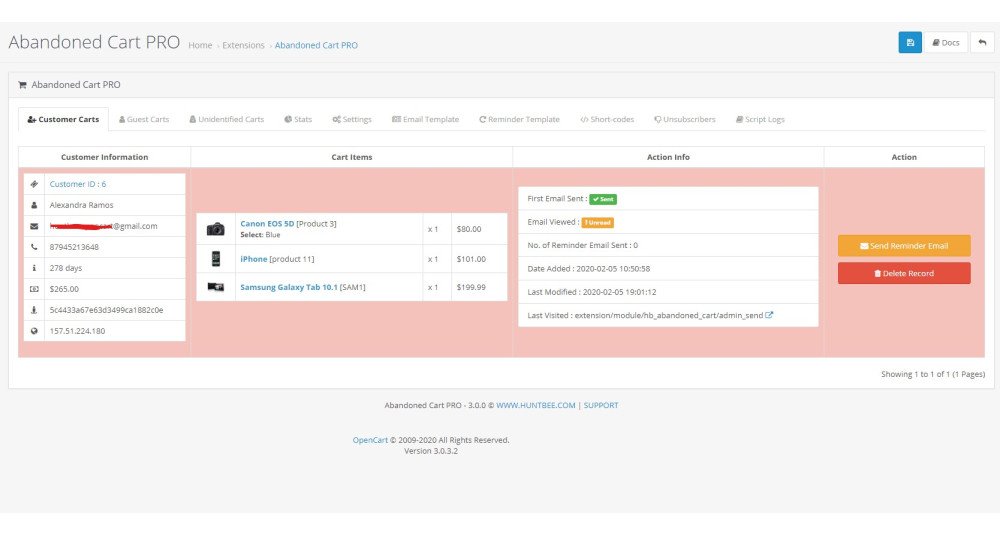
- Customer Last Action Tracking – View the customer's last recorded interaction with the store.
- Last Visited Page Tracking – Quickly understand where the customer left the website.
Registered Customer Tracking
- Registered Customer Cart Tracking – Monitor abandoned carts belonging to logged-in customers.
- Customer Information Display – View relevant customer information directly from the abandoned cart dashboard.
- Previous Customer Details – Helps identify whether the abandoned customer is an existing buyer.
Guest Cart Intelligence
- Guest Abandoned Cart Tracking – Track carts belonging to visitors who are not registered customers.
- Guest Email Capture – Collect email addresses from guest users for abandoned cart recovery.
- Potential Customer Detection – Identify visitors showing purchasing intent even before completing registration.
- IP Address Matching – Helps associate returning visitors with previously captured abandoned cart activity.
Exit Intent and Email Capture
- Exit Intent Popup – Display a popup when a visitor appears ready to leave the website.
- Guest Email Capture Popup – Encourage guest users to provide their email before leaving.
- Improved Recovery Coverage – Increase the number of abandoned carts that can be followed up by email.
Email History
- Complete Email History Per Cart – View all recovery emails associated with an abandoned cart.
- Sequence Step Tracking – See which email step was sent.
- Email Name and Template Tracking – Identify exactly which configured email was used.
- Date and Time Logging – View when each recovery email was sent.
- Cron / Manual Send Identification – Easily distinguish automated and manually sent messages.
- Coupon Logging – View whether a coupon was generated and which coupon code was used.
- Failed Email Information – Store useful failure information when available.
- Improved Troubleshooting – Quickly investigate customer queries related to emails or coupons.
Conversion Tracking
- Recovery Conversion Tracking – Identify abandoned carts that later become completed orders.
- Email Open Tracking – Track whether recovery emails have been viewed.
- Recovered Order Tracking – Connect successful recoveries with the corresponding order.
- Recovered Revenue Tracking – Measure revenue generated from abandoned cart recovery.
Advanced Statistics
- Abandoned Cart KPI Dashboard – View important abandoned cart metrics at a glance.
- Emails Sent Statistics – Track how many recovery emails have been sent.
- Email Open Statistics – Monitor engagement with recovery emails.
- Recovered Orders – See how many abandoned carts resulted in completed orders.
- Recovery Rate – Measure the percentage of abandoned carts successfully recovered.
- Recovered Revenue – Understand the financial value generated by the extension.
Email Sequence Performance
- Performance Per Email Step – Compare First Email, Second Email, Third Email, and additional configured steps.
- Sent Count – See how often each recovery email was sent.
- Open Performance – Compare customer engagement between different sequence emails.
- Recovered Orders by Email Step – Identify which email stage contributes most to recovery.
- Recovery Rate by Step – Discover which follow-up strategy performs best.
Coupon Performance Analytics
- Coupons Generated – Track recovery coupons generated by the extension.
- Coupons Used – Identify generated coupons that resulted in purchases.
- Coupon Usage Rate – Measure how effectively discount incentives are being used.
- Coupon Revenue Tracking – Measure revenue associated with coupon-based recoveries.
- Performance by Email Step – Compare coupon effectiveness across different recovery stages.
Recovery Funnel
Track the customer recovery journey through stages such as:
- Abandoned Carts
- Emails Sent
- Emails Opened
- Coupons Generated
- Coupons Used
- Recovered Orders
This helps identify where customers are dropping out of the recovery process.
Revenue Recovery Insights
- Abandoned Cart Value – Understand the potential value of abandoned carts.
- Recovered Revenue – Measure sales successfully recovered.
- Lost Cart Value – Compare recovered revenue against unrecovered opportunities.
- Revenue Recovery Rate – Understand how effectively abandoned cart value is being converted back into sales.
Google Analytics Tracking
- UTM Campaign Tracking – Add campaign tracking information to recovery links.
- Analyze Recovery Traffic – Measure abandoned cart email traffic through Google Analytics.
- Campaign Performance Insights – Compare abandoned cart recovery traffic with other marketing channels.
Multi-Store and Multi-Language
- OpenCart Multi-Store Support – Configure and monitor abandoned cart recovery across multiple stores.
- Multi-Language Support – Assign language-specific email templates to each sequence step.
- Flexible Store Configuration – Suitable for larger OpenCart installations with different storefront requirements.
Compatibility
- OpenCart Integration – Designed specifically for OpenCart.
- Journal3 Quick Checkout Compatibility – Includes compatibility support for Journal3 Quick Checkout.
How to Use
- Install Abandoned Cart Emails - PRO from the OpenCart admin panel.
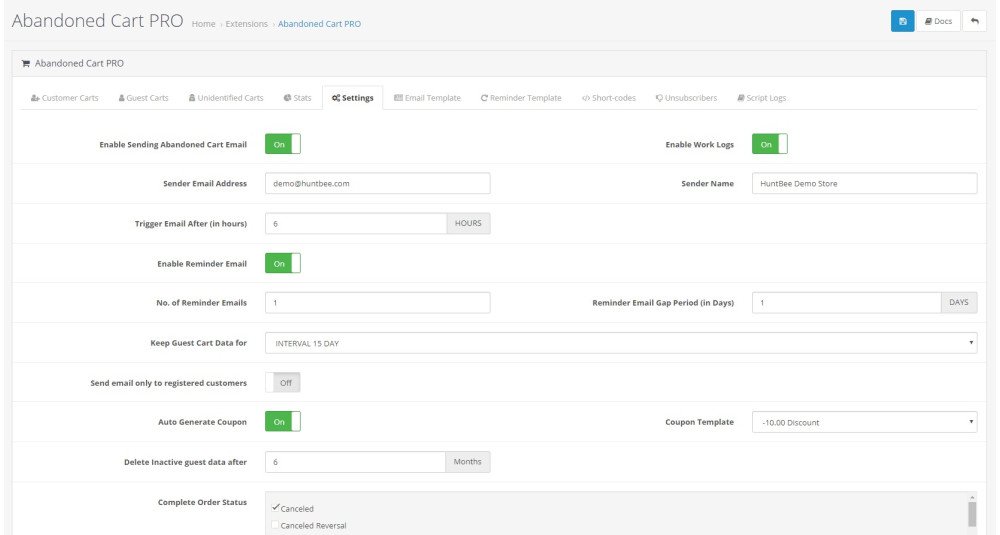
- Configure the abandoned cart tracking and cron settings.
- Create the required email templates.
- Build your abandoned cart email sequence.
- Configure the delay in hours for each email step.
- Assign the appropriate email template for each language.
- Optionally enable coupon generation and configure coupon rules for selected email steps.
- Configure the hourly cron job.
- Enable guest email capture or exit intent features if required.
- Monitor customer carts, guest carts, email history, conversions, and recovery statistics from the extension dashboard.
You can also manually send a specific recovery email from an abandoned cart record whenever required.
Use Cases
- Recovering Recent Abandoned Carts – Send the first reminder a few hours after the customer leaves.
- Multi-Step Recovery Campaigns – Follow up again after 24 hours, 48 hours, or several days.
- Progressive Discount Strategy – Start without a coupon and offer stronger discounts in later emails.
- High-Value Cart Incentives – Generate different discounts depending on cart value.
- Guest Cart Recovery – Capture guest email addresses and bring potential customers back.
- Customer Support Follow-Up – Manually send a selected recovery email when helping a customer.
- International Stores – Send different abandoned cart templates based on customer language.
- Performance Optimization – Compare sequence steps and remove emails that generate little engagement or recovery.
- Revenue Monitoring – Measure exactly how much revenue is being recovered from abandoned carts.
Expected Results
After properly configuring the extension, OpenCart store owners can expect:
- More recovered orders from customers who would otherwise leave without purchasing.
- Higher abandoned cart conversion rates through systematic follow-up.
- Better use of discounts by applying coupons only at selected recovery stages.
- Improved customer engagement through timely and personalized email communication.
- Greater visibility into which recovery emails and coupons are actually working.
- Reduced manual effort through automatic hourly processing.
- Better revenue insights through recovered order and recovered revenue tracking.
Actual results depend on store traffic, product pricing, checkout experience, email content, recovery timing, and discount strategy.
Requirements
- A supported OpenCart installation.
- Cron job access is recommended for automatic abandoned cart email processing.
- A correctly configured OpenCart mail system for sending emails.
- Email templates must be configured for the required store languages.
- Customers or guest visitors must provide a valid email address before recovery emails can be sent.
- Coupon functionality requires standard OpenCart coupon support.
- Journal3-specific functionality requires the applicable Journal3 checkout environment.
| OPENCART | |
| Compatibility | 3.0.5.0, 3.0.4.1, 3.0.4.0, 3.0.3.9, 3.0.3.8, 3.0.3.7, 3.0.3.6, 3.0.3.5, 3.0.3.3, 3.0.3.2, 3.0.3.1, 3.0.3.0, 3.0.2.0, 3.0.1.2, 3.0.1.1, 3.0.1.0, 3.0.0.0, 2.3.0.2, 2.3.0.1, 2.3.0.0, 2.2.0.0, 2.1.0.2, 2.1.0.1, 2.0.3.1, 2.0.2.0, 2.0.1.1, 2.0.1.0, 2.0.0.0 |
| Requirement | OCMOD EXTENSION |
| Core Files Overwrite | NO |
| Multi-store | Yes |
| Multi-lingual | Yes |
| SUPPORT | |
| Template Support | Refer Support Tab. |
Admin Panel
https://opencart-demo.huntbee.com/demo/admin/index.php?route=extension/hbapps/hb_cart&store_id=0
Admin Credential Pre-filled
Try adding items to carts as an customer in store frontend. You can see the cart in the admin panel.
Video Demonstration:
Open demo instruction in new tab
Abandoned Cart Email
| VERSION : 3.4.0 | DATE RELEASED: 09 Aug 2026 |
Major Update Only for OpenCart 3.x.x.x
| |
| VERSION : 3.3.4 | DATE RELEASED: 09 May 2026 |
| |
| VERSION : 3.3.2 | DATE RELEASED: 13 Mar 2025 |
| |
| VERSION : 3.1.8 | DATE RELEASED: 30 Sep 2024 |
| |
| VERSION : 3.1.7 | DATE RELEASED: 19 Sep 2024 |
| |
| VERSION : 3.1.6 | DATE RELEASED: 06 Feb 2024 |
| |
| VERSION : 3.1.5 | DATE RELEASED: 11 Aug 2023 |
| |
| VERSION : 3.1.3 | DATE RELEASED: 13 Nov 2022 |
| |
| VERSION : 3.1.2 | DATE RELEASED: 18 Oct 2022 |
| |
| VERSION : 3.1.0 | DATE RELEASED: 29 Aug 2022 |
UPDATE INSTRUCTION: After uploading the latest version via extension installer, go to Productivity Apps > All Apps. Find Abandoned Cart PRO. Click on the update button. | |
| VERSION : 3.0.5 | DATE RELEASED: 23 Mar 2021 |
| |
| VERSION : 3.0.4 | DATE RELEASED: 05 Jan 2021 |
| |
| VERSION : 3.0.3 | DATE RELEASED: 16 Jul 2020 |
| |
| VERSION : 3.0.1 | DATE RELEASED: 18 Feb 2020 |
| |
| VERSION : 3.0.0 | DATE RELEASED: 06 Feb 2020 |
UPDATE INSTRUCTION: You will need to uninstall and install this version. Previous data of this extenison will be affected. Taking backup is recommended.
| |
| VERSION : 2.0 | DATE RELEASED: 18 Oct 2017 |
| |
| VERSION : 1.2 | DATE RELEASED: 24 Mar 2017 |
BUG FIXED, VERY IMPORTANT TO UPDATE ISSUE: Duplicate entries recorded on each cron job run. How to fix it? Option 1: Get the latest download, Copy the catalog/controller/ folder to your web directory in appropriate path Option 2: Or you can simply reinstall the extension Option 3: Or You can submit support ticket for the update | |
| VERSION : 1.1 | DATE RELEASED: 25 Jan 2017 |
UPDATE INSTRUCTION You can uninstall the extension and then install newly. Please note the logs and records belonging to this extension will be reset. If you do not want to loose any records of this extension, please contact our support for the extension upgrade ($3 extra for this service). Installing or uninstalling this extension will not affect any other tables in the database. This extension works independently. | |
Related Products
Tags: abandoned cart, cart recovery, OpenCart abandoned cart, recover lost sales, automated emails, OpenCart cart reminder, OpenCart email marketing, conversion tracking, exit intent popup, OpenCart extensions